


[인프런 워밍업 스터디 클럽 3기 풀스택] 2주차 발자국
학습 내용
인프런 워밍업 클럽 스터디 2주차로,
이번 주는 드롭 박스 프로젝트와 함께 Supabase의 Storage를 다뤄볼 수 있는 시간이었다.
Supbase Storage
1. 기본 구성 요소
Files: 모든 종류의 미디어 파일 저장 가능 (이미지, GIF, 비디오 등)
Folders: 파일을 체계적으로 구성하기 위한 디렉토리 구조
Buckets: 파일과 폴더를 담는 최상위 컨테이너 (접근 규칙별로 구분)
2. 접근 제어 모델
Private Buckets (기본값)
RLS(Row Level Security) 정책을 통한 접근 제어
JWT 인증 필요
Signed URL을 통한 임시 접근 가능
Public Buckets
파일 조회 시 접근 제어 없음
URL만 있으면 누구나 접근 가능
업로드/삭제 등 다른 작업은 여전히 접근 제어 적용
3. 보안 기능
RLS 정책 설정 가능
SELECT (다운로드)
INSERT (업로드)
UPDATE (수정)
DELETE (삭제)
소유권 관리
owner_id 필드로 리소스 소유자 추적
JWT의 sub claim 기반 소유권 할당
4. 이미지 변환 기능 (Pro Plan 이상)
실시간 이미지 최적화
크기 조정
품질 조정 (20-100)
WebP 자동 최적화
변환 옵션
resize 모드: cover, contain, fill
width/height 지정 (1-2500px)
최대 파일 크기: 25MB
최대 해상도: 50MP
5. 인증 방식
S3 액세스 키
서버 사이드 전용
모든 버킷에 대한 완전한 접근 권한
세션 토큰
클라이언트 사이드 사용 가능
RLS 정책 기반 제한된 접근
6. 통합 기능
Next.js 이미지 로더 지원
AWS S3 호환성
PostgreSQL DB와 연동
7. 제한사항
파일명은 AWS S3 명명 규칙 준수 필요
HTML 파일은 보안상 plain text로 반환
이미지 변환 기능은 Pro Plan 이상에서만 사용 가능
미션 2 구현 내용
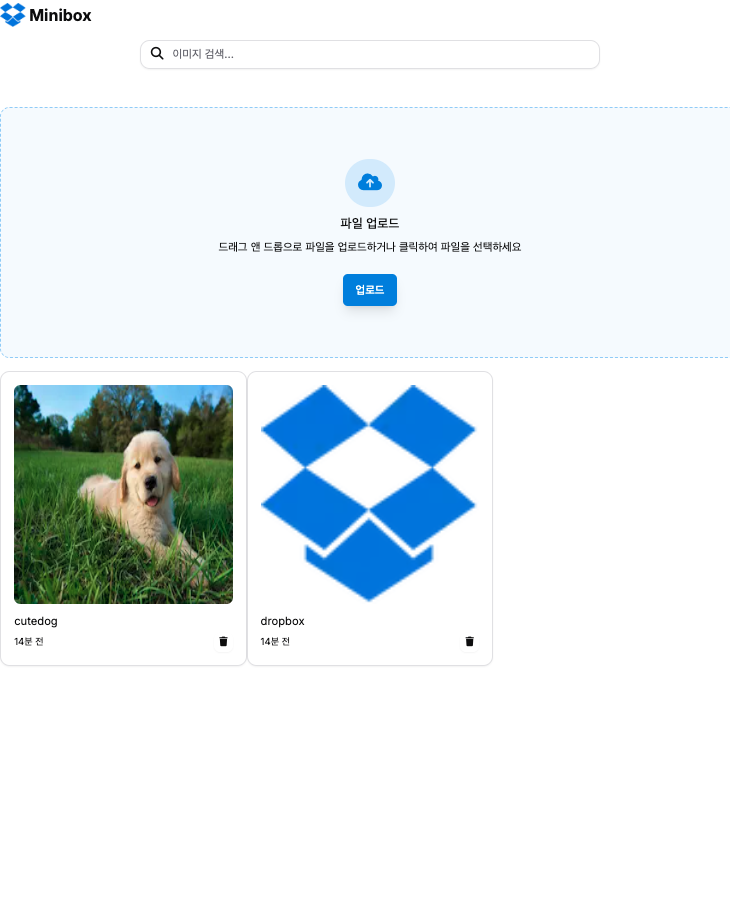
Dropbox 중
파일의 마지막 수정(업로드) 시간을 표시하는 기능 추가 하기
export interface FileObject {
  name: string
  bucket_id: string
  owner: string
  id: string
  updated_at: string
  created_at: string
  last_accessed_at: string
  metadata: Record<string, any>
  buckets: Bucket
}
=> DropboxImage 컴포넌트가 prop으로 받는 image의 타입은 FileObject로 그 중 업로드시간은 created_at을 의미하기에 이를 이미지에 추가하였다.(사진 참고)
포인트 1: 한글 파일명 es-hangul 사용
// 안전한 파일명 생성을 위한 유틸리티
export class FileNameConverter {
  // 안전한 문자 패턴 정의
  private static readonly SAFE_CHARACTERS = /^[a-zA-Z0-9!\-_.*'()]+$/;

  private static generateRandomString(length: number = 8): string {
    const chars =
      "ABCDEFGHIJKLMNOPQRSTUVWXYZabcdefghijklmnopqrstuvwxyz0123456789";
    return Array.from({ length }, () =>
      chars.charAt(Math.floor(Math.random() * chars.length))
    ).join("");
  }

  // 파일명이 안전한 문자들로만 구성되었는지 확인
  private static isSafeFileName(name: string): boolean {
    return this.SAFE_CHARACTERS.test(name);
  }

  // 안전하지 않은 문자를 포함한 파일명을 안전한 형식으로 변환
  private static convertToSafeFileName(name: string): string {
    try {
      // 파일명 정규화
      const normalized = name.trim().normalize();

      // 한글이나 특수문자가 있는지 확인
      const hasKorean = /[ㄱ-ㅎㅏ-ㅣ가-힣]/.test(normalized);
      const hasSpecialChars = /[^A-Za-z0-9]/.test(normalized);

      if (!hasKorean && !hasSpecialChars) {
        return normalized;
      }

      // 한글이 있는 경우 로마자로 변환 시도
      if (hasKorean) {
        const romanized = romanize(normalized);
        if (romanized && romanized !== normalized) {
          // 로마자 변환 결과에서 안전하지 않은 문자 제거
          return romanized.replace(/[^a-zA-Z0-9]/g, "_").toLowerCase();
        }
      }

      // 변환 실패 시 랜덤 문자열 생성
      return this.generateRandomString();
    } catch (error) {
      console.error("Conversion error:", error);
      return this.generateRandomString();
    }
  }

  // 원본 파일명을 안전한 형식으로 변환
  static encode(fileName: string): string {
    console.log("Original filename:", fileName);

    const extension = fileName.split(".").pop() || "";
    const nameWithoutExt = fileName.slice(0, fileName.lastIndexOf("."));

    const safeName = this.isSafeFileName(nameWithoutExt)
      ? nameWithoutExt
      : this.convertToSafeFileName(nameWithoutExt);

    console.log("Safe filename:", safeName);

    return `${safeName}_${Date.now()}.${extension}`;
  }

  // 파일명에서 타임스탬프 제거하여 원본 이름 추출
  static decode(fileName: string): string {
    const [name] = fileName.split("_");
    return name || fileName;
  }
}
포인트 2 : 업로드 날짜 표시
export function formatDate(timestamp: string): string {
  const date = new Date(timestamp);
  const now = new Date();
  const diff = now.getTime() - date.getTime();

  // 1일 이내
  if (diff < 24 * 60 * 60 * 1000) {
    const hours = Math.floor(diff / (60 * 60 * 1000));
    if (hours < 1) {
      const minutes = Math.floor(diff / (60 * 1000));
      return `${minutes}분 전`;
    }
    return `${hours}시간 전`;
  }

  // 30일 이내
  if (diff < 30 * 24 * 60 * 60 * 1000) {
    const days = Math.floor(diff / (24 * 60 * 60 * 1000));
    return `${days}일 전`;
  }

  // 그 외
  return date.toLocaleDateString("ko-KR", {
    year: "numeric",
    month: "long",
    day: "numeric",
  });
}
회고
파일명 변환하는데 생각보다 시간이 많이 소요됐다.
여찌저찌 구현은 헀지만, 이미지가 어떻게 encoding되고 decoding되는지 일련의 과정에 대한 공부가 필요함을 느끼는 이번주 였다.
답변 1