


[인프런 워밍업 스터디 클럽 2기 FE] 2주차 과제 - 비밀번호 생성 앱
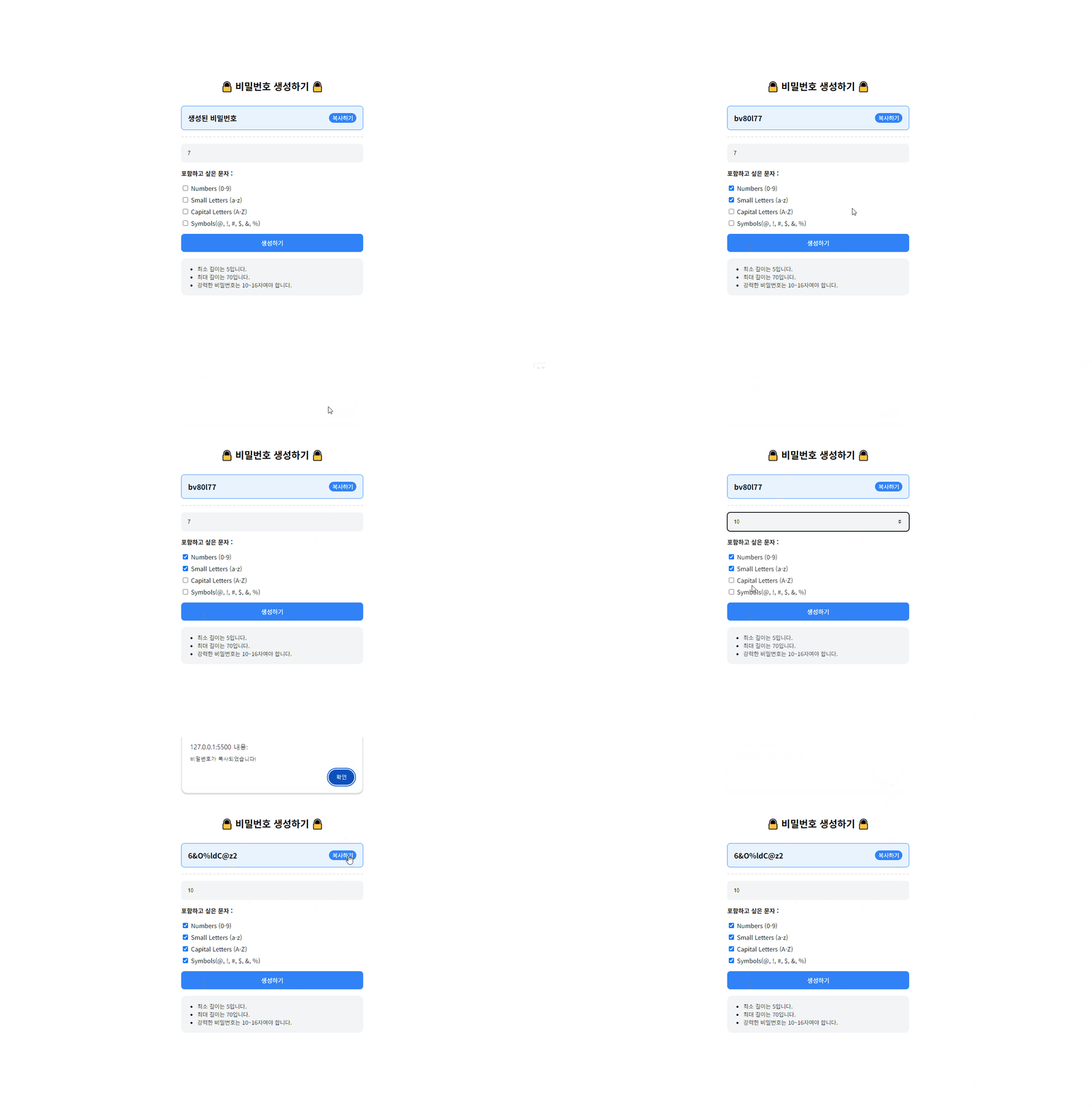 비밀번호 생성 앱 만들기
GitHub : 06-password-generation
개요
조건에 따른 비밀번호 생성 기능 구현
Generator, Design Pattern 을 사용해보기
필요한 기능
조건에 따른 비밀번호 생성
생성된 비밀번호 복사 기능
구현하기
//문자 범위
const charSets = {
  numbers: '0123456789',
  small: 'abcdefghijklmnopqrstuvwxyz',
  capital: 'ABCDEFGHIJKLMNOPQRSTUVWXYZ',
  symbols: '@!#$&%',
};

//사용자 체크박스 설정
function getOptions() {
    return {
        numbers: document.getElementById("numbers").checked,
        small: document.getElementById("small").checked,
        capital: document.getElementById("capital").checked,
        symbols: document.getElementById("symbols").checked,
    };
}
createButton.addEventListener("click", () => {
const length = parseInt(inputLength.value, 10);
const options = getOptions();
/*비밀번호 생성 최소 조건 생략 */
//Generator 사용할 때
const generatedPassword = generatePassword(length, options);
//Factory Pattern 사용할 때
const generator = PasswordFactory.createPasswordGenerator(options);
const generatedPassword = generator.generate(length);
passwordElement.textContent = generatedPassword;
}); 사용자가 선택한 비밀번호 길이와 옵션을 전달받아 비밀번호를 생성한다. 위의 설정들과 shufflePassword(password) 비밀번호 셔플 함수, copyToClipboard(text) 생성된 비밀번호 복사 함수는 같고 비밀번호 생성 과정만 다르다.
Generator 사용
function generatePassword(length, options) {
    const generator = passwordGenerator(options);
    let password = "";

    // 선택된 옵션 배열 추가
    const selectedSets = [];
    if (options.numbers) selectedSets.push(charSets.numbers);
    if (options.small) selectedSets.push(charSets.small);
    if (options.capital) selectedSets.push(charSets.capital);
    if (options.symbols) selectedSets.push(charSets.symbols);

    // 각 문자 집합에서 하나씩 선택하여 추가
    selectedSets.forEach((set) => {
        password += set.charAt(Math.floor(Math.random() * set.length));
        console.log(password);
    });

    // 나머지 자리에 대해 랜덤 문자 추가
    for (let i = password.length; i < length; i++) {
        password += generator.next().value;
    }

    // 비밀번호를 섞어서 반환
    return shufflePassword(password);
}
generatePassword(length, options)함수는 비밀번호를 생성하고 길이를 관리합니다.
사용자 설정 옵션 반영:
사용자가 선택한 옵션 값에 따라 selectedSets 배열을 만듭니다. 이 배열은 선택된 문자 집합(숫자, 소문자, 대문자, 기호)을 포함합니다.
최소 하나의 문자 포함:
selectedSets 배열을 반복하여 각 문자 집합에서 최소한 하나의 문자를 포함시킵니다. 이는 비밀번호가 선택된 옵션을 만족하도록 보장합니다.
남은 길이의 랜덤 문자 추가:
나머지 비밀번호 길이에 대해서는 passwordGenerator를 사용하여 랜덤 문자를 생성합니다.
비밀번호 반환:
최종적으로 생성된 비밀번호는 지정된 길이와 사용자 옵션을 반영하여 반환됩니다.
function* passwordGenerator(options) {
    const selectedSets = [];

    if (options.numbers) selectedSets.push(charSets.numbers);
    if (options.small) selectedSets.push(charSets.small);
    if (options.capital) selectedSets.push(charSets.capital);
    if (options.symbols) selectedSets.push(charSets.symbols);

    while (true) {
        const randomSet = selectedSets[Math.floor(Math.random() * selectedSets.length)];
        yield randomSet.charAt(Math.floor(Math.random() * randomSet.length));
    }
}
passwordGenerator(options) 함수는 비밀번호를 생성합니다.
무한 루프: while (true)를 사용하여 passwordGenerator()가 호출될 때 무한 루프를 실행합니다. 이 루프는 무작위 문자를 계속 생성하는 역할을 합니다.
무작위 문자 집합 선택: 선택된 옵션 배열을 파라미터로 받아 randomSet에서 무작위로 하나의 문자 집합을 선택합니다. Math.random()을 사용하여 0과 1 사이의 무작위 소수를 생성한 후, 이를 selectedSets.length와 곱하여 배열의 인덱스를 얻습니다. Math.floor()를 사용하여 소수를 정수로 변환함으로써 유효한 인덱스 범위 내에서 선택이 이루어지도록 합니다.
무작위 문자 선택: 위에서 선택된 문자 집합(randomSet)에서 문자를 선택합니다.
예를 들어, 선택된 randomSet이 '0123456789'일 때, Math.random()이 0.65를 반환하면 0.65 * 10 (randomSet.length) = 6.5 → Math.floor()에 의해 6이 되고
charAt(index) 메서드를 사용하여 문자열에서 지정된 인덱스에 있는 문자를 반환합니다.
랜덤 문자 생성 반복: 이 과정을 호출될 때마다 반복합니다.
Factory Pattern 사용
// 비밀번호 생성기 클래스
class PasswordGenerator {
    constructor(options) {
        this.options = options;
        this.selectedSets = [];

        if (options.numbers) this.selectedSets.push(charSets.numbers);
        if (options.small) this.selectedSets.push(charSets.small);
        if (options.capital) this.selectedSets.push(charSets.capital);
        if (options.symbols) this.selectedSets.push(charSets.symbols);
    }

    // 비밀번호 생성
    generate(length) {
        let password = "";

        this.selectedSets.forEach((set) => {
            password += set.charAt(Math.floor(Math.random() * set.length));
        });

        while (password.length < length) {
            const randomSet = this.selectedSets[Math.floor(Math.random() * this.selectedSets.length)];
            password += randomSet.charAt(Math.floor(Math.random() * randomSet.length));
        }

        return shufflePassword(password);
    }
}


class PasswordFactory {
    static createPasswordGenerator(options) {
        return new PasswordGenerator(options);
    }
}
PasswordFactory.createPasswordGenerator(options) 를 호출하여 PasswordGenerator 인스턴스를 생성한 후, 인스턴스의 generate(length) 메서드를 통해 비밀번호를 생성한다.
배운 걸 사용해보고자 Generator 함수와 클래스를 썼다.
답변 0