

[OAuth 2.0 Social Login 연동 구현 3] 에서 계속 index 문자열만 보이고 index 페이지가 보이지 않습니다.
633
3 câu hỏi đã được viết
server:
  port: 8081

spring:
  security:
    oauth2:
      client:

        registration:
          keycloak:
            authorization-grant-type: authorization_code
            client-id: oauth2-client-app
            client-name: oauth2-client-app
            client-secret: dXf021lMWuZ9kZafqxZn230MvVEdROIo
            redirect-uri: http://localhost:8081/login/oauth2/code/keycloak
            scope: profile,email

          google:
            client-id: 발급받은ID
            client-secret: 발급받은비밀번호
            scope: profile,email

          naver:
            client-id: 발급받은ID
            client-secret: 발급받은비밀번호
            authorization-grant-type: authorization_code
            client-name: naver-client-app
            redirect-uri: http://localhost:8081/login/oauth2/code/naver
            scope: profile,email


        provider:
          keycloak:
            authorization-uri: http://localhost:8080/realms/oauth2/protocol/openid-connect/auth
            issuer-uri: http://localhost:8080/realms/oauth2
            jwk-set-uri: http://localhost:8080/realms/oauth2/protocol/openid-connect/certs
            token-uri: http://localhost:8080/realms/oauth2/protocol/openid-connect/token
            user-info-uri: http://localhost:8080/realms/oauth2/protocol/openid-connect/userinfo
            user-name-attribute: preferred_username
          naver:
            authorization-uri: https://nid.naver.com/oauth2.0/authorize
            token-uri: https://nid.naver.com/oauth2.0/token
            user-info-uri: https://openapi.naver.com/v1/nid/me
            user-name-attribute: response

  mvc:
    static-path-pattern: /static/**
package springsecurityoauth2.demo.controller;

import org.springframework.security.core.Authentication;
import org.springframework.security.core.annotation.AuthenticationPrincipal;
import org.springframework.security.oauth2.client.authentication.OAuth2AuthenticationToken;
import org.springframework.security.oauth2.core.user.OAuth2User;
import org.springframework.ui.Model;
import org.springframework.web.bind.annotation.GetMapping;
import org.springframework.web.bind.annotation.RestController;

import java.util.Map;

@RestController
public class IndexController {

    @GetMapping("/")
    public String index(Model model, Authentication authentication, @AuthenticationPrincipal OAuth2User oAuth2User) {

        OAuth2AuthenticationToken oAuth2AuthenticationToken = (OAuth2AuthenticationToken) authentication;
        if (oAuth2AuthenticationToken != null) {
            Map<String, Object> attributes = oAuth2User.getAttributes();
            String name = (String) attributes.get("name");

            // 네이버는 response 계층이 하나 더 있으므로 별도 처리 필요
            if (oAuth2AuthenticationToken.getAuthorizedClientRegistrationId().equals("naver")) {
                Map<String, Object> response = (Map<String, Object>) attributes.get("response");
                name = (String) response.get("name");
            }

            model.addAttribute("user", name);
        }

        return "index";
    }
}
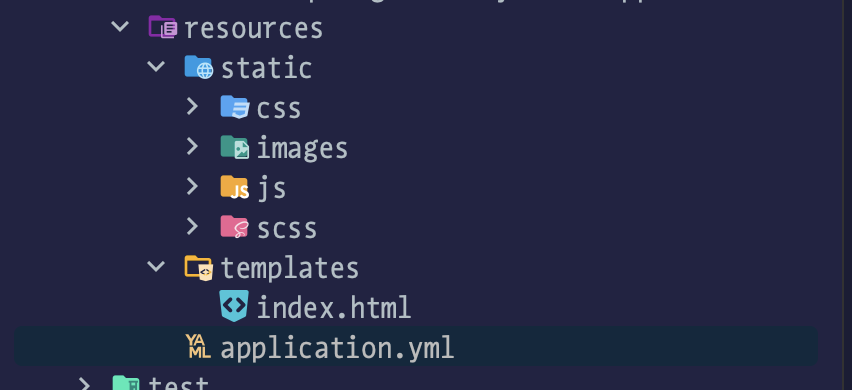
안녕하세요.
resource 파일들은 깃헙의 소셜로그인 브랜치에서 그대로 가져왔고, IndexController 와 application.yml 파일은 위와 같습니다.
브라우저에서 localhost:8081 로 접속하면
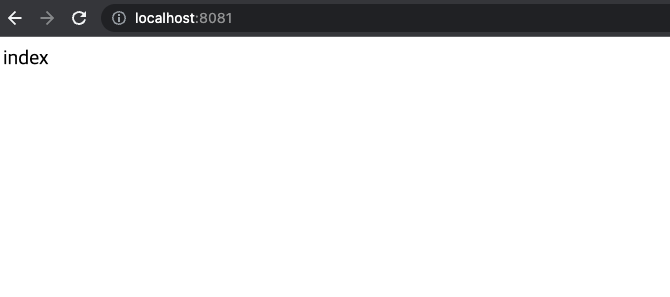 이렇게만 나옵니다 ㅠㅠ
어디가 잘못됐을까요?
Câu trả lời 1
authorization-server 라이브러리 질문이 있습니다.
0
135
1
loadUser 중 Missing attribute 'preferred_username' in attributes 에러 발생
0
164
2
JWT 조회 에 대한 질문
0
134
1
password grant 방식 에러 응답
0
196
3
FormLoginConfigure에서 생성하는 필터
0
134
2
현업에서 springboot를 3.5.5 를 사용해서 공부중인데...
0
360
2
Jdbc 관련 강의 및 깃헙 문의
0
110
1
OAuth2AuthorizedClient 이해 및 활용 강의 내용 질문
0
242
1
UserInfo 엔드포인트 요청 실습
0
114
1
RFC 문서에서의 AccessToken 발급 방식 궁금한점
0
197
1
강의자료.zip 를 다운로드 받았는데 압축이 풀리지 않습니다. 확인 부탁드려요
0
191
2
OIDC SSO 관련 질문 입니다.
0
179
1
AuthenticationEntryPoint 강의 누락 문의
0
157
1
cors설정방법
0
146
1
jwt decoder 토큰 검증 시 질문
0
272
1
클라이언트에서 userinfo 엔드포인트 호출 시 질문
0
237
2
JOSE 구성요소의 api에 관한 질문
0
186
2
스프링 부트 3버전으로 따라가시는 분들 참고하세요
1
606
1
CustomOAuth2AuthenticationFilter 구현 중 질문
0
186
2
AuthenticationManager 생성시점
0
145
1
FormLogin과 Oauth2Client 둘 중 사용하는 시점
0
150
1
postman userinfo 엔드포인트 질문
0
165
2
강의 수강신청하고 듣기 전입니다 질문있습니다.
0
147
1
인증 코드를 통해 발급 받은 토큰의 관리
0
239
1