

HTML+CSS+JS Portfolio thực tế (Mùa 1)
Tạo kiểu tùy chỉnh cho nút radio, hộp kiểm (dùng Font Awesome)
라디오버튼과 체크박스를 커스텀 체크박스로 스타일링 관련 질문 드립니다.
1037
5 câu hỏi đã được viết
■ 질문 남기실 때 꼭! 참고해주세요.
HTML을
 <label>
      <input type="checkbox" checked >HTML
    </label>
이렇게 바꾸면 체크박스용 보더는 나타나는데 폰트 어썸 아이콘이 나타나지 않습니다.폰트어썸 아이콘을 나타나게 하려면 어떻게 해야 하나요?
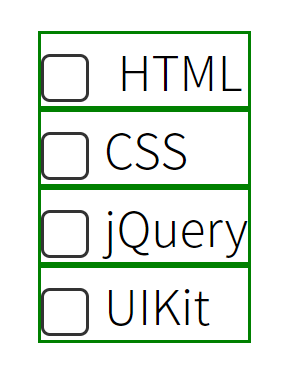
<!DOCTYPE html>
<html lang="ko">
<head>
<meta charset="UTF-8">
<title>커스텀 체크박스 스타일링(2)</title>
<link rel="stylesheet" href="style.css">
</head>
<body>
<form>
<label>
<input type="checkbox" checked >HTML
</label>
<label for="chk2">CSS
<input type="checkbox" id="chk2">
</label>
<label for="chk3">jQuery
<input type="checkbox" id="chk3">
</label>
<label for="chk4">UIKit
<input type="checkbox" id="chk4" disabled>
</label>
</form>
</body>
</html>
/* Google Web Fonts CDN */
@import url('https://fonts.googleapis.com/css?family=Noto+Sans+KR:300,400,500,700,900&display=swap');

/* Fontawesome 4.7 */
@import url('https://stackpath.bootstrapcdn.com/font-awesome/4.7.0/css/font-awesome.min.css');

body {
  font-family: 'Noto Sans KR', sans-serif;
  line-height: 1.5em;
  margin: 0;
  font-weight: 300;

  display: flex;
  justify-content: center;
  align-items: center;
  height: 100vh;
}
a {
  text-decoration: none;
}

form input[type=checkbox] {
  display: none;
}
form label {
  display: block;
  border: 1px solid green;
  cursor: pointer;
}
form label:before {
  content: '\f00c';
  font-family: fontawesome;
  display: inline-block;
  width: 14px;
  height: 14px;
  line-height: 14px;
  font-size: 13px;
  color: transparent;
  border: 1px solid #333;
  border-radius: 3px;

  text-align: center;
  vertical-align: middle;
  margin-right: 5px;
  transition: 0.2s;

}
form input[type=checkbox]:checked + label:before {
  background-color: crimson;
  color: #fff;
  border-color: transparent;
}
form input[type=checkbox]:not(:disabled) + label:active:before {
  transform: scale(0);
}
Câu trả lời 2
0
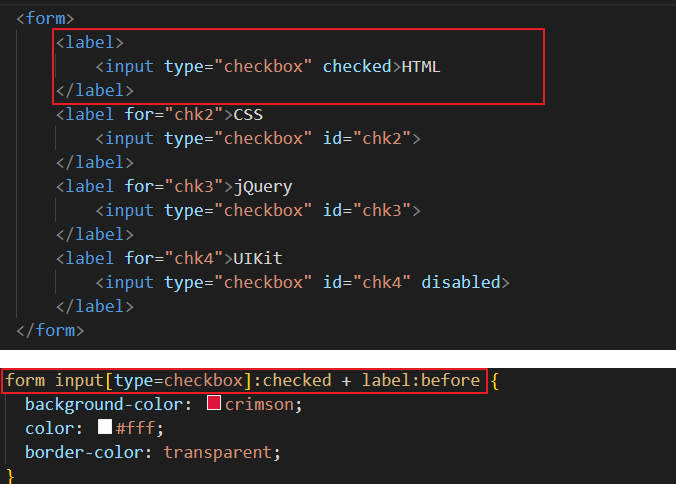
현재 구조는 label의 자식요소로 input이 있는데 css는 input:checked + label 이라고 하면 맞지 않습니다. label과 input이 따로 있어야 input:checked + label 이 구조가 성립됩니다.
곧, 아래 구조여야 css 선택자가 맞습니다. 그래야 css 구조도 맞습니다.
<input type="checkbox" id="chk2"> <label for="chk3">jQuery </label>form input[type=checkbox]:checked + label:beforecss 선택자는 input이 먼저 나오고 인접해서 label이 나옵니다. 그래서 위에 html 구조로 하셔야 합니다.
span 태그에 여백이 들어간 것 같은데 왜 그런건가요?
1
62
5
class 값 한 번에 부여하는법
2
120
1
@media에서의 flex-direction: column으로 세로배치 관련 질문드립니다.
1
98
1
div#css-checker-widget의 해결방
1
95
2
input의 포커스되었을때 검정선이 사라지지 않아요
0
116
2
강의듣는법
1
111
1
아코디언 만들기 100%이하의 화면으로 보았을때
1
92
2
input checked 질문합니다.
0
95
1
Bracket Pair Colorizer - 비주얼 스튜디오
1
192
2
Part 1 영상 안나옵니다
1
117
1
제이쿼리 작동이 안됩니다
1
235
3
강의 내용 질문있습니다.
1
164
2
일정 부분만 주석하는 방법
1
274
2
폰트어썸
1
175
2
인접선택자에 대한 질문드립니다!
1
156
2
delay 적용 안됨
1
152
1
rotateY(360deg)가 적용이 안됩니다!
1
224
2
세로이동할때 height값
1
168
2
폰트어썸이 안되요..
1
545
2
화면 정중앙에 오게끔 할수있나요?
1
194
1
어코디언 네비게이션 중
1
148
1
라이브서버 문제
1
273
2
넷플릭스 어코디언 예제 질문
1
123
1
이번 강의에선 display flex가 무조건 적으로 필요한건가요 ?
1
183
1