강의

멘토링

커뮤니티

Cộng đồng Hỏi & Đáp của Inflearn

Hình ảnh hồ sơ của dabeene4271
dabeene4271

câu hỏi đã được viết

Bộ sưu tập trang web phản hồi (Architecture Agency)

모바일 전체 레이아웃 및 네비게이션 퍼블리싱(Mobile ver.)

Viết

·

580

1

모바일 전체 레이아웃 및 네비게이션 퍼블리싱(Mobile ver.)

style.css

.trigger {
  display: none;
}
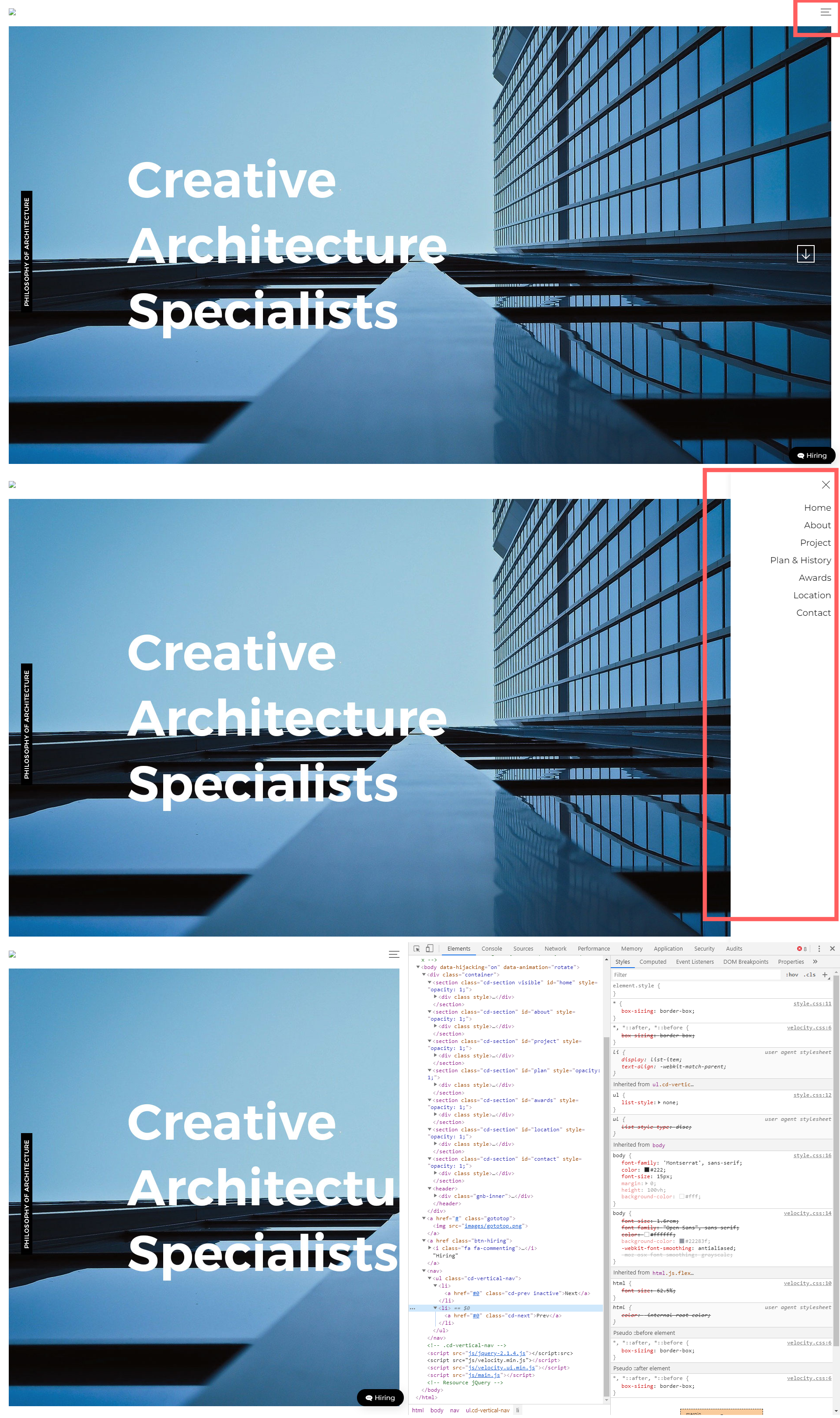
했는데 PC에서 계속 햄버거버튼 나와요


그래서 hiring 부분에서 모바일css

.btn-hiring {
  right: 10px;
  bottom: 20px;
}

수정했는데 피씨도 같이 움직여요 ㅠㅠ
트리거HTML/CSSjquery웹 디자인반응형-웹

Câu trả lời 5

0

codingworks님의 프로필 이미지
codingworks
Người chia sẻ kiến thức

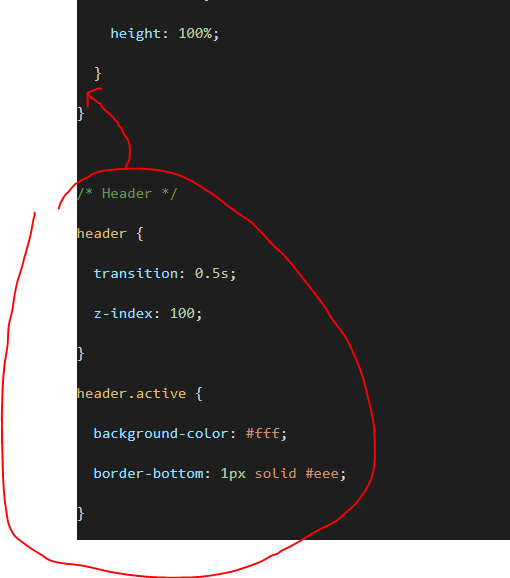
responsive.css 파일에서 /* Header */ 이하의 구문이 미디어쿼리 안에 있어야 하는데 밖에 있습니다.

그래서 PC의 .trigger 속성을 덮어써서 display: none이 안되고 있습니다.

@media (max-width: 768px) { ... }

Dabeen님의 프로필 이미지
Dabeen
Người đặt câu hỏi

정말 감사합니다!!!

0

Dabeen님의 프로필 이미지
Dabeen
Người đặt câu hỏi

@media (max-width: 768px) {
  html {
    scroll-behavior: smooth;
  }
    /* Entire Layout */
  .cd-section {
    height: auto;
  }
  .cd-section > div {
    height: auto;
  }
  .contents {
    position: static;
    width: 100%;
    height: 100%;
  }
}

/* Header */
header {
  transition: 0.5s;
  z-index: 100;
}
header.active {
  background-color: #fff;
  border-bottom: 1px solid #eee;
}
.menu {
  display: block;
}
.slogan {
  display: none;
}
.gnb {
  background-color: #fff;
  position: fixed;
  top: 0;
  right: -270px;
  width: 250px;
  height: 100vh;
  box-shadow: -5px 0 10px rgb(0, 0, 0, 0.05);
  transition: 0.5s;
}

.gnb.active {
 right: 0;
}
.menu {
  line-height: 40px;
  margin-top: 60px;
}
.menu a {
  text-align: right;
  display: block;
  padding-right: 20px;
  color: #000;
  font-size: 20px;
}

/* Trigger */
.trigger {
  display: block;
  /* border: 1px solid red; */
  width: 24px;
  height: 14px;
  position: fixed;
  right: 20px;
  top: 20px;
}
.trigger span {
  position: absolute;
  height: 1px;
  width: 100%;
  background-color: #000;
  transition: 0.5s;
}
.trigger span:nth-child(1) {
  top: 0;
}
.trigger span:nth-child(2) {
  top: 50%;
  width: 80%;
}
.trigger span:nth-child(3) {
  top: 100%;
}
.trigger.active span:nth-child(1) {
  top: 50%;
  transform: rotate(45deg);
}
.trigger.active span:nth-child(2) {
  top: 50%;
  width: 80%;
  opacity: 0;
}
.trigger.active span:nth-child(3) {
  top: 50%;
  transform: rotate(-45deg);
}

/* Gototop */
.gototop {
  position: fixed;
  bottom: 20px;
  left: 22px;
  border: 1px solid #fff;
  display: block;
  width: 40px;
  height: 40px;
  border-radius: 50%;
  text-align: center;
  line-height: 40px;
  transform: translateY(30px);
  opacity: 0;
  transition: 0.5s;
}
.gototop.active {
  opacity: 1;
  transform: translateY(0);
}

.btn-hiring {
  right: 10px;
  bottom: 20px;
}

0

Dabeen님의 프로필 이미지
Dabeen
Người đặt câu hỏi

/* Google Web Font : Montserrat */
@import url('https://fonts.googleapis.com/css?family=Montserrat:200,300,400,500&display=swap');
@import url('https://fonts.googleapis.com/css?family=Manrope:300,400,500,600&display=swap');
@import url('https://fonts.googleapis.com/css2?family=Source+Sans+Pro:wght@200;300;400;600;700;900&display=swap');
@import url('https://fonts.googleapis.com/css2?family=Overpass&display=swap');

/* FontAwesome CDN 4.7 */
@import url('https://stackpath.bootstrapcdn.com/font-awesome/4.7.0/css/font-awesome.min.css');

/* Reset CSS */
* { box-sizing: border-box; }
ul { list-style: none; }
a { text-decoration: none; }

/* Default CSS */
body {
  font-family: 'Montserrat', sans-serif;
  color: #222;
  font-size: 15px;
  margin: 0;
  height: 100vh;
  background-color: #fff;
}

/* Entire Layout */
.cd-section {
  height: 100vh;
}
.cd-section > div {
  height: 100%;
  position: relative;
}
.contents {
  background-color: #ddd;
  position: absolute;
  width: calc(100% - 40px);
  height: calc(100% - 80px);
  left: 20px;
  bottom: 20px;
  overflow: hidden;
}

/* Header */
header {
  position: fixed;
  top: 0;
  left: 0;
  width: 100%;
}
.gnb-inner {
  /* border: 1px solid #000; */
  width: calc(100% - 40px);
  margin: auto;
  height: 60px;
  line-height: 60px;
}
.logo {
  float: left;
}
.logo img {
  padding-top: 17px;
}
.gnb {
  float: right;
}
.menu {
  display: none;
}
.menu a {}
.slogan {
  font-size: 16px;
  font-style: italic;
}
.trigger {
  display: none;
}

/* Hiring Button */
.btn-hiring {
  position: fixed;
  right: 50px;
  bottom: 50px;
  color: #fff;
  background-color: #000;
  padding: 10px 20px;
  border-radius: 20px;
  box-shadow: 5px 5px 20px rgba(0, 0, 0, 0.119);
  transition: 0.5s;
}
.btn-hiring .fa {
  transform: rotateY(180deg);
  margin-right: 5px;
}
.btn-hiring:active {
  transform: scale(0);
}


0

Dabeen님의 프로필 이미지
Dabeen
Người đặt câu hỏi

<!doctype html>
<html lang="ko">
<head>
  <meta charset="UTF-8">
  <meta name="viewport" content="width=device-width, initial-scale=1.0">
  <title>DesignWorks Architecture Agency</title>
  <script src="js/jquery-2.1.4.js"></script>
  <!-- Page Scroll Effects Js & CSS -->
  <script src="js/velocity/modernizr.js"></script>
  <script src="js/velocity/velocity.min.js"></script>
  <script src="js/velocity/velocity.ui.min.js"></script>
  <script src="js/velocity/main.js"></script>
  <link rel="stylesheet" href="js/velocity/velocity.css">
  <!-- Smooth Scrolling -->
  <!--  <script src="js/jquery.scrollto.min.js"></script> -->
  <!-- Custom js & CSS -->
  <script src="custom.js"></script>
  <link rel="stylesheet" href="style.css">
  <link rel="stylesheet" href="responsive.css">

</head>
<!-- hijacking: on/off - animation: none/scaleDown/rotate/gallery/catch/opacity/fixed/parallax -->

<body data-hijacking="on" data-animation="rotate">
  <div class="container">
    <section class="cd-section visible" id="home">
      <div>
        <div class="contents">
          <img src="images/temp-section-01.jpg" alt="">
        </div>
      </div>
    </section>
 
    <section class="cd-section" id="about">
      <div>
        <div class="contents">
          <img src="images/temp-section-02.jpg" alt="">
        </div>
      </div>
    </section>
 
    <section class="cd-section" id="project">
      <div>
        <div class="contents">
          <img src="images/temp-section-03.jpg" alt="">
        </div>
      </div>
    </section>
 
    <section class="cd-section" id="plan">
      <div>
        <div class="contents">
          <img src="images/temp-section-04.jpg" alt="">
        </div>
      </div>
    </section>
 
    <section class="cd-section" id="awards">
      <div>
        <div class="contents">
          <img src="images/temp-section-05.jpg" alt="">
        </div>
      </div>
    </section>
    <section class="cd-section" id="location">
      <div>
        <div class="contents">
          <img src="images/temp-section-06.jpg" alt="">
        </div>
      </div>
    </section>
    <section class="cd-section" id="contact">
      <div>
        <div class="contents">
          <img src="images/temp-section-07.jpg" alt="">
        </div>
      </div>
    </section>
    <header>
      <div class="gnb-inner">
        <div class="logo">
          <a href="none"><img
          src="images/logo.png"></a>
        </div>
        <div class="gnb">
          <div class="menu">
            <a href="#home">Home</a>
            <a href="#about">About</a>
            <a href="#project">Project</a>
            <a href="#plan">Plan & History</a>
            <a href="#awards">Awards</a>
            <a href="#location">Location</a>
            <a href="#contact">Contact</a>
          </div>
          <div class="slogan">We design places,
          not projects. Hiring</div>
        </div>
        <div class="trigger">
          <span></span>
          <span></span>
          <span></span>
        </div>
      </div>
    </header>
  </div>
 
<a href="#" class="gototop"><img src="images/gototop.png"></a>
<a href="" class="btn-hiring"><i class="fa fa-commenting"></i>Hiring</a>
  <nav>
    <ul class="cd-vertical-nav">
      <li><a href="#0" class="cd-prev inactive">Next</a></li>
      <li><a href="#0" class="cd-next">Prev</a></li>
    </ul>
  </nav> <!-- .cd-vertical-nav -->
<script src="js/jquery-2.1.4.js"></script:src>
<script src="js/velocity.min.js"></script>
<script src="js/velocity.ui.min.js"></script>
<script src="js/main.js"></script> <!-- Resource jQuery -->
</body>
</html>

0

codingworks님의 프로필 이미지
codingworks
Người chia sẻ kiến thức

PC 버전에서는 .trigger가 안보여여 하는 지금은 보이네요.

이건 html, css 코드를 복사해서 올려주세요.

코드 올리시면 제가 확인해볼게요.

Hình ảnh hồ sơ của dabeene4271
dabeene4271

câu hỏi đã được viết

Đặt câu hỏi