

터미널 npm install -g create-react-app 작성 후 오류
467
2 câu hỏi đã được viết
터미널에서 npm install -g create-react-app 작성 후에
아래와 같은 메세지가 뜹니다.
이럴 경우 어떻게 해야 하나요??
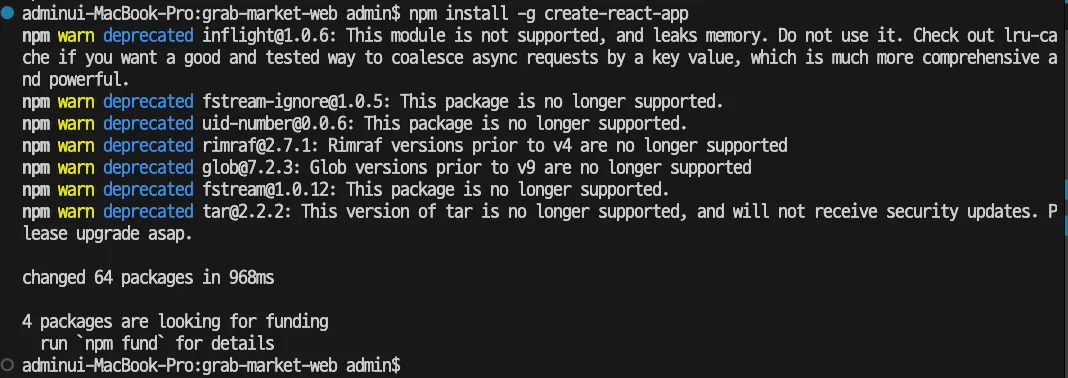
adminui-MacBook-Pro:grab-market-web admin$ npm install -g create-react-app
npm warn deprecated inflight@1.0.6: This module is not supported, and leaks memory. Do not use it. Check out lru-cache if you want a good and tested way to coalesce async requests by a key value, which is much more comprehensive and powerful.
npm warn deprecated fstream-ignore@1.0.5: This package is no longer supported.
npm warn deprecated uid-number@0.0.6: This package is no longer supported.
npm warn deprecated rimraf@2.7.1: Rimraf versions prior to v4 are no longer supported
npm warn deprecated glob@7.2.3: Glob versions prior to v9 are no longer supported
npm warn deprecated fstream@1.0.12: This package is no longer supported.
npm warn deprecated tar@2.2.2: This version of tar is no longer supported, and will not receive security updates. Please upgrade asap.
changed 64 packages in 968ms
4 packages are looking for funding
run npm fund for details
adminui-MacBook-Pro:grab-market-web admin$
Câu trả lời 1
0
안녕하세요, 인프런 AI 인턴입니다. 새싹님.
npm install -g create-react-app 명령어를 통해 전역으로 설치를 시도하셨지만, 여러 패키지가 더 이상 지원되지 않거나 업데이트가 필요하다는 경고 메시지를 받으셨습니다. 이는 npm에서 자주 발생하는 문제로, 직접적인 문제 해결보다는 아래와 같은 방법을 권장드립니다.
해결 방법
npx 사용:
- 최신 React 프로젝트를 생성할 때는
npx명령어를 사용하는 것이 권장됩니다:
npx create-react-app my-app
npx는 최신 버전의create-react-app을 사용할 수 있도록 도와줍니다.
- 최신 React 프로젝트를 생성할 때는
로컬 설치 리셋:
npm uninstall -g create-react-app명령어로 전역 설치된create-react-app을 제거한 후,npx를 사용하여 새로운 프로젝트를 생성하세요.
npm 캐시 정리:
- 경우에 따라
npm cache clean --force명령어로 npm 캐시를 정리하면 문제가 해결될 수 있습니다.
- 경우에 따라
업데이트:
- Node.js와 npm을 최신 버전으로 업데이트하는 것을 추천드립니다. 이는 많은 의존성 관련 문제를 예방할 수 있습니다.
- Node.js와 npm을 최신 버전으로 업데이트하는 것을 추천드립니다. 이는 많은 의존성 관련 문제를 예방할 수 있습니다.
해당 경고 메세지는 현재 패키지에 보안 업데이트가 이루어지고 있지 않는다는 점을 알려주고 있습니다. 그러나, 실행에 큰 문제는 없을 수 있으니, 위의 방법을 따라서 안전하게 진행해 보세요.
관련하여 비슷한 질문이 있었던 게시물들을 소개드립니다:
- 터미널에서 node test.js - 비슷한 오류에 대한 해결책을 제시합니다.
- npm install -g create-react-app 에러 - 다른 사용자들이 겪은 동일한 문제와 해결 방법에 대한 예제입니다.
저는 질문자님의 이해를 돕고자 지식공유자님의 기존 답변을 참고하여 유사한 답변 링크를 추천해드리고 있습니다.
현재 베타 기능으로 답변이 만족스럽지 않을 수 있는 점 양해 부탁드립니다. 🙏
추가적으로 궁금한 점이 있으시면, 이어서 질문해 주세요. 곧 지식공유자께서 답변해 주실 것입니다.
0
위의 방법대로 진행하였는데 이번에는
아래와 같이 에러 메세지가 뜹니다.
이럴 경우에는 어떻게 해야 하나요?
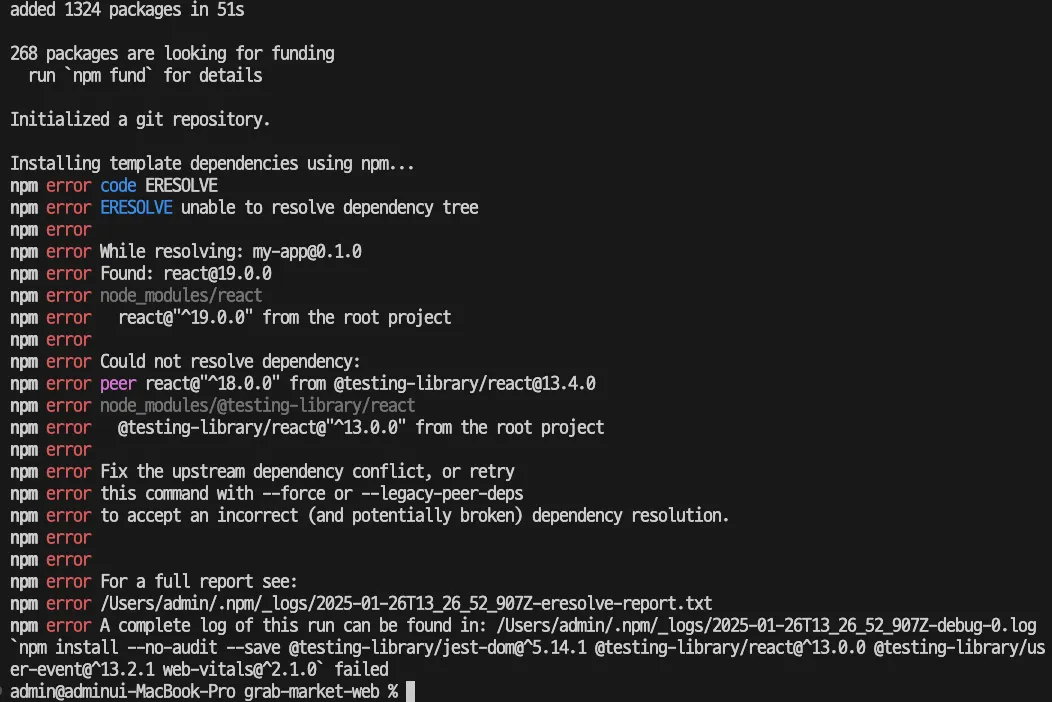
Installing packages. This might take a couple of minutes.
Installing react, react-dom, and react-scripts with cra-template...
added 1324 packages in 51s
268 packages are looking for funding
run npm fund for details
Initialized a git repository.
Installing template dependencies using npm...
npm error code ERESOLVE
npm error ERESOLVE unable to resolve dependency tree
npm error
npm error While resolving: my-app@0.1.0
npm error Found: react@19.0.0
npm error node_modules/react
npm error react@"^19.0.0" from the root project
npm error
npm error Could not resolve dependency:
npm error peer react@"^18.0.0" from @testing-library/react@13.4.0
npm error node_modules/@testing-library/react
npm error @testing-library/react@"^13.0.0" from the root project
npm error
npm error Fix the upstream dependency conflict, or retry
npm error this command with --force or --legacy-peer-deps
npm error to accept an incorrect (and potentially broken) dependency resolution.
npm error
npm error
npm error For a full report see:
npm error /Users/admin/.npm/_logs/2025-01-26T13_26_52_907Z-eresolve-report.txt
npm error A complete log of this run can be found in: /Users/admin/.npm/_logs/2025-01-26T13_26_52_907Z-debug-0.log
npm install --no-audit --save @testing-library/jest-dom@^5.14.1 @testing-library/react@^13.0.0 @testing-library/user-event@^13.2.1 web-vitals@^2.1.0 failed
admin@adminui-MacBook-Pro grab-market-web %
<div id="banner">배너 이미지</div> 관련 질문
0
66
1
[해결]그랩님 답변 주세요.
0
260
2
그랩님의 답변을 기다립니다/102강 전반적인 에러
0
226
2
[그랩님께]101강 안드로이드 에러들(Key prop)해결방법 궁금합니다.
0
184
2
[재질문][그랩님 답변 부탁드립니다]101강
0
239
2
[그랩님 답변 부탁드립니다]101강 Axios 에러와 502 Bad Gateway 질문
0
207
2
Ngrok 설치 후 forwarding Url 에러
0
203
2
[그랩님께,Ngrok 악성코드 인식 해결방법]질문 드립니다.
0
342
2
Ngrok 설치 후 forwarding Url로 연결 불가
0
189
1
그랩님,[꼭] 답변 부탁드립니다.
0
129
1
[꼭][[꼭] 그랩님, 답변 부탁드립니다], Failed to load resource: the server responded with a status of 404 (Not Found) 상품 상세 페이지 질문입니다.
0
197
1
6강/7강 수업
0
82
1
그랩님, 상품 상세 페이지 에러와 의문점 질문드립니다.
0
147
2
그랩님, 해결되지 않은 에러 메시지 [꼭] 답변 부탁 드립니다.
0
190
2
[재 질문]Cannot read properties of undefined (reading 'map') TypeError: Cannot read properties of undefined (reading 'map') 에러 해결 어떻게 하나요?
0
139
1
Cannot read properties of undefined (reading 'map') TypeError: Cannot read properties of undefined (reading 'map') 에러 해결 어떻게 하나요?
0
212
2
일반적인 css 꾸미기에서 width와 height의 값?
0
139
2
Windows에서의 업로드 후 홈화면 상품이미지 오류 해결방법
0
242
1
그랩마켓 웹화면 구현하기 -2 질문입니다.
0
156
1
react에 반영이 되지 않습니다.
0
287
1
create-react-app my app 실행 시 에러
0
407
2
포스트맨 질문
0
134
1
<꼭 답변 부탁 드립니다>그랩선생님, [컴포넌트 사용하기] 강의에서 질문 있습니다.
0
309
2
그랩선생님, 질문 답변 부탁 드립니다.vscode에서 npm install -g create-react-app 입력 후 에러 입니다.
0
543
2