

code 강조가 안됨니다..
코드블럭 테스트
language::typescript
export const { auth, signIn, signOut, handlers } = NextAuth({
등등을 존재하는데
아래와같이 코드는 작성했는데 코드 강조가 안되고있습니다. 뭐가문제일까요?
import React from 'react'
import {
  ContentfulRichTextGatsbyReference,
  renderRichText,
} from 'gatsby-source-contentful/rich-text'
import { getImage } from 'gatsby-plugin-image'
import { NodeRenderer, Options } from '@contentful/rich-text-react-renderer'
import { BLOCKS, INLINES, MARKS } from '@contentful/rich-text-types'
import {
  Blockquote,
  Heading,
  Image,
  HorizontalRule,
  OrderedList,
  UnorderedList,
  Link,
  Code,
} from './node'

export const HEADERS = [
  BLOCKS.HEADING_1,
  BLOCKS.HEADING_2,
  BLOCKS.HEADING_3,
] as const
const CODE_METADATA_REGEX = /^language::(\w+)/

const options: Options = {
  renderMark: {
    [MARKS.CODE]: text => {
      const isBlock = !!text && CODE_METADATA_REGEX.test(text.toString())

      if (!isBlock) return <Code>{text}</Code>
      else
        return (
          <Code
            isBlock
            className={`language-${
              CODE_METADATA_REGEX.exec(text.toString())?.[1]
            }`}
          >
            {text.toString().replace(CODE_METADATA_REGEX, '').trimStart()}
          </Code>
        )
    },
  },
  renderNode: {
    ...HEADERS.reduce<{ [block: string]: NodeRenderer }>((nodes, header) => {
      nodes[header] = (node, children) => (
        <Heading type={header}>{children}</Heading>
      )

      return nodes
    }, {}),
    [BLOCKS.OL_LIST]: (_node, children) => (
      <OrderedList>{children}</OrderedList>
    ),
    [BLOCKS.UL_LIST]: (_node, children) => (
      <UnorderedList>{children}</UnorderedList>
    ),
    [BLOCKS.HR]: () => <HorizontalRule />,
    [BLOCKS.QUOTE]: (_node, children) => <Blockquote>{children}</Blockquote>,
    [BLOCKS.EMBEDDED_ASSET]: node => {
      const { gatsbyImageData, description } = node.data.target
      const image = getImage(gatsbyImageData)

      if (image) return <Image image={image} alt={description} />
    },
    [INLINES.HYPERLINK]: (node, children) => (
      <Link
        href={node.data.uri as string}
        target="_blank"
        rel="noopener noreferrer"
      >
        {children}
      </Link>
    ),
  },
}

export default function useRenderRichText({
  raw,
  references,
}: Queries.ContentfulPostContent) {
  if (!raw) return null

  return renderRichText(
    {
      raw,
      references: references as unknown as ContentfulRichTextGatsbyReference[],
    },
    options,
  )
}
import React from 'react' import { GatsbyBrowser } from 'gatsby' import Layout from './src/components/common/Layout' import 'prismjs/themes/prism-tomorrow.min.css' export const wrapPageElement: GatsbyBrowser['wrapPageElement'] = ({ element, props, }) => { return <Layout {...props}>{element}</Layout> }
import React from 'react'
import { GatsbyBrowser } from 'gatsby'
import Layout from './src/components/common/Layout'
import 'prismjs/themes/prism-tomorrow.min.css'

export const wrapPageElement: GatsbyBrowser['wrapPageElement'] = ({
  element,
  props,
}) => {
  return <Layout {...props}>{element}</Layout>
}
import React, { useEffect } from 'react' import styled from 'styled-components' import { TPostBodyProps } from '../../types/PostBody' import Prism from 'prismjs' import 'prismjs/components/prism-typescript' import useRenderRichText from '../../hooks/useRenderRichText' const Wrapper = styled.div` position: relative; display: grid; grid-template-columns: 1fr 220px; grid-gap: 30px; justify-content: space-between; align-items: flex-start; padding-top: 100px; ` const Content = styled.div` overflow: auto; display: flex; flex-direction: column; gap: 100px; font-size: 16px; line-height: 2; word-break: break-word; ` export default function PostBody({ content }: TPostBodyProps) { const richText = useRenderRichText(content) useEffect(() => { Prism.highlightAll() }, []) return ( <Wrapper> <Content> <div id="content">{richText}</div> {/* 댓글 컴포넌트가 들어갈 자리 */} </Content> {/* 플로팅 목차 컴포넌트가 들어갈 자리 */} </Wrapper> ) }
Câu trả lời 3
1
Contentful 게시글을 렌더링하는 과정에서 모든 요소들이 각각 p 태그로 래핑되는데, 해당 강의에서 코드를 표현하기 위한 목적으로 사용되는 pre 태그 또한 p 태그로 래핑됩니다. 그래서 p 태그 내에 pre 태그가 위치하여 해당 에러가 발생하는데, 동작 과정에서 문제가 되는 부분은 없기에 무시하고 넘어가셔도 상관없습니다!
0
감사합니다 해결되었습니다!!
그런데 해당 부분이 해결되고나니
head-export-handler-for-browser.js:72 Warning: validateDOMNesting(...): <pre> cannot appear as a descendant of <p>.
이러한 에러가 발생하는데 뭐가 문제일까요?
0
안녕하세요 정훈님!
정확한 확인을 위해 블로그 페이지 캡쳐본과 Contentful에 작성한 코드 부분을 올려주실 수 있나요?
그리고 Contentful에서 코드를 작성하는 과정에서 코드 영역이 제대로 인식되지 않는 경우도 존재합니다.
따라서 명확하게 코드 영역을 다시 설정하신 후, pnpm clean && pnpm develop 명령어를 통해 캐시를 삭제하고 다시 로컬 서버를 실행해보시겠어요?
1
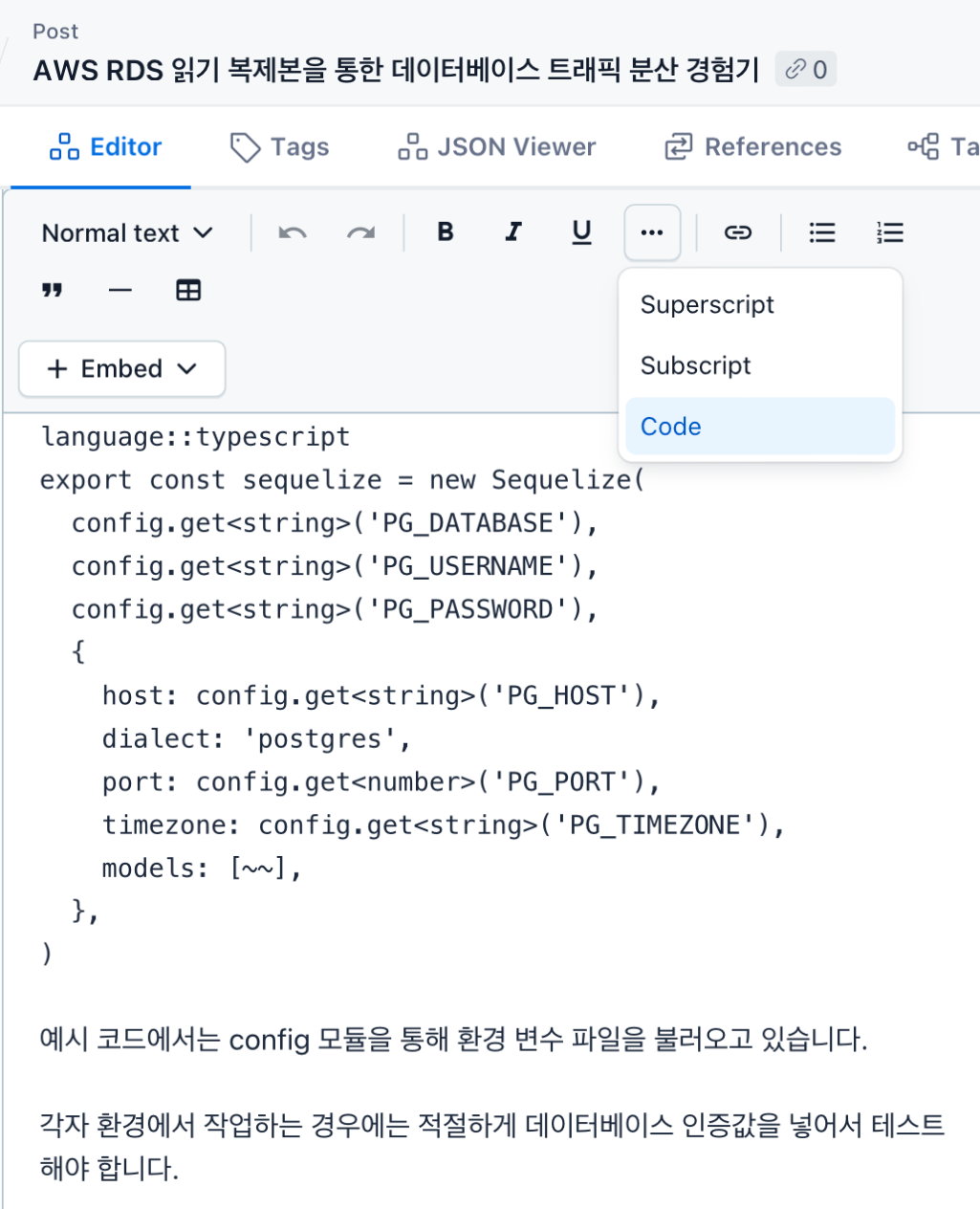
Contentful에서 위 사진과 같이 코드 영역을 등록하면 다른 일반 텍스트와 다른 폰트가 적용되는데, 정훈님께서 올려주신 사진은 그렇지 않아보입니다!
사진과 같이 코드 설정을 하신 후에 다시 로컬 서버를 실행해보시겠어요?
소스 코드가 회사 보안 프로그램에 막혀서 안 보여요.
0
2
0
claude code 상태표시줄 궁금합니다!
0
4
1
수파베이스 데모 버전
0
6
0
10월 15일 삭제예정 강의 문의
0
7
0
설치의 필요성
0
19
2
modal-root질문드립니다.
0
15
2
모달 여러개 질문드립니다
0
13
2
지금 강의가 어려우신분 추천드립니다.
0
18
1
기존의 완성된 CRUD의 Build.gradle에 security관련 dependency를 추가하면 문제가 생깁니다.
0
30
2
시작하기전에 질문 드립니다.
0
46
2
tsconfig.app.json 파일 설정(경로 별칭 옵션) 관련 질문입니다.
0
47
2
output style이 안나와요
0
42
2
강의제목에 10/15일 삭제라고 나와있는데,
0
45
1
CRA ? 질문입니다
0
43
1
교제 노션 복제 방법 문의
0
44
2
output style은 뭘선택하나요?
0
39
1
agent team vs shrimp task manager
0
51
2
깃허브 배포시 하얀화면
0
126
1
GaphQL reference 질문
0
181
2
렌더링 문제
0
333
2
깃 액션 활용
0
435
3
Github Actions 배포 이후 ReadMe만 보이는 에러
0
407
1
Property 'references' does not exist on type 'ContentfulPostContent' 에러
0
379
2
정규 표현식 질문
1
305
2