

실습5 진행시 젠킨스에서 playbook실행 커맨드 추가하고 빌드 시 오류
Running as SYSTEM
Building in workspace /var/jenkins_home/workspace/My-First-Project
The recommended git tool is: NONE
No credentials specified
 > git rev-parse --resolve-git-dir /var/jenkins_home/workspace/My-First-Project/.git # timeout=10
Fetching changes from the remote Git repository
 > git config remote.origin.url https://github.com/joneconsulting/cicd-web-project # timeout=10
Fetching upstream changes from https://github.com/joneconsulting/cicd-web-project
 > git --version # timeout=10
 > git --version # 'git version 2.39.2'
 > git fetch --tags --force --progress -- https://github.com/joneconsulting/cicd-web-project +refs/heads/*:refs/remotes/origin/* # timeout=10
 > git rev-parse refs/remotes/origin/main^{commit} # timeout=10
Checking out Revision df356f7f9629011a817acf6fbd0ae17864226dea (refs/remotes/origin/main)
 > git config core.sparsecheckout # timeout=10
 > git checkout -f df356f7f9629011a817acf6fbd0ae17864226dea # timeout=10
Commit message: "changed version to 3.2.5"
 > git rev-list --no-walk df356f7f9629011a817acf6fbd0ae17864226dea # timeout=10
SSH: Connecting from host [00eb708d0fb1]
SSH: Connecting with configuration [ansible-server] ...
SSH: Creating session: username [root], hostname [172.17.0.3], port [22]
SSH: Connecting session ...
SSH: Connected
SSH: Opening SFTP channel ...
SSH: SFTP channel open
SSH: Connecting SFTP channel ...
SSH: Connected
SSH: cd [.]
SSH: OK
SSH: Remote root is not absolute, getting absolute directory from PWD
SSH: cd [/root]
SSH: OK
SSH: put [hello-world.war]
SSH: Opening exec channel ...
SSH: EXEC: channel open
SSH: EXEC: STDOUT/STDERR from command [ansible-playbook -i hosts first-devops-playbook.yml] ...
SSH: EXEC: connected

PLAY [all] *********************************************************************

TASK [Gathering Facts] *********************************************************
fatal: [172.17.0.3]: UNREACHABLE! => {"changed": false, "msg": "Failed to connect to the host via ssh: root@172.17.0.3: Permission denied (publickey,gssapi-keyex,gssapi-with-mic,password).", "unreachable": true}

PLAY RECAP *********************************************************************
172.17.0.3                 : ok=0    changed=0    unreachable=1    failed=0    skipped=0    rescued=0    ignored=0

SSH: EXEC: completed after 1,002 ms
SSH: Disconnecting configuration [ansible-server] ...
ERROR: Exception when publishing, exception message [Exec exit status not zero. Status [4]]
Build step 'Send build artifacts over SSH' changed build result to UNSTABLE
Finished: UNSTABLE
실습 5번 진행하면서 젠킨스에서 ansible-server를 ssh로 연결 한 후에 playbook 실행 exec에 작성하고 빌드하면 위와 같은 문제가 납니다...
yml파일을 ansible-server에서 직접 실행하면 동작이 되는데 젠킨스에서 빌드 할 때 만 오류가 나네요.... ㅠㅠ
Câu trả lời 3
0
안녕하세요, 이도원입니다.
Jenkins에서 ansible로의 접속에 오류가 있는 것 같습니다. 이유는 여러가지가 있겠지만, connection fail이 발생하는 것으로 봐서, ansible 서버의 접속 정보가 잘못되었거나(변경 되었거나), ansible 서버로의 접속을 위한 SSH ID 부분에 문제가 생겼을 수도 있을 것 같습니다. SSH ID를 초기화 해서 다시 복사하시거나 아래 답변하신 것 처럼 ansible을 삭제하고 다시 기동해 보시는 것도 방법일 것 같습니다.
감사합니다.
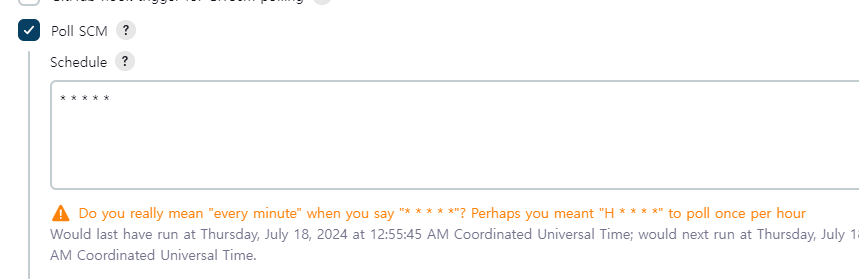 를 추가했더니 빌드가 되는 것 같은데 무슨 원인 오류 였는지를 모르겠네요 ㅠㅠ
 내장형 톰캣일경우
0
101
2
git 에 강의내용에 필요한 파일들 존재하지 않음
0
163
2
젠킨스에 등록된..
0
169
2
필요한 파일만 가지고 배포할 수 있나요?
0
160
2
yml 파일 db 접속정보 수정 후 배포 시 미반영
0
225
2
jdk 버전 17
0
146
2
섹션2 강의자료
0
145
2
DOCKER 이미지 PULL
0
362
1
36강 edowon0623/cicd-project-ansible이 호환이 안되는것 같아요
0
89
1
질문이 있습니다!!
0
107
1
exec /usr/local/tomcat/bin/catalina.sh: invalid argument 오류 해별법(공유)
1
291
4
m2 mac: ansible-server에서 container 실행 안됨
0
213
2
Jenkins와 k8s 연동과 관련한 질문입니다.
0
151
2
Ansible 과 연동에서 이미지 및 컨테이너 생성과 관련한 질문 드립니다.
0
229
2
맥북 실리콘칩 invalid argument 에러 해결 (수동 설치)
0
329
3
Docker Container에서 Tomcat 설치
0
275
2
ec2 여러대에서 각각 직접 설치 이유
0
192
1
P@ssw0rd 설정시기
0
202
2
ansible 원리
0
175
2
ansible 존재여부
0
170
2
젠킨스 빌드 성공후 shutdown
0
340
2
Docker Hub에 Push 무한 로딩
0
183
2
컨테이너에 ssh로 접속 비밀번호 불일치
0
153
1
maven project 오류
0
164
2