

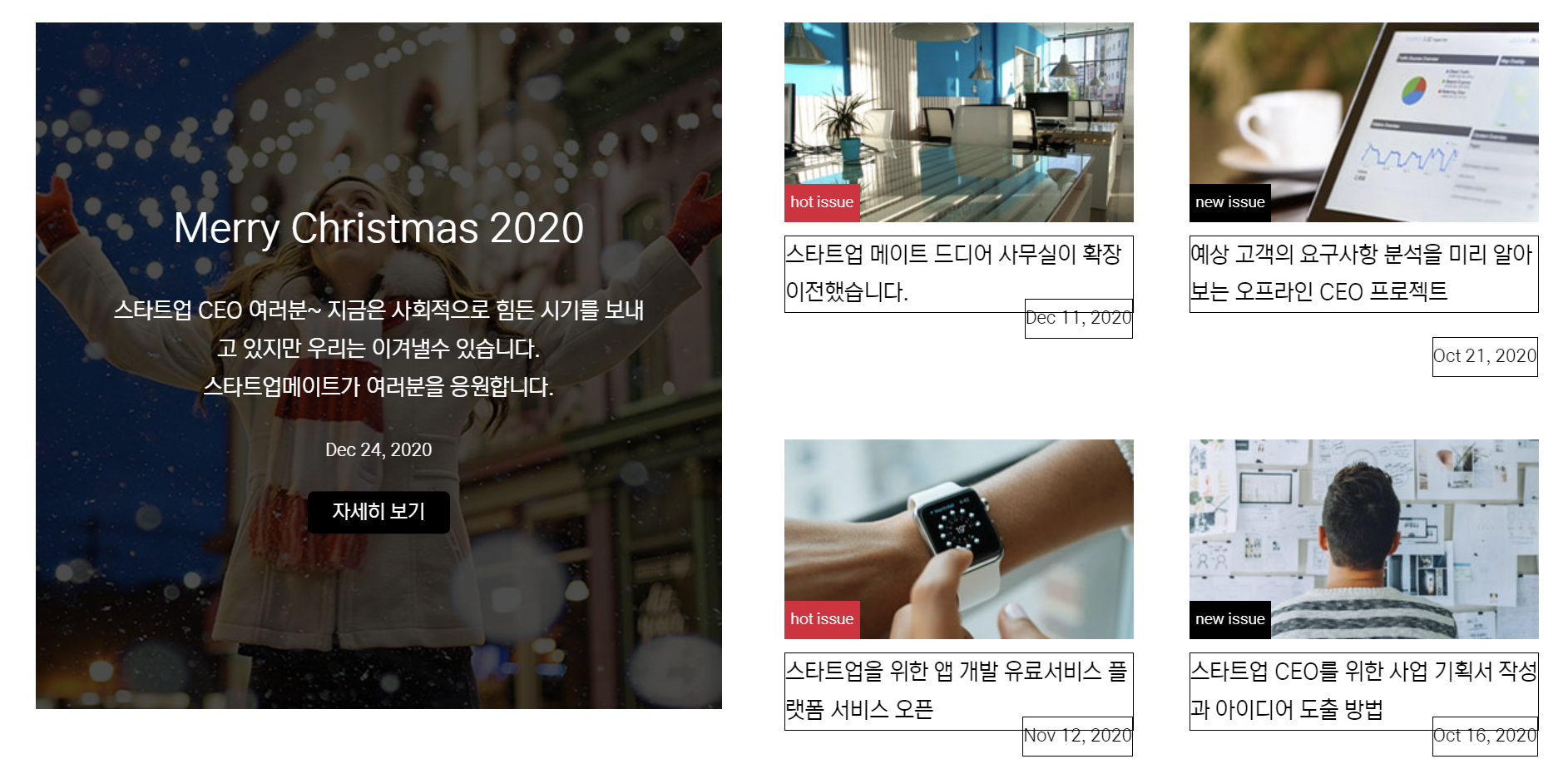
.news-thum .date 위치가 안맞아요
281
1 câu hỏi đã được viết
<section class="news" id="news">
      <div class="news-inner">
        <div class="headline-share">
          <h1>스타트메이트 최신 소식</h1>
        </div>
        <div class="news-content">
          <div class="news-left">
            <div class="news-big">
              <img src="images/news-thum-big.jpg">
              <div class="news-headline">
                <h2>Merry Christmas 2020</h2>
                <p>
                  스타트업 CEO 여러분~ 지금은 사회적으로 힘든 시기를 보내고 있지만 우리는 이겨낼수 있습니다.<br>
                  스타트업메이트가 여러분을 응원합니다.
                  <small class="date">Dec 24, 2020</small>
                </p>
                <a href="#none" class="btn-view">자세히 보기</a>
              </div>
            </div>
          </div>
          <div class="news-right">
            <div class="news-items">
              <div class="news-thum">
                <div class="news-photo">
                  <img src="images/news-thum-small-01.jpg">
                  <span class="badge hot">hot issue</span>
                </div>
                <p>
                  스타트업 메이트 드디어 사무실이 확장 이전했습니다.
                  <small class="date">Dec 11, 2020</small>
                </p>
              </div>
              <div class="news-thum">
                <div class="news-photo">
                  <img src="images/news-thum-small-02.jpg">
                  <span class="badge new">new issue</span>
                </div>
                <p>
                  예상 고객의 요구사항 분석을 미리 알아보는 오프라인 CEO 프로젝트
                  <small class="date">Oct 21, 2020</small>
                </p>
              </div>
            </div>
            <div class="news-items">
              <div class="news-thum">
                <div class="news-photo">
                  <img src="images/news-thum-small-03.jpg">
                  <span class="badge hot">hot issue</span>
                </div>
                <p>
                  스타트업을 위한 앱 개발 유료서비스 플랫폼 서비스 오픈
                  <small class="date">Nov 12, 2020</small>
                </p>
              </div>
              <div class="news-thum">
                <div class="news-photo">
                  <img src="images/news-thum-small-04.jpg">
                  <span class="badge new">new issue</span>
                </div>
                <p>
                  스타트업 CEO를 위한 사업 기획서 작성과 아이디어 도출 방법
                  <small class="date">Oct 16, 2020
                  </small>
                </p>
              </div>
            </div>
          </div>
        </div>
        <a href="#none" class="btn-readmore">read more news</a>
      </div>
    </section>

//css
.news {
  background-color: #f9f9f9;
}
.news-inner {
  width: 1300px;
  margin: auto;
}
.news-content {
  overflow: hidden;
  width: 95%;
}
.news-content > div {
  float: left;
  width: 50%;
}
.news-big {
  position: relative;
  width: 550px;
  height: 550px;
  margin: auto;
}
.news-big::before {
  content: '';
  position: absolute;
  background-color: rgba(0, 0, 0, 0.6);
  width: 100%;
  height: 100%;
  top: 0;
  left: 0;
  transition: 0.3s;
}
.news-big:hover::before {
  background-color: rgba(0, 0, 0, 0.4);
}
.news-big img {
  width: inherit;
  height: inherit;
  object-fit: cover;
}
.news-headline {
  position: absolute;
  top: 50%;
  left: 50%;
  transform: translate(-50%, -50%);
  color: #fff;
  text-align: center;
  width: 90%;
}
.date {
  display: block;
  margin-top: 20px;
  font-size: 14px;
}
.btn-view {
  background-color: #000;
  padding: 5px 10px;
  border-radius: 5px;
  color: #fff;
}
.news-items {
  margin-bottom: 20px;
}
.news-items > div {
  display: inline-block;
}
.news-thum {
  width: 280px;
}
.news-thum:first-child {
  margin-right: 30px;
}
.news-thum:hover .news-photo img {
  transform: scale(1.1);
}
.news-thum p {
  margin-top: 0;
}
.news-photo {
  position: relative;
  display: inline-block;
  overflow: hidden;
}
.news-photo img {
  display: block;
  transition: 0.3s;
}
.badge {
  position: absolute;
  bottom: 0;
  left: 0;
  color: #fff;
  font-size: 14px;
  padding: 0 10px;
}
.badge.new {
  background-color: red;
}
.badge.hot {
  background-color: #000;
}
.news-thum .date {
  float: right;
}
.btn-readmore {
  background-color: #69acfe;
  color: #fff;
  width: 180px;
  text-align: center;
  padding: 5px;
  border-radius: 20px;
  text-transform: uppercase;
  font-weight: bold;
  font-size: 16px;
  display: block;
  margin: auto;
  margin-top: 30px;
}
제목 길이에 따라 date 위치가 바뀌는데 어떻게 수정해야 같은 위치로 놓을 수 있나요?
Câu trả lời 2
0
부분 코드말고 HTML CSS 전체 코드로 올려주셔야 테스트를 빠르게 할 수 있습니다.
하드코딩으로 이미지맵(image map) 만들기
1
143
2
슬릭 슬라이더
1
213
2
position: fixed; 가 안먹혀요..뭐가 문제일까요?
1
203
1
반응형 fixed 안먹히는 문제
1
324
2
선생님
2
204
1
TypeIt - Welcome 부분이 적용이 안됩니다..
1
436
2
Scroll Reveal Animation 적용이 안되요
1
407
1
완성 후 각 섹션 display:none 주석 시 문제
1
461
3
브라우저를 줄일 때 화면 깨짐
1
695
2
welcome-heading 부분이 왜 저렇게 위치되는지 모르겠습니다.
1
382
1
제이쿼리 탭메뉴 클릭 질문
1
281
1
질문있습니다
1
578
1
질문있습니다.
2
706
2
슬릭슬라이더가 왜 안되는지 모르겠습니다
1
677
1
slick slider와 .ceo-content영역 겹침
1
766
1
span .badge 부분 참고하실분 하세요
2
378
1
플렉스를 안주고 그냥 패딩을 줘도 되지 않나요
1
372
1
창을 줄이면 위치가 이동되는 백그라운드 이미지
1
589
1
크롬창을 줄어들면 이미지가 작아짐
1
795
1
scroll behavior 오류
1
309
1
선생님 코딩좀 봐주세요..
1
473
3
왜 전 선생님과 화면이 다를까요?
1
429
3
따라했는데 이상합니ㅏㄷ..ㅠ
1
339
2
flex로 된 부분을 좌우로 애니매이션 할때 발생하는 문제점.
1
255
1