inflearn logo
inflearn logo

STM32 FreeRTOS Implementation

We will explain in detail how to implement FreeRTOS on STM32 MCU.

(4.4) 14 reviews

228 learners

Level Basic

Course period Unlimited

FreeRTOS
FreeRTOS
FreeRTOS
FreeRTOS

News

14 articles

  • ihil님의 프로필 이미지


    hello.


    It was stopped a while ago
    Downloading electronic documents (pdf files) is now possible again.
    Those who purchased the course from Infraon
    Please download and use electronic documents from the data room.


    Thank you~!!


    0
  • ihil님의 프로필 이미지

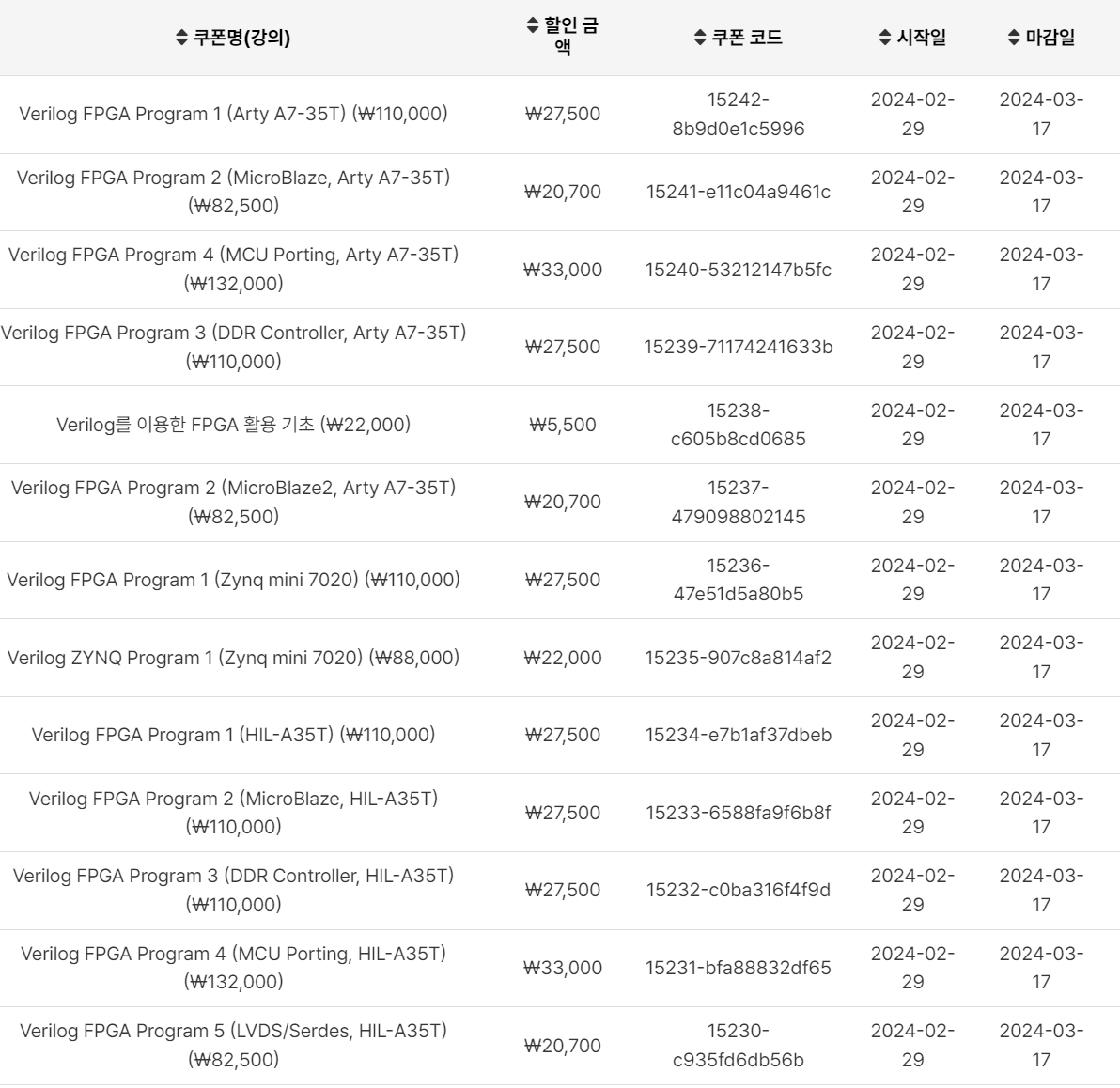
    To celebrate the new semester, we are holding a discount event for individual course purchases.
    I hope this will be a good opportunity for those who want to learn Verilog and FPGA.

    1. Discount event for lectures related to Verilog and FPGA

    25% discount on lectures
    Period: 2024. 02. 29 ~ 2024. 03. 17
    Purchase from Infleun using the discount coupon below

    2. HIL-A35 Development Board Discount Event

    15% discount on development boards
    Period: 2024. 02. 29 ~ 2024. 03. 17
    Smart Store: https://smartstore.naver.com/ihil

    Thank you~!!

    image

    0
  • ihil님의 프로필 이미지

    Hello.​

    We are starting to sell development boards.
    You can purchase it from the Naver Smart Store below.
    Smart Store Link: https://smartstore.naver.com/ihil

    Development board related materials can be downloaded from the link below.
    There is a manual and a test program (led, button operation).
    Download link: http://naver.me/xJqtlt1T

    The development board is a product developed in-house for use in Inflearn lectures.

    1. Verilog FPGA Program 1 (HIL-A35T)

    2. Verilog FPGA Program 2 (MicroBlaze, HIL-A35T)

    3. Verilog FPGA Program 3 (DDR Controller, HIL-A35T)

    4. Verilog FPGA Program 4 (MCU Proting, HIL-A35T )

    I hope that the development board and lectures will be of great help to you.
    Thank you~!!

    0
  • ihil님의 프로필 이미지

    The lecture has been updated.

    • Lecture Name: FPGA MicroBlaze Implementation

    • Update Contents: Chapters 4 and 5 have been updated.

    Those who purchased the lecture, please download it from the data room.

    In the future, the entire content of the "FPGA MicroBlaze Implementation" lecture will be continuously updated.

    Thank you~!!


    0
  • ihil님의 프로필 이미지

    The lecture has been updated.

    1. FPGA Utilization with Verilog (v2.1)

      1. NRZL Decoder implementation (ch11) has been added.

      2. Important information about implementing and using FIFO.

      3. I hope it will be of great help in my practice.

    2. FPGA Utilization for Zynq with Verilog (v1.2)

      1. NRZL Decoder implementation (ch14) has been added.

      2. Important information about implementing and using FIFO.

      3. I hope it will be of great help in my practice.

    Those who purchased the course can download it for free from the data room.
    I hope this lecture will be of great help to you.

    thank you

    0
  • ihil님의 프로필 이미지

    hello.

    [FPGA Utilization for Zynq using Verilog] lecture is now open.

    This lecture is about adapting the contents of [FPGA Utilization using Verilog] to the Zynq mini 7020 (7010) board.
    It has been newly organized.

    First half

    • vivado 2021.1 installation

    • Download the code implemented on the Zynq board and check the results

    The second half

    • LED control using counter

    • SPI Controller

    • UART Controller

    • I2C Controller

    • Xilinx IP

    To celebrate the opening of the course, we are offering a 30% discount.
    Thank you for your interest.

    thank you

    0
  • ihil님의 프로필 이미지

    Verilog, FPGA lectures have been completed.

    ​At first, I didn't think it would go this far,
    Many people helped and responded
    I think I was able to come this far.
    I would like to express my sincere gratitude to everyone who has shown interest in my lectures.

    Let me briefly explain some tips for using the lecture.

    1. Please familiarize yourself with the basic Verilog grammar before attending the lecture.
    The lecture does not explain grammar. The lecture proceeds assuming that you know basic grammar. You only need to know basic grammar (reg, wire, always, module, etc.)

    ​2. Please start with “FPGA Utilization using Verilog”.
    There is a lot of content included in this lecture.
    Please read it carefully 2-3 times, implement it yourself with code, verify it with simulation, and upload it to the board to check.
    If you want to learn verilog and fpga, learning by sight is of no use.
    I have 25 years of total development experience, and about 20 years in the Verilog and FPGA fields.
    Even now, to implement an i2c controller, you have to go through the process of coding and simulation verification dozens of times.
    Lecture introduction: https://cafe.naver.com/worshippt/266

    3. Please use the “Basics of FPGA Utilization using Verilog” section as an appendix.
    It consists of content that you should know at least once.
    This lecture will be updated with additional content in the future.
    Lecture introduction: https://cafe.naver.com/worshippt/265

    4. The FPGA MCU porting lecture is a course that can upgrade developers' skills to the next level.
    I have applied the content of this lecture to numerous projects.
    It is also used for debugging logic and is a very useful solution that does not require a separate MCU to be used externally.
    In addition, you can freely utilize the memories inside the FPGA.
    Lecture introduction: https://cafe.naver.com/worshippt/268

    5. If you properly understand the contents of the two MicroBlaze lectures, you can learn almost all the contents and apply them to your projects.
    MicroBlaze offers great performance compared to MCU porting.
    On the other hand, there are some limitations in configuring and applying memory.
    If you know both MCU porting and MicroBlaze, you can choose which one to use depending on your project.
    If you want something lightweight, you can use MCU porting, and if you need something high-performance, you can use MicroBlaze.
    Lecture Introduction-1: https://cafe.naver.com/worshippt/269
    Lecture Introduction-2: https://cafe.naver.com/worshippt/270

    6. DDR Controller lecture is a lecture required for fields that process Image Data.
    To process image data, a Frame Buffer is required, and most Frame Buffers use DDR Memory.
    This lecture explains everything from creating a DDR Controller to implementing a Framer Buffer.
    Lecture introduction: https://cafe.naver.com/worshippt/267

    We will come back with better content in the future.
    I would like to thank everyone again for their interest in my lecture.

    thank you

    0
  • ihil님의 프로필 이미지

    MicroBlaze tutorial has been updated (v1.5).

    ​Chapters 10-11 have been newly added.

    • In Chapter 10, we implement the Block Memory Interface that is provided by default in Block Design.

    • In Chapter 11, we implement the Block Memory Interface by adding Block Memory in the user logic. By applying this, we implement the User Logic Register Map and implement an example of controlling the frequency and duty of the PWM.

    Those who have already purchased it can download it from the data room.

    thank you

    0

$8.80