

Practical GitOps CI/CD with Jenkins and ArgoCD
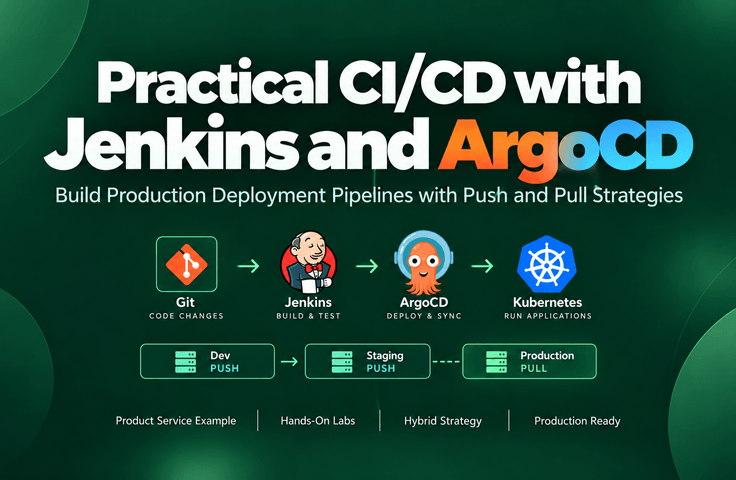
Beyond traditional Jenkins-based CI/CD, this course also covers GitOps deployments using ArgoCD. You will design and implement CI/CD and GitOps deployment strategies for dev, staging, and production environments by combining Jenkins and ArgoCD. You will work with both push-based Jenkins and pull-based ArgoCD, directly comparing the two approaches on the same cluster to build a practical hybrid deployment pipeline. You will practice essential deployment techniques for operations, including Canary, Blue-Green, RBAC, approval procedures, incident response, and automatic rollback.
301 learners
Level Basic
Course period Unlimited

News
3 articles
Hello, I’m Lee Do-won (Kenneth).
I’ve opened the free course “Spring AI LLM Cost Monitoring — Build a Token Dashboard with One Line of Actuator”.
Why did I create this course?
The question I was asked most often while consulting on enterprise AI projects was this.
"We built a chatbot, but how much will this cost per month?"
LLM service costs vary with every request, responses can take several seconds, and the causes of failures lie outside our code. Yet many teams monitor them like ordinary web services and only discover the problem after receiving the bill.
Zero errors, Health UP, HTTP 200. An incident where input tokens increase several-fold while everything appears normal cannot be detected by conventional monitoring.
What this course does
With one line of Actuator, expose the token, latency, and error metrics that Spring AI is already recording.
With a single docker compose command, launch a Prometheus + Grafana token dashboard.
We find “occasionally slow requests” using p95 instead of the average.
With a single topK 4 → 20 setting, you will reproduce firsthand a “failure that looks normal” where input tokens increase approximately fourfold, and detect it on the dashboard.
No business code changes are needed. Just one dependency line and a few configuration lines.
Course Information
Duration: Approximately 1 hour (including hands-on practice)
Lab environment: JDK 21 or later, Docker Desktop, and an OpenAI API key or Ollama (free)
Provided materials: hands-on project, docker-compose, Grafana dashboard JSON, load scripts (bash · PowerShell), and step-by-step course materials
Metric names follow the Spring AI standard, so you can use the hands-on dashboard as-is in your project. Even without an API key, you can follow along all the way using Ollama.
Recommended for those who
Backend developers building a PoC or internal chatbot with Spring AI and preparing for launch
Actuator and Prometheus users who don't know what to monitor in LLM services
Team leads and architects who need to report the cost of adopting LLMs in numbers
If you want to go deeper
The custom metric that converts tokens into KRW costs, cost spike alerts, and distributed tracing (Jaeger) for viewing a single request step by step are covered in the 『Practical LLM Service Development for Spring Developers』 Section 16.
👉 Practical LLM Service Development for Spring Developers
If you get stuck while taking the course, please post your questions on the Q&A board. Questions like "I followed the steps, but the graph is empty" are welcome too.
The feedback you leave in your course review is a great help when creating the next course.
Thank you.
Best regards,
Dowon LeeHello. We’ve added a new supplemental lecture to the Practical LLM Service Development for Spring Developers (Part 1) course. In this approximately one-hour lecture, you’ll learn how to integrate TypeSafe AI’s recently released decision model, Jev, into a Spring Boot application.
Why was it added?
In Section 4, we covered how to useentity()to receive an LLM response as a Java object, as well as the practical pitfall of parsing breaking when the model wraps JSON in code fences. Whether you ask through a prompt or automate it withentity(), the limitation remains that you are ultimately "asking" the LLM to follow a particular format.
Jev takes a different approach. Instead of writing text, it chooses an answer from a predefined set of options and returns it along with its probability. In other words, the format is structurally guaranteed. Processing the same input in both ways makes it much clearer what to consider when designing "structured output." That is why we organized this content as an extension of Section 4.What will you learn?
The Concept of Jev and System One Models: What It Means to Return a “Typed Decision” Instead of Text
The difference between LLMs and Jev: descriptive answers vs. multiple-choice answers, and what each does well and poorly
Three question types (choice · score · noul) and the
/v1/systemonerequest structureCalling from Spring: Call the Jev API with
RestClientand use a Java enum to create choices and convert the response in a type-safe manner.Comparison demonstration: Analyze the same movie review using
entity()and Jev, then compare speed, format errors, confidence, and consistency.
Updated materials included
Section 4 Example Code (ch4): Two Review Analysis APIs (
/api/movies/review/llm,/api/movies/review/jev) and the Addition ofJevClientSupplementary lecture slides and course materials
Comparison test scripts:
review-compare.shfor macOS andreview-compare.ps1for Windows
Things to know in advance
Jev is not a feature of Spring AI, but rather a separate external service provided by TypeSafe AI. In the course, it is called directly using Spring AI's
RestClient, not itsChatClient.Jev is currently in the early access stage, so there may be a wait to obtain an API key. Jev is disabled by default in the example code (
jev.enabled=false), so you can proceed with the existing exercises as usual even without a key. If you don't have a key, watch the demonstration in the video and follow along with a focus on the concepts and code.As this service has just been launched, its pricing or API may change later. If any changes occur, we will notify you again through a new announcement.
📌 Go directly to the course: https://inf.run/VVpnV
If you have any questions while taking the newly added lessons or get stuck during the hands-on exercises, feel free to leave a comment. We’ll continue to regularly add content that you can use right away in your work.
Hello, I’m Lee Do-won.
"I’ve built a Jenkins pipeline, but I’ve only heard of ArgoCD and GitOps as concepts."
"I’m at a loss as to how to design deployments for each environment: dev, staging, and production."
For those of you facing these challenges, we’ve launched the “Practical GitOps CI/CD with Jenkins and ArgoCD” course on Inflearn.
Here’s what sets this course apart
• Beyond traditional Jenkins-based CI/CD, we also cover ArgoCD-based GitOps.
• We directly compare the Push approach (Jenkins) and Pull approach (ArgoCD) on the same cluster. You can see firsthand that when someone makes a manual change with kubectl, one remains as is while the other is automatically restored, and directly experience the differences in how rollbacks and deployment histories are checked.
• Combine the two approaches to build a hybrid deployment pipeline from start to finish, with Jenkins Push for dev and staging, and ArgoCD Pull for production (manual Sync approval).
• Practice essential deployment techniques required for operations, including Canary, Blue-Green, RBAC, approval procedures, incident response, and automatic rollbacks.
Practice environment
We’ll use Docker Desktop only. It works on both Windows and macOS, and you don’t need a cloud account like AWS or any additional expenses.
Recommended for
• Backend and infrastructure engineers who have used Jenkins but are new to ArgoCD/GitOps
• Those who want to move from manual kubectl apply to automated Kubernetes deployments
• DevOps and SRE professionals concerned with operational requirements such as deployment approvals, rollbacks, and audit trails
The total runtime is approximately 10–11 hours, and hands-on materials and a troubleshooting guide are also provided.
👉 Watch the course: https://inf.run/dEjZE
Please feel free to leave any questions in the comments or in the course Q&A!
