inflearn logo

[Lv.5] SwiftUI with AI - Building AI Apps with Apple Intelligence

For those of you who have completed intermediate SwiftUI, it is now time to integrate AI into your apps. Complete an on-device AI app that runs locally without an internet connection using Apple Intelligence and the FoundationModels framework.

9 learners are taking this course

Level Intermediate

Course period Unlimited

iOS
iOS
Swift
Swift
SwiftUI
SwiftUI
AI
AI
iOS
iOS
Swift
Swift
SwiftUI
SwiftUI
AI
AI

What you will gain after the course

  • Ability to implement on-device AI in SwiftUI apps

  • Practical implementation skills for Streaming, Guided Generation, and Tool Calling

  • AI Emotion Diary App MoodMate Completed

  • AI app architecture design skills, including sessions, context windows, and error handling

⚠️ Must-read before taking the course - Practice environment and device requirements

⚠️ This course uses the Apple FoundationModels framework.

This technology is currently in the beta stage, and the API and operation methods may change according to Apple's updates.

The course content will be continuously updated as changes occur.

⚠️ Supported Devices (Must Check)

  • iPhone: iPhone 15 Pro or later + iOS 18.0 or later (Physical device required for Preview)

  • Mac: Apple Silicon (M1 or later) + MacOS 15.0 Sequoia or later

  • iPad: M1 chip or later with iPadOS 18.0 or later

  • Simulator cannot be used - FoundationModels must run on an actual device or My Mac build

⚠️ Development Environment

  • Xcode: 26.0 or higher

  • Operating System: macOS 15.0 Sequoia or later

  • Apple Intelligence activation required (System Settings -> Apple Intelligence & Siri -> On)

This course is based on the iPhone 17. If you do not have an iPhone device, you can complete all exercises using the My Mac build. (However, separate Frame settings are required.)


Do you absolutely need a server and an API key to add AI features to a SwiftUI app?

The answer lies in Apple FoundationModels .

In an era where AI features have become a core competitive advantage for apps, developers still struggle with external API costs, privacy leak concerns, and dependence on internet connectivity. The solution to all these problems is Apple Intelligence's on-device AI framework, FoundationModels.

In this course, you will learn how to implement AI features that run directly on-device using FoundationModels with SwiftUI, and apply them through a real-world project (MoodMate - AI Emotion Diary).
By practicing the entire process—from streaming response handling, @Generable structured output, and Tool Calling to Session Context Window management—you will take your AI app development capabilities to the next level.

💬 "I can just build apps with ChatGPT, Gemini, and Claude, so do I really need to learn FoundationModels?"

I also actively use Claude and ChatGPT APIs in my practical work. In fact, they significantly increase productivity.

However, there is a reality you face when launching an app. API costs increase as the number of users grows. The fact that a user's diaries, memos, and conversation history are transmitted to an external server must be explicitly stated in the App Store review process and privacy policy. Furthermore, without a network connection, the AI functions themselves will stop working.

FoundationModels solves these three problems all at once.

Here is the conclusion

  1. Cloud AI and on-device AI are not in competition, but are tools with different purposes.

  2. For iOS apps that handle personal data, FoundationModels is the choice that simultaneously addresses cost, security, and offline functionality.

💬 "Isn't on-device AI less powerful than cloud AI?"

To be honest, that is correct. For tasks requiring complex reasoning or vast amounts of knowledge, large cloud models like GPT-4, Claude, and Gemini are superior.

But polishing diary entries, analyzing emotions, summarizing books, and simple Q&A — the AI features actually needed in everyday apps are fully achievable with on-device models. In fact, response speeds are often faster than those of the cloud.

It is true that Apple Intelligence is still in the beta stage and lags behind other large models in terms of performance. However, what matters is the direction.

Smartphone AP performance is improving rapidly every year. The iPhone in your hand today will be able to run much more powerful AI models in two to three years. The on-device AI market is expected to grow from approximately $33.2 billion in 2026 to $156.6 billion by 2033.

On-Device AI 2026: Why AI Is Moving to Your Phone

Apple's Privacy-First AI Strategy: On-Device LLMs by 2026

The shift from cloud-based AI services to on-device AI has already begun due to security and privacy concerns. We are entering an era where the smartphone you carry becomes a powerful AI model in itself.

The conclusion is this

  1. Learning FoundationModels now is preparing for the era of on-device AI ahead of everyone else.

  2. Apple Intelligence is in beta, but with improvements in AP performance, the trend is already shifting toward on-device.

Features of this course 🚀


Connecting On-Device AI directly to SwiftUI: No servers, no API keys, and no internet required. You will learn the entire process of implementing AI features that run within the device using Apple FoundationModels into a SwiftUI app.

 Immediately applicable in practice: Covers all essential AI features for real-world projects, including streaming response handling, @Generable structured output, Tool Calling, and Session Context Window management.

Concept -> Code -> Verification: All code is written and tested firsthand, and verified through a completed app (MoodaMate) to ensure it works in practice.

A course for intermediate SwiftUI users and above: If you are an iOS developer who has experience with SwiftUI basics and Async/Await, you can take on this challenge right away! Upgrade your AI app development capabilities to the next level.

Recommended for these people 🙋‍♂

iOS developers who want to integrate AI features into their apps

Intermediate developers who want to understand the core of FoundationModels and directly implement on-device AI features into SwiftUI apps

Those who want to learn through hands-on projects
Those who want to complete a real-world app (MoodMate) while learning core AI technologies such as streaming responses, structured output, and Tool Calling

Those interested in the latest Apple technology
Those who want to experience Apple Intelligence and FoundationModels firsthand and keep up with the latest AI trends in iOS development

You will learn these topics. 📚

Building a Foundation with FoundationModels

• Understand the structure and operating principles of the Apple Intelligence and FoundationModels frameworks.

• From implementing your first AI conversation to analyzing Response objects, error handling, and availability checks - you will learn the entire process of calling AI on an actual device step-by-step.


Prompt Engineering

• The quality of an AI's response varies depending on how the same question is phrased. You will learn effective prompt writing principles by directly comparing them through code.

• Covers the differences between the String approach and the Prompt object approach, dynamic prompt composition, and handling Guardrail Violations.

Session & Instructions

• Understand how Sessions work to maintain conversation context with AI.

• Learn how to define the AI's role and tone using Instructions, and understand the limitations and management strategies of the Context Window.

Generation Options

• Experiment directly with the effects of Temperature and Sampling Mode (Greedy, Top-K, Nucleus) on AI output.

• Control response length by setting token limits and learn the optimal combination of options for different situations.

Guided Generation

• Understand the concept and advantages of the @Generable macro, where AI directly generates defined Swift structures instead of free text.

• From @Guide constraints, Enum generation, nested structs, and the Streaming + Generable combination to array streaming - practice all patterns of structured output.

Tools

• Understand the concept and operating principles of Tool Calling, where AI directly calls external functions.

• We will implement step-by-step from Tool protocol implementation, structured Tool responses, and Tool error handling to combining multiple Tools and integrating Tools with external APIs.

Transcript

•Learn how to read the Transcript, which is the conversation history with the AI, and utilize it for debugging.

•We will cover patterns for recovering conversations when the Context Window is exceeded, as well as Conversation Persistence for permanently storing conversation history.

Hands-on Project - MoodMate (AI Emotional Diary App)

•Complete a fully functional AI app from start to finish using the combination of SwiftData + FoundationModels.

• Text streaming where AI refines the original diary entry, structured analysis of emotions, intensity, keywords, and advice using @Generable, along with session caching and management — we will integrate and implement all previously learned features into a single app.

Practical Project - TodayBooks with AI - Scheduled for update in late July (Currently filming)

• Complete a complex real-world app that handles both external APIs and on-device AI by integrating the Kakao Book Search API with FoundationModels.

• From AI streaming that summarizes book introductions into 3 lines, to recommending the next book based on reading patterns using @Generable, and even multi-turn Q&A conversations with books - we will apply all features of FoundationModels to a single real-world app.

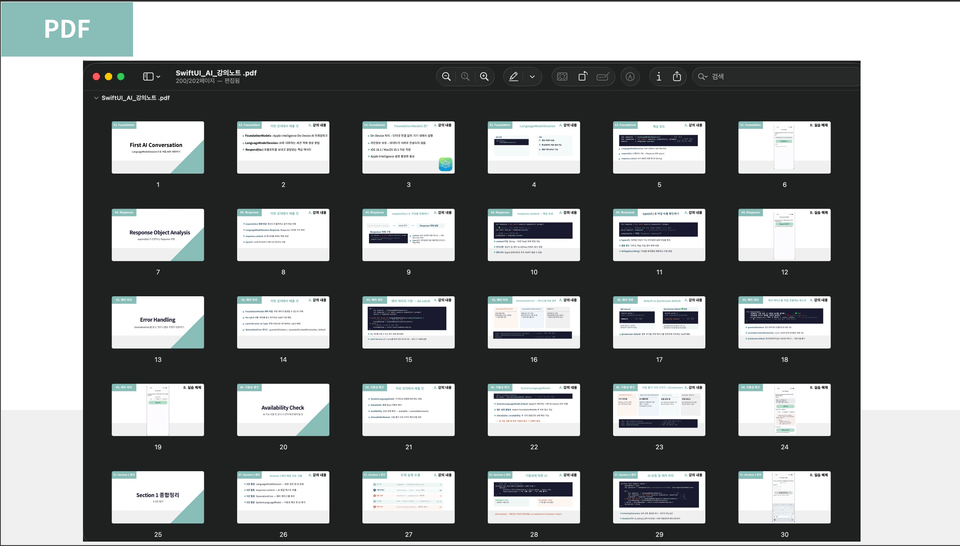
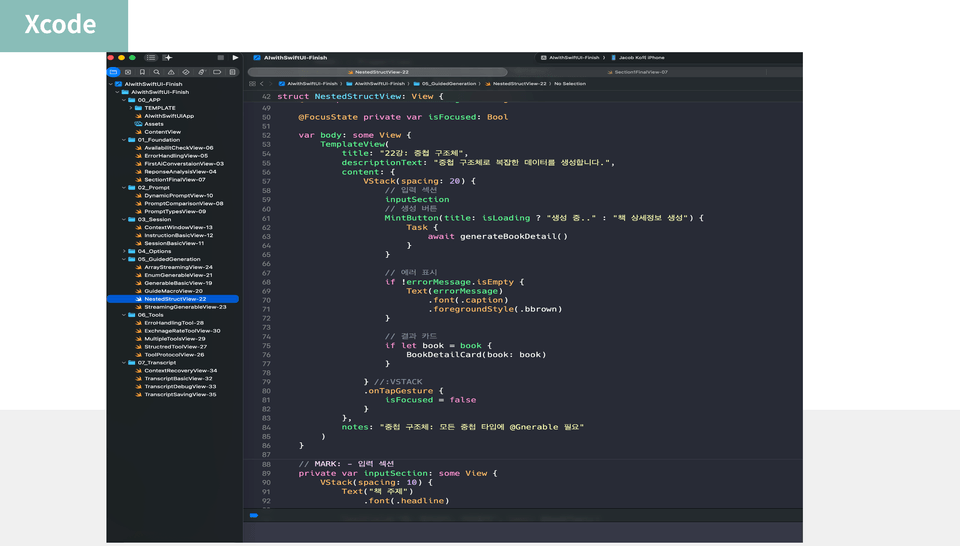
PDF theoretical materials and practice files provided

• We provide all the PDF materials and Xcode project files required for the lecture.

• You can immediately practice and apply the lecture content through step-by-step code examples.


Through all these processes, you will gain the ability to integrate on-device AI into SwiftUI and be able to directly implement AI functions that work in real-world apps! 🚀

Prerequisites

If you are familiar with the basic concepts of SwiftUI and Swift, you can start this course right away.

However, if you are unfamiliar with SwiftUI basics, SwiftData, or Async/Await, I recommend taking the courses below first.

Recommended for
these people

Who is this course right for?

  • iOS developers who have learned SwiftUI but feel lost on how to integrate AI features.

  • App developers who are delaying the adoption of AI because they are worried about costs and privacy when using the ChatGPT API

  • Developers who want to create AI apps but haven't started because they don't know if it's possible without a server or backend.

  • Students who have completed the SwiftUI series (Lv.1–4) and wish to move on to the next level

  • SwiftUI developers who are anxious about falling behind AI trends but don't know where to start studying.

Need to know before starting?

  • You must be familiar with basic SwiftUI syntax and how to construct views. (SwiftUI Basic Lv.1 recommended)

  • You must have an understanding of Swift's basic syntax, such as optionals, closures, and protocols.

  • It is recommended to have a basic understanding of Async/Await asynchronous programming. (SwiftUI Networking. Lv.3 recommended)

  • An Apple Silicon Mac (M1 or later) or an iPhone 15 Pro or later device is required. (On-device execution of FoundationModels is mandatory)

Hello
This is jacobko

Career Verified

910

Learners

52

Reviews

49

Answers

5.0

Rating

5

Courses

Student discount always available

For students who find the course fee burdensome, please use your school email account, e.g., @***.ac.kr, @***.edu

If you send me an email, I will send you a discount coupon (50%) for all courses.

👉jacobko@kakao.com


Hello, I'm Jacob, an iOS developer.

I am currently based overseas, balancing iOS app development with teaching.

  • Participated as an iOS developer in startups in Australia and New Zealand, with experience launching apps on the App Store.

  • Led multiple migration projects transitioning UIKit-based legacy apps to SwiftUI

  • Designing a practical-focused lecture curriculum based on experience collaborating with overseas teams

Based on the experience I gained firsthand in overseas development environments rather than domestic ones, I am creating a SwiftUI course that can be applied directly to real-world projects, going beyond mere theory.

If you steadily follow the curriculum, which is organized as a series from Lv.1 to Lv.4, I will take full responsibility to ensure you systematically master the core of iOS development.

More

Curriculum

All

56 lectures ∙ (21hr 2min)

Course Materials:

Lecture resources
Published: 
Last updated: 

Reviews

Not enough reviews.
Please write a valuable review that helps everyone!

jacobko's other courses

Check out other courses by the instructor!

Similar courses

Explore other courses in the same field!

25% off for new members

$137.00

25%

$187.00