
Digital Forensic Specialist Level 2 Practical Exam Preparation Course for Beginners (EnCase/Autopsy)
This is a Digital Forensic Specialist Level 2 practical lecture for beginners, starting slowly and easily with everything from terminology to writing answers for the once-difficult subject of digital forensics.

News
6 articles
Hello!
The title is a bit grand, but remember how I recently conducted a survey because someone requested an offline lecture or study group?
While it wasn't a huge number of participants, I was still able to gather some meaningful opinions from them.
The most notable part was that every single respondent expressed a desire to participate in a study group but said they haven't been able to because they don't know how to find one.
While it would be great in many ways if I could personally run offline lectures or study groups, there are practical difficulties, so
With my apologies, I have prepared a small space where I can instead connect those who are looking for a study group.
https://padlet.com/nstyxn/DF_study
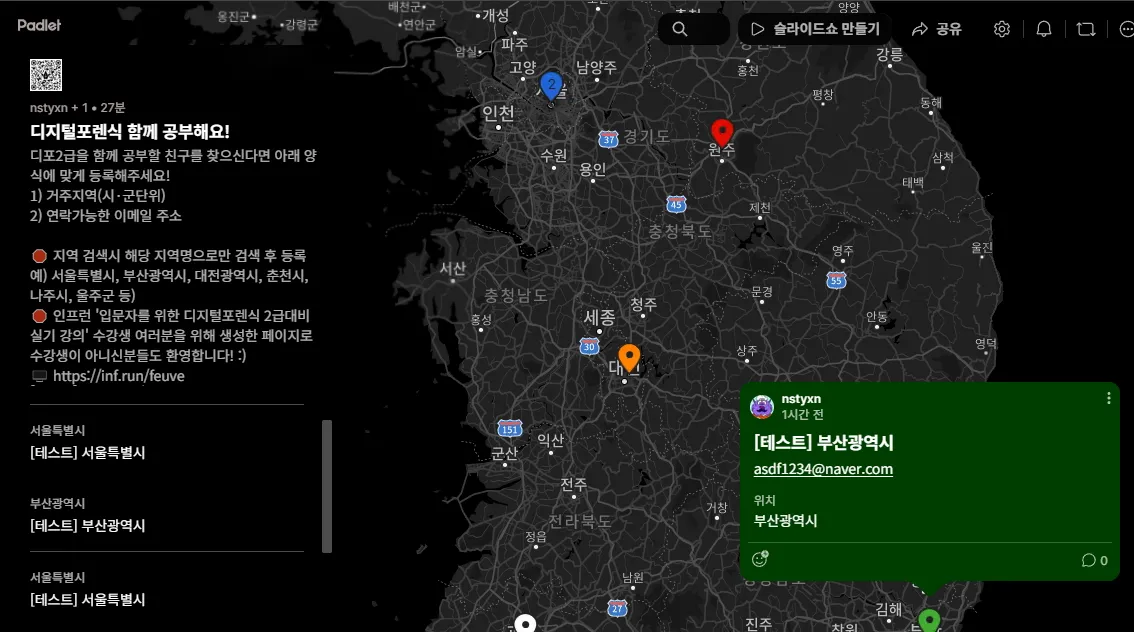
As shown in the screenshot above, when someone wishing to join a study group leaves a post according to a specific format, their location is marked with a pin, allowing others to find them intuitively.
If you are looking for study members or a study group to study with, you can register here,
or check the information here and contact the listed contact details to help form a group!This is a service provided by Padlet (https://www.padlet.com), and it can be used after signing up for a free account.
(It is available on both Web/App, and while it is possible to use as a non-member, I have inevitably set it so that you must log in to use it as a preventive measure for management purposes, such as editing or deleting after posting, and because non-students also use it!)Please be sure to follow these rules when using the service!
1) Please use it for its intended purpose!
- Since this is not a format where extensive conversations can take place like a general bulletin board, I am not overly concerned;
however, as this space is open to everyone, not just students, please use it according to its purpose to avoid any issues.
- Currently, posts are published automatically without separate approval, but if problems arise, the process may be changed to require administrator review before registration.
2) Please follow the posting format!
① Search for and select your current area of residence (at the city/county level) (Please provide only the city or county where you live, not the detailed address)
Ex) Gangnam-gu, Seoul X▶Seoul, Gangnam Station, Seoul X▶Seoul② Please leave a contactable email address
- Please be sure to leave your email address so that prospective study members living in that area can contact you.③ Personal information other than your email address is prohibited!
- To protect your personal information, you must never leave any additional personal information, such as your mobile phone number, except for your email address! (I will forcibly edit this part if I find it.)④ After selecting the location, it's even better if you clean up the unnecessary parts of the title!
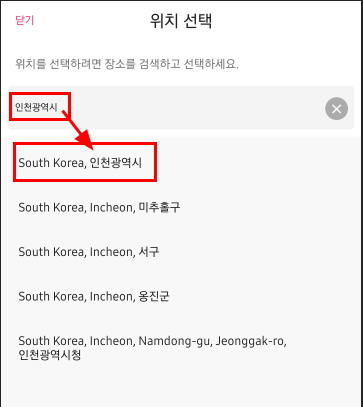
Ex) South Korea, Incheon ▶ Incheon
3) Study group operation is 100% autonomous
This space only serves to connect people. Please lead the study method, location, and schedule coordination autonomously among the participants of the respective study group~4) Please delete your post once matching is complete
If the study group has been formed with the desired number of members, please delete the post you submitted on Padlet!5) Please spread the word!
I believe that forming study groups in regions outside the metropolitan area may be difficult with only the students taking my course. It would be very helpful if you could spread the word as much as possible so that even those not taking the course can participate, allowing study group activities to proceed smoothly in other regions as well!Instructions for Use (Mobile)
1) Install APP
Search for 'Padlet' in the Apple App Store / Android Play Store and install it.
2) Sign Up
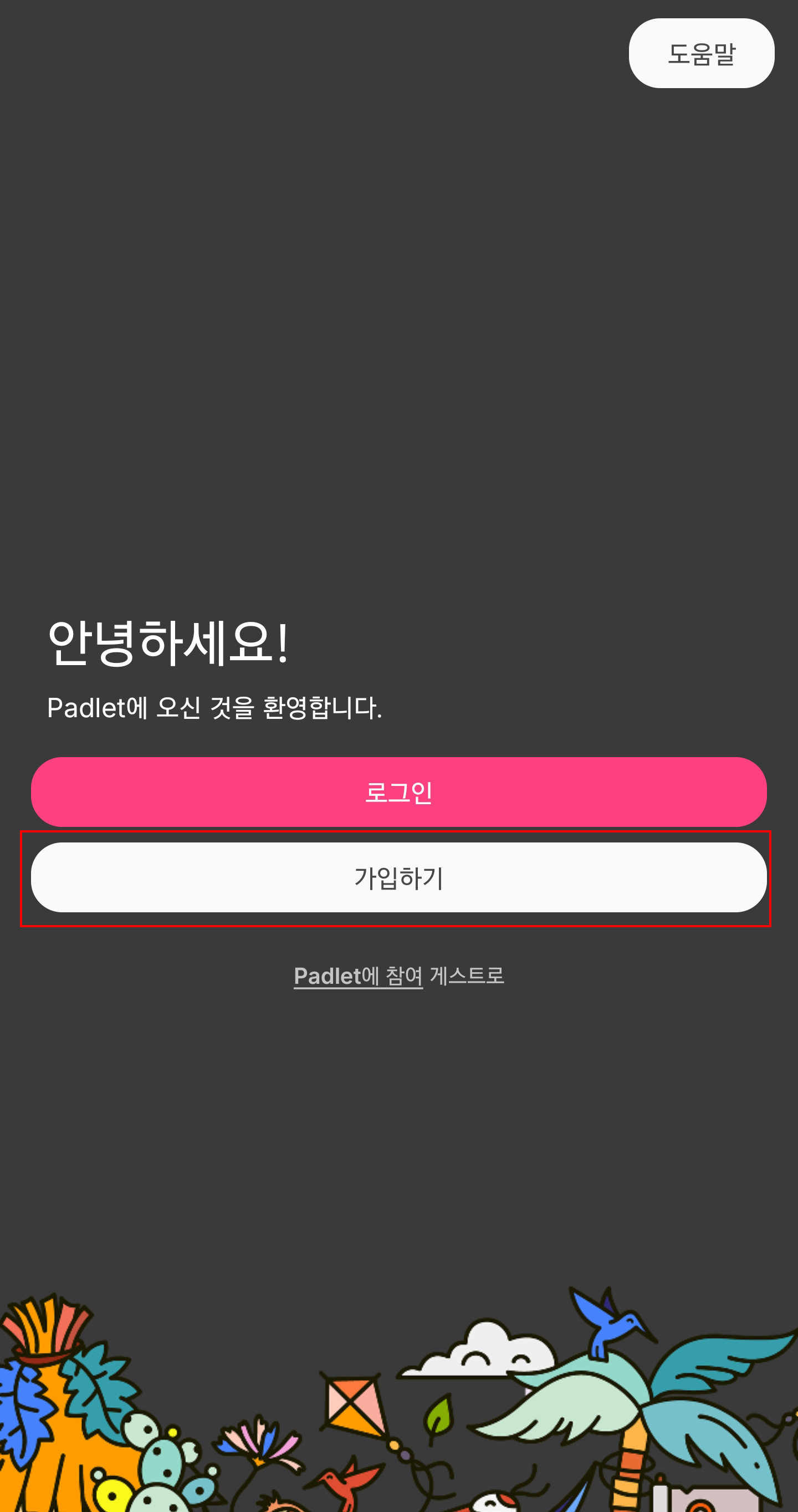
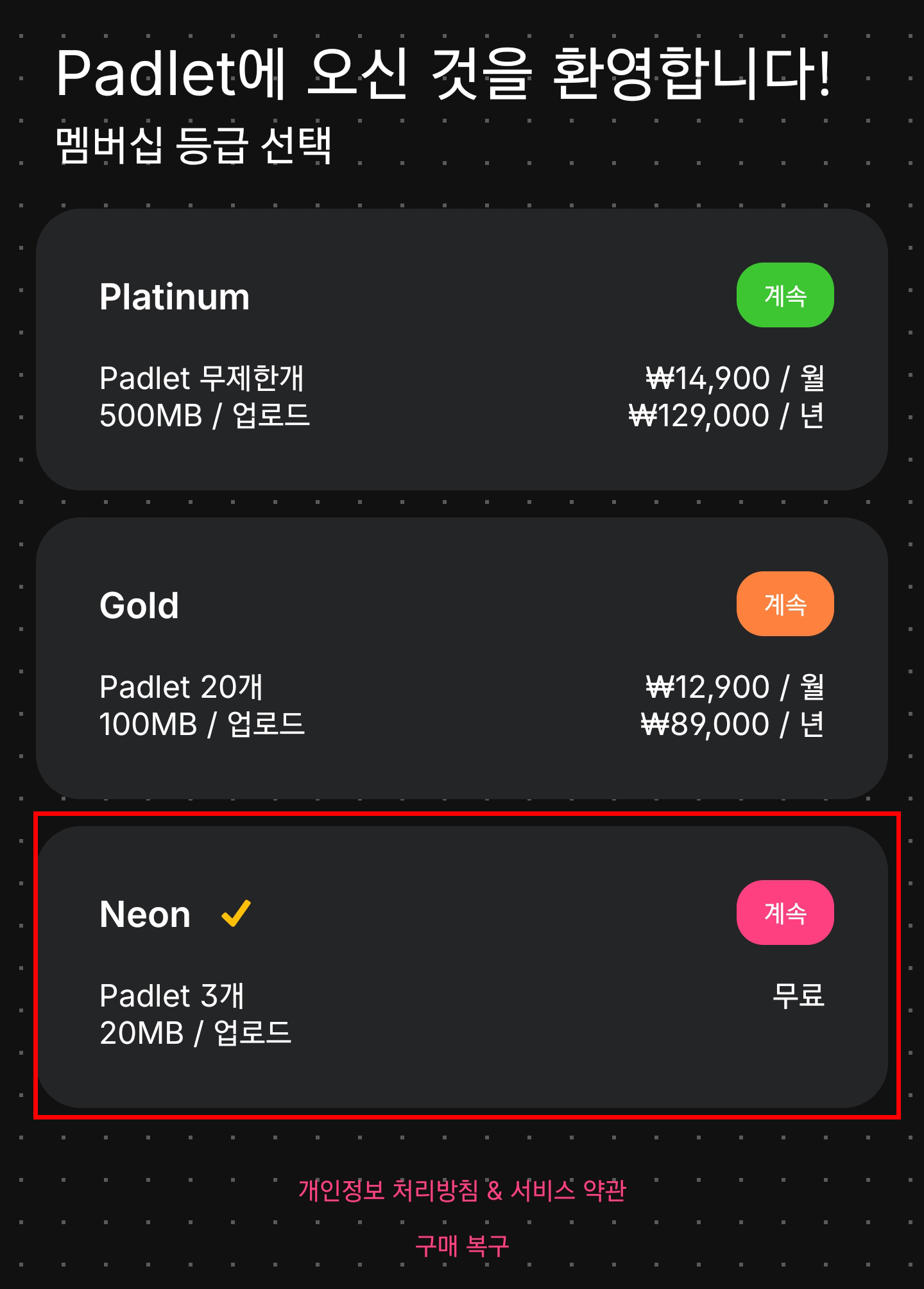
3) Select Plan
Select the free account, 'Neon'
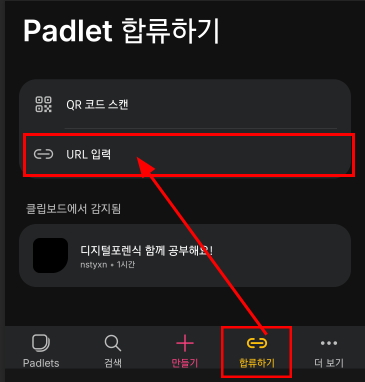
4) Join > Enter Address
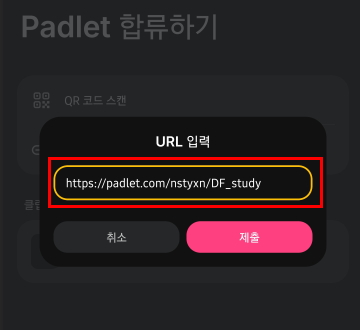
To access the study group matching service, tap the [Join] button ▶ tap [Enter URL] ▶ enter the URL
or scan the QR codehttps://padlet.com/nstyxn/DF_study
5) Check registered studies
Touch the pin on the map to check the details
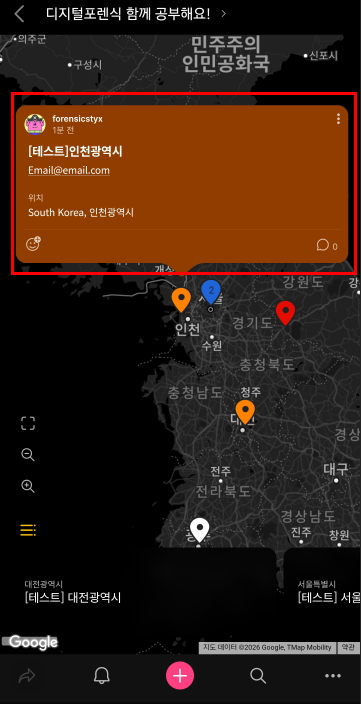
6) Registering for a study
Touch the pink '+' button at the bottom
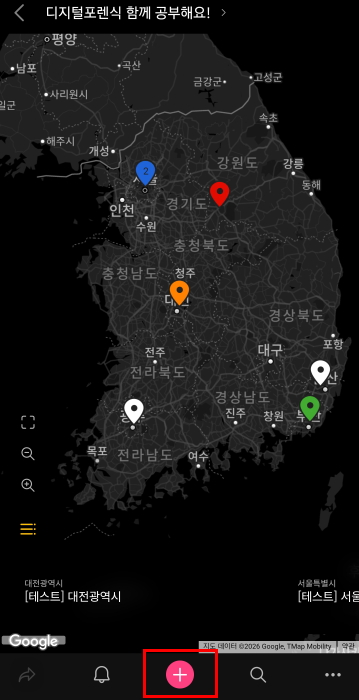
Enter current place of residence: Search by city/county (e.g., Seoul, Incheon, Wonju, Gimhae, Jeonju, etc.) and then
select the search result that shows only the relevant city/county from the results.
Enter a contactable email address and any other comments in the content field, then tap the [Post] button
🎈 Never enter personal information other than your email!
🎈 It will look much cleaner if you edit out any unnecessary information automatically entered in the title field!
I am worried about whether it will actually be activated.
It's just a quickly put-together page, but I hope it helps even a little bit!
Currently, there are a few samples registered under the name [Test] to provide you with examples.
Please note that this part is scheduled to be deleted once the actual study recruitment posts are uploaded~
I feel like I need to apologize to those of you who are studying using Encase.
As of October 23, EnCase related lectures will no longer be updated.
We would like to inform you that we are unable to answer your questions.In order to give you an accurate answer, I would need to be able to use Encase.
Encase is no longer available (unfortunately, I don't have a license)
Since Encase is no longer available, I will not be able to update the lectures, and I will not be able to give you exact answers to your questions.I'm not sure if I can answer some basic questions about previously uploaded lectures, but
When I thought about the most effective way to show you the questions you have while using the program directly through video or image capture, I decided that relying on memory to give you an inaccurate answer could give you incorrect information.
I apologize for having to make this decision.hello~
I would like to inform you of additional uploaded lectures.
It seems like many people had difficulty recovering partitions during the last 19th exam.
How to find and restore backup BR for NTFS single partition without MBR
I've prepared it.
There is no way to confirm exactly how it was damaged during the 19th test, so I cannot give an exact answer to that.
Since it is difficult to give, I would like to tell you what to check for a single NTFS partition without MBR.
I hope this helps
thank you :)
Lecture Confirmation: [Section 14. Supplementary Lecture] - [[Common] BR Recovery of NTFS Partition]
Instructions for viewing lectures
1. Be sure to check out the lecture introduction video in Section 0.
2. All lectures are categorized by headings such as [Common] / [EnCase] / [Autopsy].
1) [Common]: Videos that you should see in common regardless of the analysis tool you plan to use.
2) [EnCase]: Video you should watch only if you use Encase
3) [Autopsy]: Video you should watch only if you use Autopsy
Because the lecture is conducted according to the analysis tool you want to use.
Please watch only the videos for [Common] + [Analysis tool you want to use] .
Example) If you use Encase: [Common] video + [EnCase] video
If you use Autopsy: [Common] video + [Autopsy] video
3. Before watching the lecture video, please check the notes at the bottom of the lecture video.
4. You can download textbooks and practice-related files by clicking the [Class Materials] button at the top of the relevant lecture video.
1) Textbook: [Section 1. Legal Theory] - [[Common] Legal Theory 1]
2) Summary of legal theories: [Section 1. Legal theories] - [[Common] Legal theories 2]
3) Basic practice images including tool function descriptions
- File name: forensictool.E01
- Download: [Section 7. How to Use Digital Forensic Tools] - [[EnCase]EnCase1]
[Section 7. How to Use Digital Forensic Tools] - [Autopsy]Autopsy1]
※ It is the same file, just divided into two places to fit the analysis tool.
4) Practice image for FAT32/NTFS partition recovery
- File name: Partition Recovery 1.zip (FAT32.001 / NTFS.001)
- Download: [Section 8. Partition Recovery] - [[Common] Partition Recovery using HxD]
5) Practice image for partition recovery in Encase
- encase_partion_break.E01
- Download: [Section 8. Partition Recovery] - [[EnCase]Partition Recovery using EnCase]
※ For Encase only
6) Practice Scenario 1 (Image Files and Problems, Reports)
① When using EnCase
- File name: [EnCase]Scenario1.zip (019-1-2-345.E01 / Transmission technology leak.001 / [EnCase]Scenario1_Scenario and issues.pdf / [EnCase]Automatic transmission technology leak_Complete report.pdf
- Download [Section 11. Practice Scenario 1] - [[EnCase] Practice Scenario Solution 1-1]
② When using Autopsy
- File name: [Autopsy] Scenario 1.zip (019-1-2-345.E01 / Transmission technology leak.001 / [Autopsy] Scenario 1_Scenario and issues.pdf / [Autopsy] Automatic transmission technology leak_Complete report.pdf
- Download [Section 11. Practice Scenario 1] - [[Autopsy] Practice Scenario Solution 1-1]
7) Practice Scenario 2 (Image Files and Problems, Reports)
① When using EnCase
- File name: [EnCase]Scenario2.zip (Nabo Seok's usb.E01 / Nabo Seok's usb.001 / [EnCase]Scenario2_Scenario and Issues.pdf / [EnCase]Precious Metal Theft Case_Report.pdf
- Download [Section 12. Practice Scenario 2] - [[EnCase] Practice Scenario Solution 2-1]
② When using Autopsy
- File name: [Autopsy]Scenario2.zip (Nabo Seok's usb.E01 / Nabo Seok's usb.001 / [Autopsy]Scenario2_Scenario and Problems.pdf / [Autopsy]Precious Metal Theft Case_Report.pdf
- Download [Section 12. Practice Scenario 2] - [[Autopsy] Practice Scenario Solution 2-1]
8) Practice Scenario 3 (Image Files and Problems, Reports)
① When using EnCase
- File name: [EnCase]Scenario3.zip (Park Sung-min's usb.E011 / Park Sung-min's usb.001 / [EnCase]Scenario3_Scenario and Issues.pdf / [EnCase]Scenario3_Report.pdf
- Download [Section 13. Practice Scenario 3] - [[EnCase] Practice Scenario Solution 3-1]
② When using Autopsy
- File name: [Autopsy]Scenario3.zip (Park Sung-min's usb.E01 / Park Sung-min's usb.001 / [Autopsy]Scenario3_Scenario and Issues.pdf / [Autopsy]Scenario3_Report.pdf
- Download [Section 13. Practice Scenario 3] - [[Autopsy] Practice Scenario Solution 3-1]
5. Download programs such as analysis tools used in the lecture
I will provide you with the download link for the program used in the lecture.
1) Encase
Encase is a commercial program, so it can only be used if you have a separate license. It does not appear to provide a direct installation file, and it is difficult to confirm whether the installation file can be distributed, so it is difficult to provide an installation program.
2) FTK Imager
Available for download on the exterro website
https://www.exterro.com/ftk-imager
After entering the link above, click the 'Download FTK Imager' button.
You will be taken to the download page. You can download by filling out the information on the right side of the download page (Fill out the form to download~) and submitting it.
Currently, version 4.7 is available for download, and since it is not much different from version 4.5.0.3 used in the lecture, you can use version 4.7.
3) HxD
Available for download from the mh-nexus website
https://mh-nexus.de/en/downloads.php?product=HxD20
After entering the link above, you can download the Korean version in the middle.
This is the same version as the 2.5.0.0 version used in the lecture.
4) REGA/LNK Parser
You can download it from the Korea University Digital Forensics Research Center Tool page.
http://forensic.korea.ac.kr/tools.html
If you click on the link above, you will be taken to the download page.
Among the many tools, you can download the second REGA from the top / the fifth LNK Parser from the top.
hello!
Some lectures using Autopsy have been uploaded.
The lectures added so far are as follows:
1) [Section 7 How to Use Digital Forensic Tools] How to Use Autopsy Tool 1~2
2) [Section 8 Partition Recovery] Partition Recovery Using Autopsy
3) [Section 10 Information Verification Method] Autopsy Information Verification Method 1-6
The upload of the AUtopsy lecture, excluding the practice scenario, has been completed.
The practice scenario solution videos will be uploaded sequentially as they are prepared, so it may take some more time, but I will try to upload them as quickly as possible ㅜ_ㅜ
I think there may be some editing or other mistakes in the video because I tried to upload it quickly.
If you are watching the autopsy lecture and have any problems with video editing, I would like to first apologize.
Please let me know and I will fix it.
For reference, I have registered it separately by classifying it as an autopsy lecture content, but the common encase/autopsy content within the video (mainly the theory explanation part) was edited using existing videos, so there may be some inconsistencies in the audio. (Since the filming locations are different, the sound is also slightly different ;)
Also, while editing by importing existing footage, there are parts where Encase is mentioned, such as 'Check with Encase~', and the part where it says 'Encase' in the PT section of the footage refers to a forensic analysis program, so please understand it as autopsy.
Even though it is an additional lecture, I am worried that it might be too poor. I apologize in advance ;;
We will notify you again when the practical scenario lecture is uploaded. Thank you!
The order in which you watch the lectures
Please watch all lectures in the curriculum order.
Lectures with [Common] in the lecture title are required lectures.
In addition, lectures with [EnCase] or [Autopsy] in the lecture title
Please select one video according to the digital forensics analysis program you wish to use and watch them in order.
Hello students~ :)
As I promised when I first opened this course, and as many people have requested, I plan to upload an analysis course using autopsy in addition to the existing analysis course using encase.
The autopsy lectures that will be added are not new lectures that are different from the existing lectures. They are made by modifying some of the contents covered in the encase lectures to fit the use of autopsy, so the practice files and scenarios are the same. The common parts will be used as they are in the existing lectures.
However, as the number of lecture videos increases, in order to reduce confusion, the lecture video titles will be divided into [Common], [Encase], and [Autopsy], so students only need to study [Common] and [Encase or Autopsy] according to the analysis tool they are preparing! (You do not need to watch all the videos!)
Example) If you are preparing with Autopsy, just watch the [Common] and [Autopsy] videos~
Currently, we have completed filming the textbooks and basic contents for autopsy to some extent.
There are still three practice scenarios left to be filmed, but since there is a lot of material to work with, I think it will take some time, and considering that there is still about a month left until the exam, I will first upload the practice scenario solution videos as they are ready, and I will only edit the parts that have already been filmed in accordance with the curriculum order and then upload them.
The lectures that will be uploaded first are expected to be uploaded in the second half of next week at the earliest (around 23.6.2).
We will try to upload it as quickly as possible so that it can be helpful to those preparing for the 20th exam.
Thank you~ :)

