

안녕하세요 질문이 있습니다
429
2 asked
안녕하세요 텍스트가 볼드, 가운데 정렬, 눌렀을때 컬러가 하얀색이 되지 않습니다. 이유를 알수있을까요? ㅠㅠ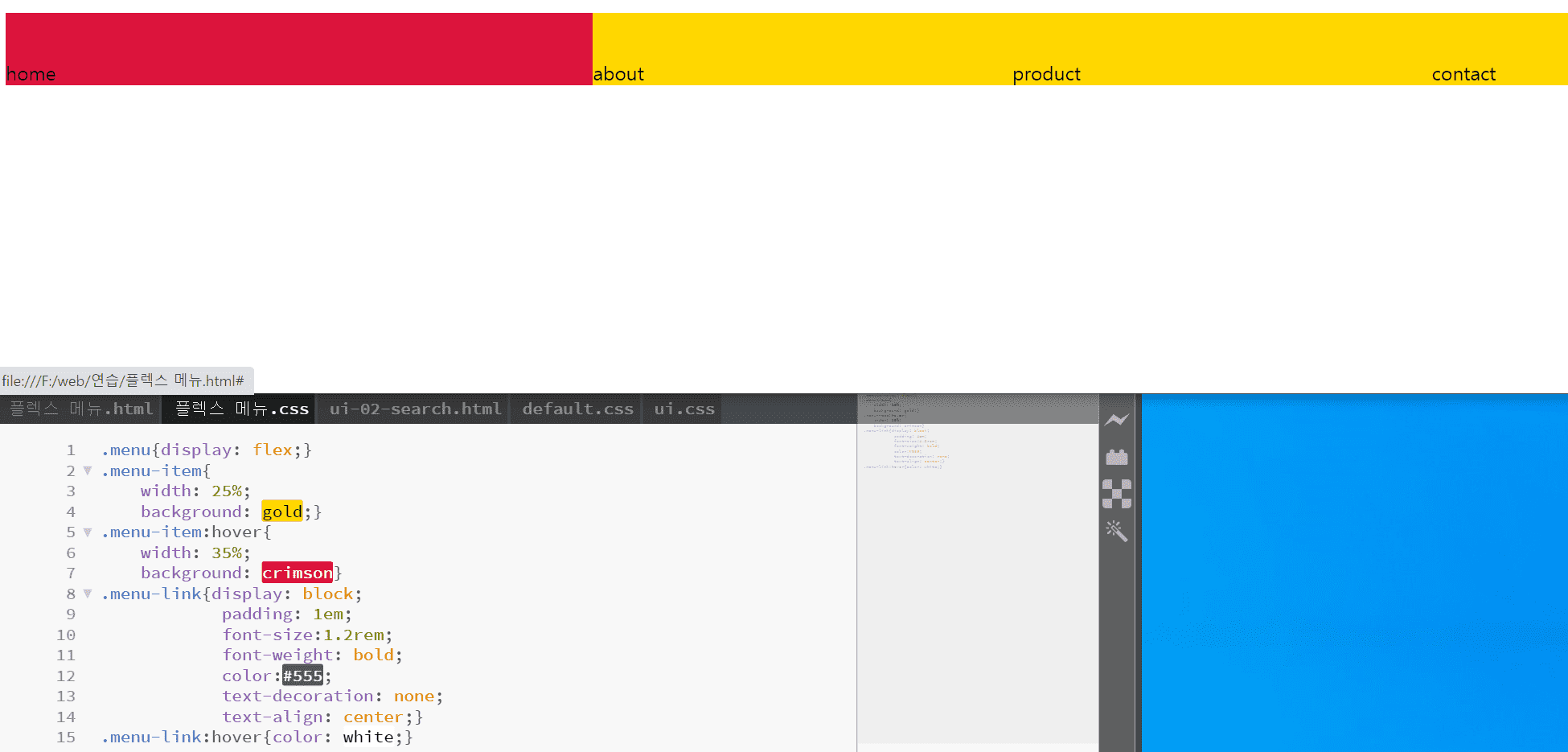
Answer 5
0
home, about같은 텍스트들을 <a>태그 안에 넣어주세요^^
아래와 같은 형식으로 하시면 됩니다.
<li class="menu-item"><a href="#" class="menu-link">home</a></li>
0
<!DOCTYPE html>
<html lang="ko">
<head>
<meta charset="UTF-8">
<meta name="viewport" content="width=device-width, initial-scale=1.0">
<meta http-equiv="X-UA-Compatible" content="ie=edge">
<title>css flex!!</title>
<link rel="stylesheet" href="플렉스 메뉴.css">
<style>
ul{list-style:none;}
ul{padding: 0; list-style: none;}
</style>
</head>
<body>
<ul class="menu">
<li class="menu-item"><a href="#" class="menu-link"></a>home</li>
<li class="menu-item"><a href="#" class="menu-link"></a>about</li>
<li class="menu-item"><a href="#" class="menu-link"></a>product</li>
<li class="menu-item"><a href="#" class="menu-link"></a>contact</li>
</ul>
</body>
</html>
0
.menu{display: flex;}
.menu-item{
width: 25%;
background: gold;}
.menu-item:hover{
width: 35%;
background: crimson}
.menu-link{display: block;
padding: 1em;
font-size:1.2rem;
font-weight: bold;
color:#555;
text-decoration: none;
text-align: center;}
.menu-link:hover{color: white;}
가로스크롤 과 margin: 0 -1rem 질문 있습니다
0
181
1
수업자료 다운로드
0
186
1
VS코드에 클래스 이름만 넣으셨는데 선생님이 뭘 누르면 바로 태그로 변하던데...
1
206
1
css grid repeat() 에서 autofit 사용시
0
256
1
menu 아이템 반응형 변경
0
149
1
질문은 아니고.. 오타 발견..
0
158
1
웹에서 위치?값
0
289
1
px, em ,rem을 어떻게 감각적으로 쓸 수 있을까요?
0
592
2
강의에 나오는 html 자동으로 만들어주는 편집기에 대해 알 수 있을까요?
0
355
1
flex-basis auto, 0 차이
0
794
2
padding 대신 gap을 쓰는게 더 편하지 않나요?
2
653
1
animation forwards 관련 질문
0
551
2
auto-fill, auto-fill이 적용되지 않는것 에 대해 질문드립니다.
0
602
1
flex-grow IE 질문드립니다.
0
686
2
Flex-grow가 적용되는 영역에 대해 질문드립니다.
0
476
1
Grid 수직정렬 문의
0
1124
1
card__item에 display:flex를 했을 때..
0
558
1
11vmin
0
450
1
header class 안에 div와 h2
0
619
1
grid 반응형 페이지 step1 질문있습니다~
0
323
1
반응형 페이지 step4 order
0
402
1
미디어쿼리 사이즈
1
325
1
figure + div
0
329
1
CSS Grid를 통한 정렬의 장점
0
299
1