

this.$router params 방식 질문
안녕하세요. 잘 안되는 부분이 있어서 질문하게 되었습니다. 현재 params로 넘길 시 id가 undefind라고 뜨고 query방식으로 넘길 시에는 데이터가 잘 넘어가는데 이유를 모르겠습니다..
github에 있는 코드를 그대로 붙여봐도 똑같아서 질문드립니다 ㅠ
params 방식
ListToDetailView.vue
console.log(customerId)
this.$router.push({ name: 'DetailView', params: { id: customerId } })
DetailView.vue
    console.log(this.$route)
    this.id = this.$route.params.id
    console.log(this.id)
- index.js에서 router 등록
  {
    path: '/template/p3/detail',
    name: 'DetailView',
    component: () =>
      import(
        /* webpackChunkName: "template", webpackPrefetch:true */ '../views/11_template/p3/DetailView.vue'
      )
} 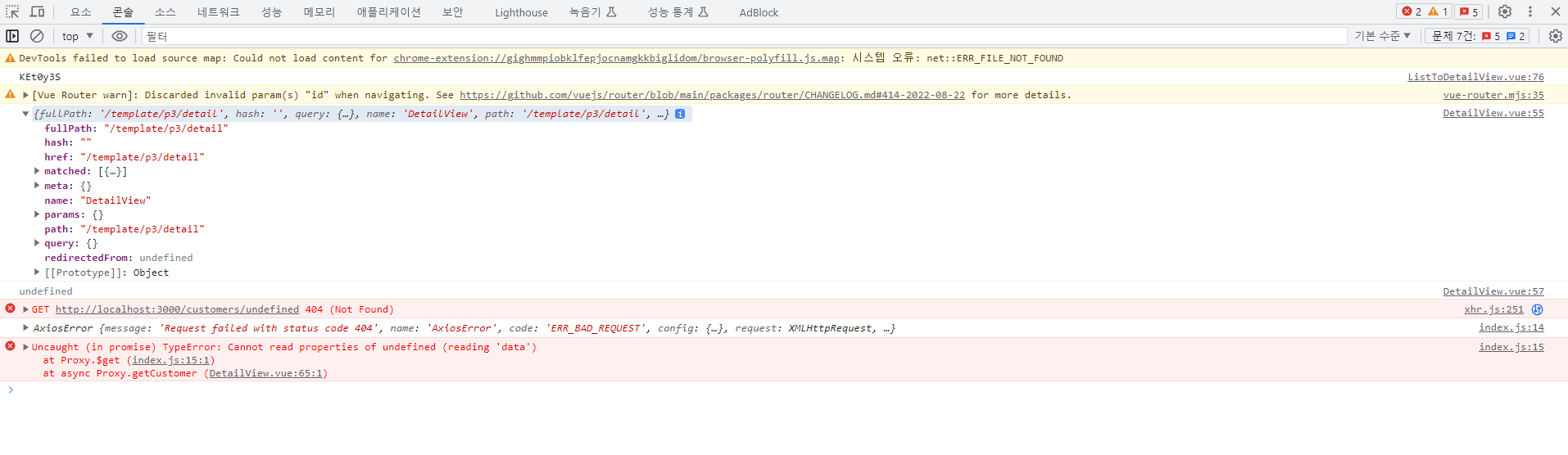
현재 log찍었을 때 router params에 id가 안들어있어서 goToDetail부분이 이상하다고 생각이드는데 혹시 몰라서 github에 있는 것을 그대로 붙여 쓰는데도 결과는 똑같더라고요 ㅠ 현재 customerId는 값이 들어오고있어요.
    goToDetail(customerId) {
      // this.$router.push({
      //   path: '/template/p3/detail',
      //   query: { id: customerId }
      // })

      console.log(customerId)
      this.$router.push({ name: 'DetailView', params: { id: customerId } })
      // http://localhost:8080/template/p3/detail
    },
그리고 index.js는 github에 있는 파일과 코드 동일합니다.
query 방식
ListToDetailView.vue
this.$router.push({
  path: '/template/p3/detail',
  query: { id: customerId }
})
DetailView.vue
console.log(this.$route.query.id)
this.id = this.$route.query.id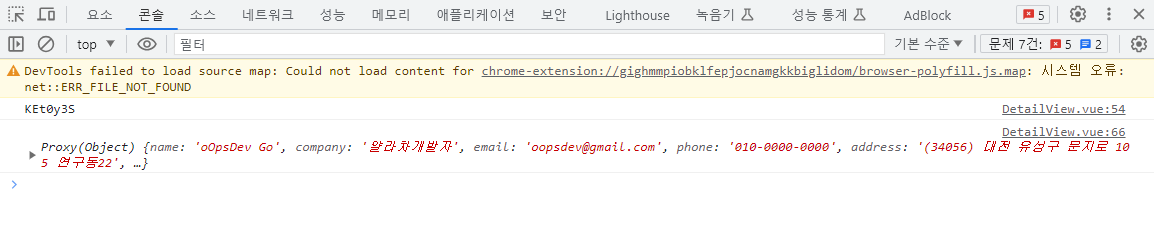
DetailView에서 EditView로 params로 넘길때도 똑같은 상황입니다 ㅠ
라우터에 :id 를 쓰면 되긴 하는데
http://localhost:8080/template/p3/detail이런 형식이 안되다보니..
Answer 2
0
일단 깃허브에 올라간 소스코드를 그대로 실행하면 정상적으로 오류 없이 실행이 됩니다. 깃허브 전체 코드 내려 받고, project 폴더에서 npm install --force 로 패키지 모듈 설치한 후 실행해 보면 params 방식이 정상적으로 되는 것을 확인할 수 있습니다.
얄라차개발자님이 안되는 이유를 파악하려면 조금 더 많은 정보가 필요합니다.
현재 package.json 내용을 알려주시면 제가 파악하는데 도움이 될것 같습니다.
0
선생님~ package.json 첨부합니다~
{
  "name": "project",
  "version": "0.1.0",
  "private": true,
  "scripts": {
    "serve": "vue-cli-service serve",
    "build": "vue-cli-service build",
    "lint": "vue-cli-service lint"
  },
  "dependencies": {
    "@fortawesome/fontawesome-svg-core": "^6.4.0",
    "@fortawesome/free-solid-svg-icons": "^6.4.0",
    "@fortawesome/vue-fontawesome": "^3.0.3",
    "@fullcalendar/core": "^6.1.8",
    "@fullcalendar/daygrid": "^6.1.8",
    "@fullcalendar/interaction": "^6.1.8",
    "@fullcalendar/timegrid": "^6.1.8",
    "@fullcalendar/vue3": "^6.1.8",
    "apexcharts": "^3.41.0",
    "axios": "^1.4.0",
    "bootstrap": "^5.2.3",
    "core-js": "^3.8.3",
    "exceljs": "^4.3.0",
    "file-saver": "^2.0.5",
    "vue": "^3.2.13",
    "vue-cookies": "^1.8.3",
    "vue-good-table-next": "^0.2.1",
    "vue-loading-overlay": "^6.0.3",
    "vue-router": "^4.2.2",
    "vue-sweetalert2": "^5.0.5",
    "vue3-apexcharts": "^1.4.1",
    "vuex": "^4.0.0",
    "vuex-persistedstate": "^4.1.0"
  },
  "devDependencies": {
    "@babel/core": "^7.12.16",
    "@babel/eslint-parser": "^7.12.16",
    "@vue/cli-plugin-babel": "~5.0.0",
    "@vue/cli-plugin-eslint": "~5.0.0",
    "@vue/cli-plugin-router": "~5.0.0",
    "@vue/cli-plugin-vuex": "~5.0.0",
    "@vue/cli-service": "~5.0.0",
    "@vue/eslint-config-standard": "^6.1.0",
    "eslint": "^7.32.0",
    "eslint-plugin-import": "^2.25.3",
    "eslint-plugin-node": "^11.1.0",
    "eslint-plugin-promise": "^5.1.0",
    "eslint-plugin-vue": "^8.0.3"
  },
  "eslintConfig": {
    "root": true,
    "env": {
      "node": true
    },
    "extends": [
      "plugin:vue/vue3-essential",
      "@vue/standard"
    ],
    "parserOptions": {
      "parser": "@babel/eslint-parser"
    },
    "rules": {
      "space-before-function-paren": "off"
    }
  },
  "browserslist": [
    "> 1%",
    "last 2 versions",
    "not dead",
    "not ie 11"
  ]
}
0
안녕하세요.
https://router.vuejs.org/guide/essentials/navigation.html
공식 문서에 나와 있는 것 처럼 params 가 되어야 하는데요.
제가 조금 더 확인해 본 후 답변 드리겠습니다.
일단 query 방식으로 진행 부탁드립니다
0
안녕하세요 router 4 부터는 router 부터는 아래와 같이 path에 params로 던질 파라미터를 반드시 정의해야 하는 것으로 변경이 되었네요. 이렇게 사용할 수 밖에 없습니다.
{
    path: '/template/p3/detail/:id',
    name: 'DetailView',
    component: () =>
      import(
        /* webpackChunkName: "template", webpackPrefetch:true */ '../views/11_template/p3/DetailView.vue'
      )
  }
0
선생님~ 그러면 :id를 사용하면 그 강의때 말씀하신 url이 http://localhost:8080/template/p3/detail
이렇게 나오지 않고 id가 어떤건지 보여서 나오게 되면 query방식이나 params 방식 둘다 차이가 없는거져?
제가 강의를 들을때 생각했던거는 params방식과 query방식 url이 다르게 나온다고 생각했거든여...
10월 15일 삭제예정 강의 문의
0
44
1
강의제목에 10/15일 삭제라고 나와있는데,
0
50
1
npm run serve시 error
0
65
1
깃권한요청드립니다
0
80
1
sample 파일 참조시...
0
81
2
HashRoutes.vue 로 컴포넌트 한것 뿐인데
0
115
2
깃허브 주소
0
84
1
카카오 로그인
0
177
1
vue-loading-overlay show 오류 발생
0
518
2
부트스트랩 설치 시 오류 발생
0
535
3
cors 에러
0
269
1
route에서 prefetch와 component 지정 방식 문의
0
281
1
카카오 로그인
0
256
1
데이터바인딩
0
232
1
Event 다음 extra 부분 질문 있습니다.
0
460
2
vue cli 회원가입 단계(1,2,3) 라우터1개 vs 라우터3개
0
267
1
카카오/네이버 로그인 이용하기
0
494
2
카카오 로그인
1
455
1
mixins/index.js 'application/json;charset=utf-8' 부분을 선언 안해도 잘 동작 되는데 안하면 어떤 문제가 발생하는지 궁금합니다.
1
1543
1
부트스트랩 설치 시 오류 발생에 대해 질문 드립니다.
0
1065
1
node express vue cli 배포
1
944
1
믹스인 강의 json-server 질문드립니다.
2
474
2
영상에 나오는 깃헙 사이트
0
545
1
라우터 15분 쯤 .prettierrc 파일설정 부분
0
505
3