

DataBinding시 오류 질문
안녕하세요 선생님 도저히 오류를 고치지 못하겠어서 문의드립니다. DataBinding만 하면 오류가 나네요.
구글링을 한참 해봤는데 xml파일의 오류도 아닌 것 같고, databinding 안 쓰고, <layout> 태그 안 쓰면 정상적으로 앱은 실행됩니다.. 한 번만 살펴봐주시면 감사하겠습니다.
그냥 제 컴퓨터에서는 DataBinding을 포기하고 findViewById 만 사용해서 수업을 따라가도 될까요..?
위치 : 주사위앱 마지막 강의 3:30
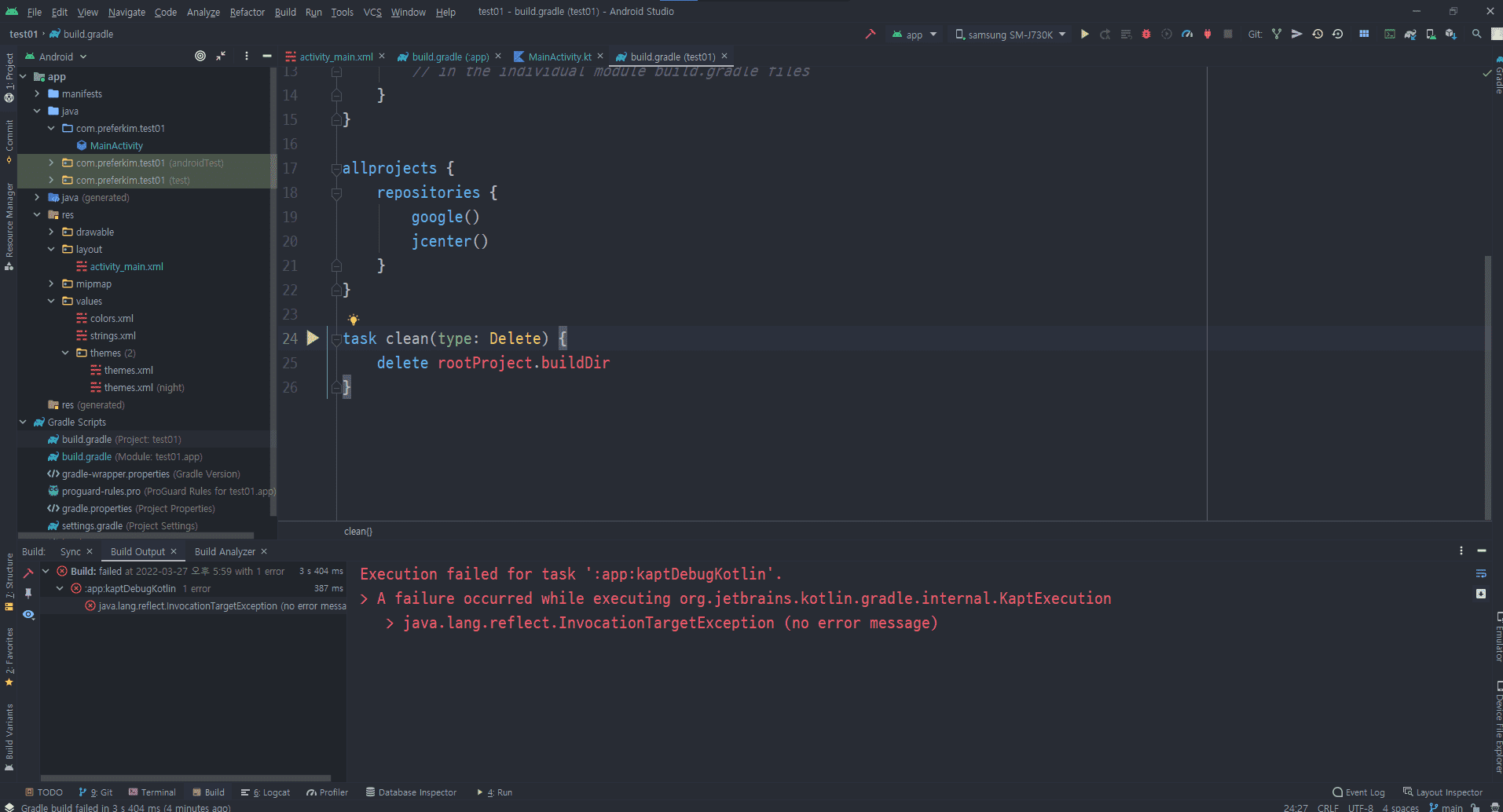
// MainActivitiy.kt
package com.preferkim.test01

import androidx.appcompat.app.AppCompatActivity
import android.os.Bundle
import android.widget.Toast
import androidx.databinding.DataBindingUtil
import com.preferkim.test01.databinding.ActivityMainBinding

class MainActivity : AppCompatActivity() {

    private lateinit var binding : ActivityMainBinding

    override fun onCreate(savedInstanceState: Bundle?) {

        super.onCreate(savedInstanceState)
        setContentView(R.layout.activity_main)

        binding = DataBindingUtil.setContentView(this, R.layout.activity_main)

        binding.diceStartButton.setOnClickListener {
            Toast.makeText(this, "주사위 GO!", Toast.LENGTH_LONG).show()
        }
    }
}

// activity_main.xml
<?xml version="1.0" encoding="utf-8"?>

<layout>

    <LinearLayout xmlns:android="http://schemas.android.com/apk/res/android"
        xmlns:tools="http://schemas.android.com/tools"
        android:layout_width="match_parent"
        android:layout_height="match_parent"
        android:background="#008000"
        android:orientation="vertical"
        tools:context=".MainActivity">

        <LinearLayout
            android:layout_width="match_parent"
            android:layout_height="200dp"
            android:layout_marginTop="100dp">

            <TextView
                android:layout_width="match_parent"
                android:layout_height="wrap_content"
                android:layout_margin="20dp"
                android:gravity="center"
                android:text="인생은 주사위 한 방에 가는 거 아니겠습니까?"
                android:textColor="@color/black"
                android:textSize="30sp"
                android:textStyle="bold" />

        </LinearLayout>

        <LinearLayout
            android:layout_width="match_parent"
            android:layout_height="150dp"
            android:weightSum="2">


            <ImageView
                android:layout_width="match_parent"
                android:layout_height="match_parent"
                android:layout_weight="1"
                android:src="@drawable/dice_1" />

            <ImageView
                android:layout_width="match_parent"
                android:layout_height="match_parent"
                android:layout_weight="1"
                android:src="@drawable/dice_2" />

        </LinearLayout>

        <android.widget.Button
            android:id="@+id/diceStartButton"
            android:layout_width="match_parent"
            android:layout_height="50dp"
            android:layout_margin="50dp"
            android:background="@color/black"
            android:gravity="center"
            android:text="인생 고고"
            android:textColor="@color/white" />

    </LinearLayout>

</layout>

// build.gradle(app)
plugins {
    id 'com.android.application'
    id 'kotlin-android'
    id 'kotlin-kapt'

}

android {
    compileSdkVersion 31
    buildToolsVersion "30.0.0"

    defaultConfig {
        applicationId "com.preferkim.test01"
        minSdkVersion 16
        targetSdkVersion 30
        versionCode 1
        versionName "1.0"

        testInstrumentationRunner "androidx.test.runner.AndroidJUnitRunner"
    }

    buildTypes {
        release {
            minifyEnabled false
            proguardFiles getDefaultProguardFile('proguard-android-optimize.txt'), 'proguard-rules.pro'
        }
    }
    compileOptions {
        sourceCompatibility JavaVersion.VERSION_1_8
        targetCompatibility JavaVersion.VERSION_1_8
    }
    kotlinOptions {
        jvmTarget = '1.8'
    }

    // 추가
    buildFeatures {
        dataBinding true
    }
//    dataBinding {
//        enabled true
//    }
}

dependencies {

    implementation "org.jetbrains.kotlin:kotlin-stdlib:$kotlin_version"
    implementation 'androidx.core:core-ktx:1.7.0'
    implementation 'androidx.appcompat:appcompat:1.4.1'
    implementation 'com.google.android.material:material:1.5.0'
    implementation 'androidx.constraintlayout:constraintlayout:2.1.3'
    testImplementation 'junit:junit:4.+'
    androidTestImplementation 'androidx.test.ext:junit:1.1.3'
    androidTestImplementation 'androidx.test.espresso:espresso-core:3.4.0'
    kapt 'com.android.databinding:compiler:4.1.3'

}

// build.gradle(project)
// Top-level build file where you can add configuration options common to all sub-projects/modules.
buildscript {
    ext.kotlin_version = "1.4.32"
    repositories {
        google()
        jcenter()
    }
    dependencies {
        classpath "com.android.tools.build:gradle:4.1.3"
        classpath "org.jetbrains.kotlin:kotlin-gradle-plugin:$kotlin_version"

        // NOTE: Do not place your application dependencies here; they belong
        // in the individual module build.gradle files
    }
}

allprojects {
    repositories {
        google()
        jcenter()
    }
}

task clean(type: Delete) {
    delete rootProject.buildDir
}
Answer 1
주사위앱 소개 및 레이아웃 설정 문제
0
100
2
안드로이드 에뮬레이터가 실행이 안 되요...ㅠ
0
169
2
30 강 소스 좀 올려 주십시요
0
112
2
onBackPressed 함수가 동영상 하고 다르게 동작합니다.
0
134
2
ListView 초기 실행 안됩니다.
0
129
2
코딩을 완료하고난후 앱 실행시 자동 종료
0
105
2
datavinding에서 오류가 납니다.
0
79
1
안드로이드 스튜디오 버전 차이로 초기 empyt activity 선택하면 안됩니다.
0
188
2
context의 구별에 대하여
0
101
2
"프롤로그에서 ..." 오류 관련해 직전 질문에 대한 추가 질문입니다.
0
94
2
"프롤로그에서 콘텐츠가 허용되지 않습니다." 오류
0
216
3
해결완료
1
234
2
databinding 설정후 run하면 에러(해결)
0
251
2
databinding 설정 이후 실행시 에러
0
340
4
안드로이드 입문하는 사람입니다.
0
88
1
Firebase uid
0
112
3
activity_main 화면 다름
0
159
2
강의화면과 다른데 맞게진행되는것인가요...????
0
143
2
파이어베이스 질문
0
97
2
ActivityMainBinding에 오류가 납니다
0
174
2
선생님 onBackPressed 작동이 안되는거 같습니다
0
147
2
>app>res>layout 이 존재하지 않습니다.
0
141
2
안드로이드 스튜디오 미어캣 버전 사용 한글 깨짐
0
830
2
안드로이드 스튜디오 오류 발생 시 대처 방법은 요?
0
325
2