

run 클릭 시 에러 발생
669
4 asked
5분 30초 정도에서 println 하는 부분에서
run을 누르니 에러가 떠서 수업을 진행하지 못하고 있습니다ㅠㅠ
구글링해봐도 정확한 해답을 못찾겠어서 질문 올립니다.
어떤 문제일까요??
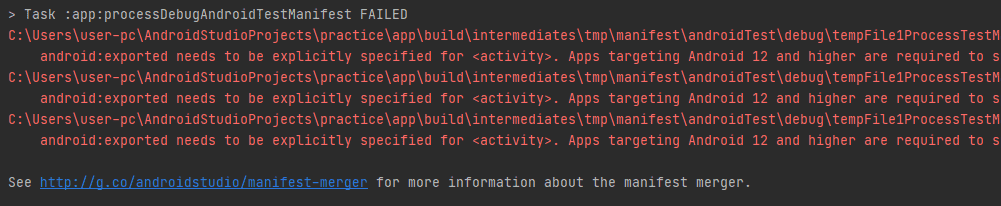
> Task :app:processDebugAndroidTestManifest FAILED
C:\Users\user-pc\AndroidStudioProjects\practice\app\build\intermediates\tmp\manifest\androidTest\debug\tempFile1ProcessTestManifest12737616324960338379.xml Error:
android:exported needs to be explicitly specified for <activity>. Apps targeting Android 12 and higher are required to specify an explicit value for `android:exported` when the corresponding component has an intent filter defined. See https://developer.android.com/guide/topics/manifest/activity-element#exported for details.
C:\Users\user-pc\AndroidStudioProjects\practice\app\build\intermediates\tmp\manifest\androidTest\debug\tempFile1ProcessTestManifest12737616324960338379.xml Error:
android:exported needs to be explicitly specified for <activity>. Apps targeting Android 12 and higher are required to specify an explicit value for `android:exported` when the corresponding component has an intent filter defined. See https://developer.android.com/guide/topics/manifest/activity-element#exported for details.
C:\Users\user-pc\AndroidStudioProjects\practice\app\build\intermediates\tmp\manifest\androidTest\debug\tempFile1ProcessTestManifest12737616324960338379.xml Error:
android:exported needs to be explicitly specified for <activity>. Apps targeting Android 12 and higher are required to specify an explicit value for `android:exported` when the corresponding component has an intent filter defined. See https://developer.android.com/guide/topics/manifest/activity-element#exported for details.
See http://g.co/androidstudio/manifest-merger for more information about the manifest merger.
Answer 2
1
저도 같은 오류 떴었는데 manifests 에서 activity 안에 android:exported="false" 추가해주니까 해결됐어요!
<activity
    android:name=".MainActivity"
    android:exported="false">
    <intent-filter>
        <action android:name="android.intent.action.MAIN" />

        <category android:name="android.intent.category.LAUNCHER" />
    </intent-filter>
</activity>
0
저도 같은 문제인데 andriod:exported="false"를 하면 반드시 exported 되어야 한다고 오류가 뜨네요 ㅠㅠ 해결방법이 없을까요
미션 제출 방식 건의
0
23
0
트랜잭션 내 Redis I/O 에 대한 궁금한점
1
23
1
미션 진행 방식에 대한 질문입니다.
0
45
1
파킹 페이지와 대기열 큐 질문입니다.
0
44
1
소리
0
36
1
조회 메서드에서 @Transactional(readOnly=true) 질문
1
40
1
"폴더를 찾을 수 없습니다." 라는 응답만 계속 나옵니다.
0
43
1
해당 결제 부분을 포폴에서 테스트 api를 적용에 대한 궁금증
1
44
1
소스파일
0
44
1
11강 [실습] Docker로 MySQL1 분만에 실행하기
0
87
2
11강 [실습] Docker로 MySQL1 분만에 실행하기
0
63
2
구현 방법에 대한 문의
0
79
2
MSA 통신방식에 대해서 질문 있습니다.
0
52
1
앱 캠페인 중복 트래픽 문제 없는걸까요?
0
75
2
안녕하세요 질문있습니다.!
0
71
2
@Modifying에 관하여
1
69
1
activity_main.xml 파일이 없어요...
0
313
1
3강에서 MainActivity.kt에서 activity_main.xml에 있는 nav_host_fragment를 가져오는게 안됩니다
0
856
1
3강에서 앱 구현할 때 활용할 이미지는 어디에서 구할 수 있을까요?
0
740
1
안녕하세요 질문있습니다 ㅠㅠ
0
379
0
nav_graph 프래그먼트 안보임
0
544
2
button 에러
1
422
1
ignoreNulls 함수
0
209
0
1편 기본 문법 47분) val 이름 mNotNull 에 대하여
0
292
0