

position : relative; 관련하여 질문드립니다.
320
2 asked
<!DOCTYPE html>
<html lang="en">
<head>
    <meta charset="UTF-8">
    <title>Document</title>
    <style>
        .container{
            width: 400px;
            height: 400px;
            background-color: skyblue;
            position: relative;
            top: 10px;
            left: 10px;
        }
        .one{
            width: 100px;
            height: 100px;
            background-color: red;
            position: absolute; /*absoule의 기준점 선정은 부모에 relative 설정*/
            top: 50%;
            left: 50%;
        }
        .two{
            width: 100px;
            height: 100px;
            background-color: blue;
            position: absolute;
            top: 30px;
            left: 30px;
        }
    </style>
</head>
<body>
    <div class="container"> <!-- container 클래스를 기준점으로 잡음-->
        <div class="one"></div>
        <div class="two"></div>
    </div>
    <div class="container"> <!-- top: 10px; 적용 안됨..?-->
        <div class="one"></div>
        <div class="two"></div>
    </div>
</body>
</html>
안녕하세요 :)
<div class="container">를 2번 출력하면
아래의 container 클래스는 top: 10px; 이 적용되지 않는 이유에 대해서 질문드립니다.
저는 아래 container 클래스가 출력될 때 top:10px; 이 적용되어서
중간에 여백이 생길 줄 알았는데, 붙어서 출력되더라구요.
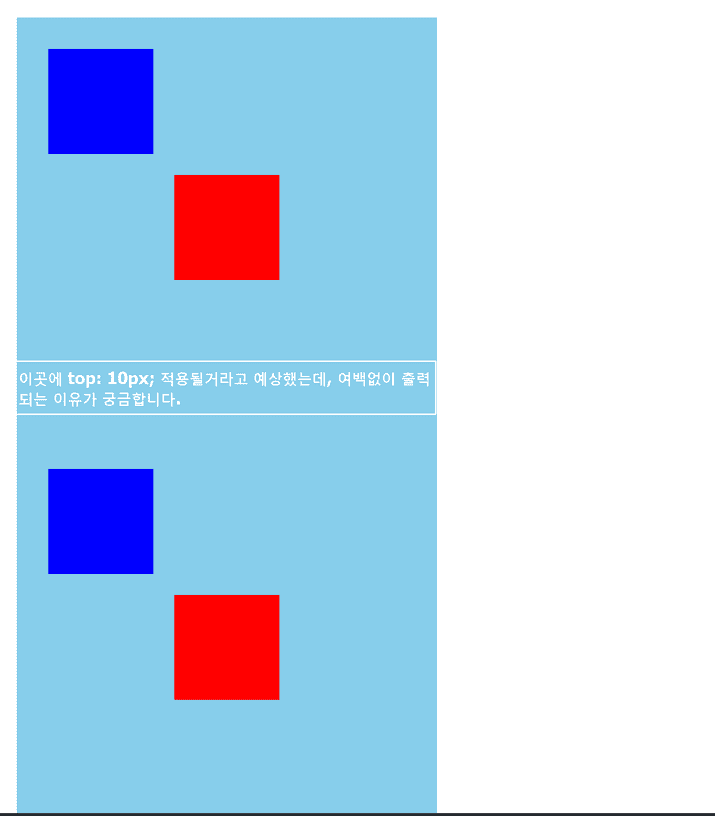
답변 부탁드립니다.
감사합니다.
Answer 1
0
이미 해결하셨겠지만..
두 container 태그에 모두 top 값이 적용되어서 그런 것 같습니다만
두 번째 container에 top값을 더 주거나 하시면 될 것 같습니다.
css에 container:nth-child(2){ top:20px } 를 하셔도 되고,, 방법은 많습니다!
이론파트 재탕문제
0
5
0
누락코드
0
5
1
다차원 배열 포인터 질문있습니다
0
13
2
원핫인코딩 전 train과 test 병합여부
0
10
1
수강기간 연장
0
13
1
자동화시트에 이미지를 제가 원하는 사진을 다운 받아서 시트에 입력할수 있을까요?
0
11
1
이론 파트 재탕
0
20
1
codesandbox 처음부터 안되네요
0
687
2
codesandbox 문서 버튼이 안보여요
0
372
1
html의 input
0
377
0
HTML - input
0
268
0
현재 기준으로 쥬피터 노트북 메뉴가 안보이네요
0
340
0
20 분쯤에서 코드대로 했는데 왜 안되는걸까요ㅜ_ㅜ
0
251
0
atom 단축키 문의
0
410
1
이거 크롬 웹브라우저에 안나타나요...
0
260
1
재미있었어요.
0
259
1
facebook 컬러를 어떻게 가져오나요?
1
295
1
오류 질문드려요
1
289
1
쥬피터??가 뭔가요...
0
374
1
부트스트랩 다운 과정
2
356
1
open in browser 문의
1
346
2
{% static %} 을 해도 바뀌지 않음.
0
266
1
getElementByClass는 없나요?
2
381
1
탭을 누르는게 뭔가요?
2
443
2