

"포스트 생성에 실패했습니다" 실패 문구와 함께 에러가 발생합니다ㅠㅠ
안녕하세요 정환님! 정환님의 강의를 들으면서 코드를 따라 작성해보다가 포스트와 이미지를 최종적으로 업로드 하는 과정에서 아래의 캡쳐 사진과 같이 포스트 생성에 실패했다는 에러 메시지가 뜨게됩니다.
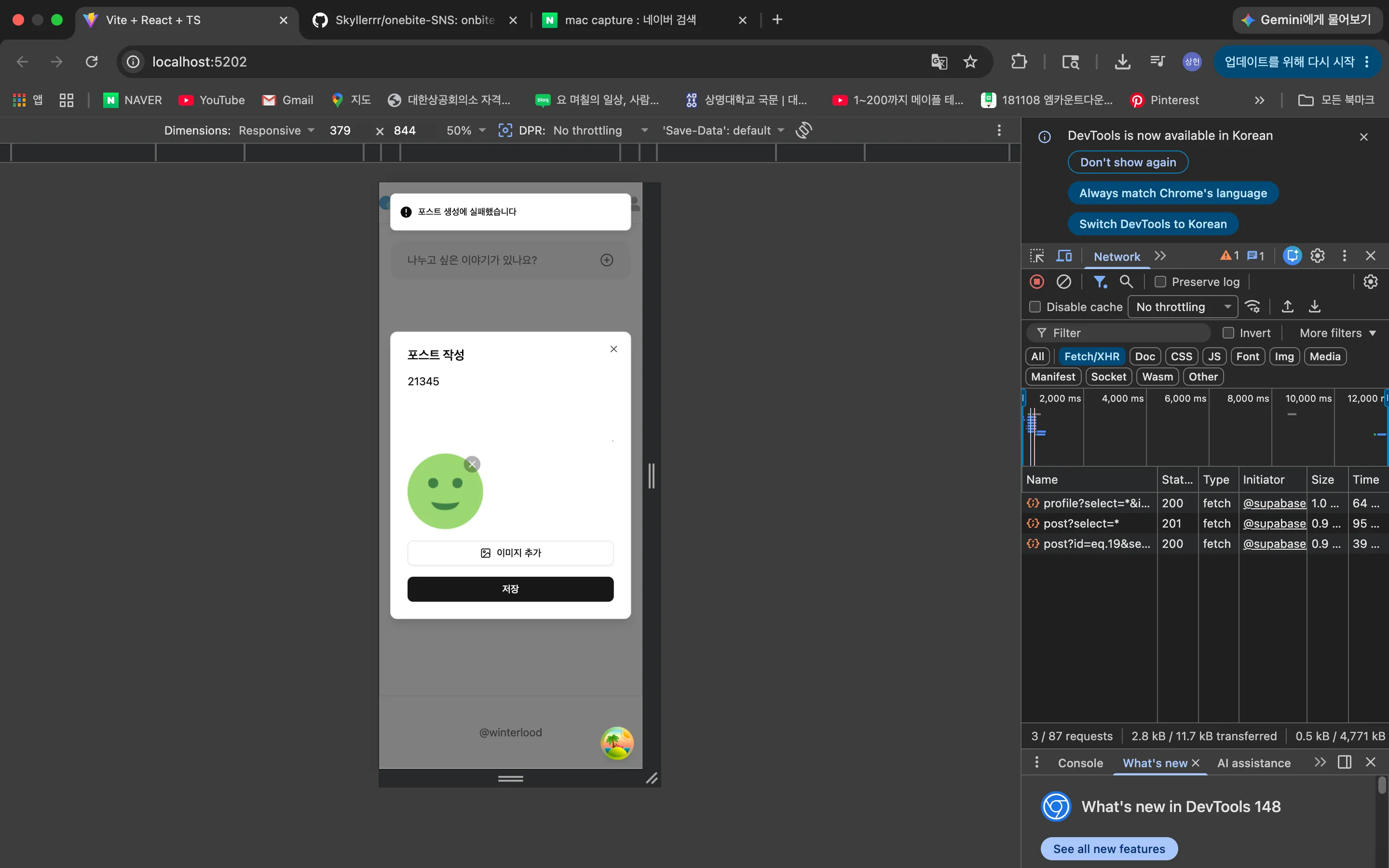
네트워크 탭에 보면, 포스트 부분은 잘 전달이 되는거같은데 이미지 생성에 관한 결과가 보이지 않는 것으로 보아 이미지 생성 관련 코드에서 문제가 생긴것같은데 무슨 문제일까요??..ㅠ
아래는 해당 코드들입니다. 이미지 생성 관련 코드를 가져왔는데 혹여나 다른 부분의 코드가 필요하면 추가 업로드 드리겠습니다.
api/post.ts
import type { PostEntity } from './../types';
import supabase from '@/lib/supabase';

export async function createPost(content: string) {
  const { data, error } = await supabase
    .from('post')
    .insert({
    content
    })
    .select()
    .single()

  if (error) throw error
  return data
}


export async function createPostWithImages({
  content,
  images,
  userId
}: {
  content: string
  images: File[]
  userId: string
}) {
  // 1. 새로운 포스트 생성 (맨 위에서 생성한 포스트 비동기 함수 가져오기)
  const post = await createPost(content)

  if (images.length === 0) return post
  // 2. 이미지 업로드
  try {
    const imageUrls = await Promise.all(
      images.map((image) => {
        const fileExtension = image.name.split(".").pop() || "webp"
        const fileName = `${Date.now()}-${crypto.randomUUID()}.${fileExtension}`
        const filePath = `${userId}/${post.id}/${fileName}`

        return uploadImage({
          file: image,
          filePath
        })
      })
    )
    // 3. 포스트 테이블 업데이트
    const updatedPost = await updatePost({
      id: post.id,
      image_urls: imageUrls
    })

    return updatedPost
  } catch(error) {
    await deletePost(post.id)
    throw error
  }
}


export async function updatePost(post: Partial<PostEntity> & { id: number }) {
  const { data, error } = await supabase
    .from("post")
    .update(post)
    .eq("id", post.id)
    .select()
    .single()

  if (error) throw error
  return data
}


export async function deletePost(id: number) {
  const { data, error } = await supabase
    .from("post")
    .delete()
    .eq("id", id)
    .select()
    .single()

  if (error) throw error
  return data
}
hooks/mutations/post/use-create-post.ts
import type { UseMutationCallback } from './../../../types';
import { createPost, createPostWithImages } from '@/api/post';
import { useMutation } from '@tanstack/react-query';

export function useCreatePost(callbacks?:UseMutationCallback) {
  return useMutation({
    mutationFn: createPostWithImages,
    onSuccess: () => {
      if(callbacks?.onSuccess) callbacks.onSuccess()
    },
    onError: (error) => {
      if (callbacks?.onError) callbacks.onError(error)
    }
  })
}
components/modal/post-editor-modal.tsx
import { Button } from '@/components/ui/button'
import { Dialog, DialogContent, DialogTitle } from '@/components/ui/dialog'
import { useCreatePost } from '@/hooks/mutations/post/use-create-post'
import { usePostEditorModal } from '@/store/post-editor-modal'
import { useSession } from '@/store/session'
import { ImageIcon, XIcon } from 'lucide-react'
import { useRef, useState, useEffect, ChangeEvent } from 'react'
import { toast } from "sonner"
import { Carousel, CarouselContent, CarouselItem } from '../ui/carousel'

type Image = {
  file: File,
  previewUrl: string
}

export default function PostEditorModal() {
  const session = useSession()
  const { isOpen, close } = usePostEditorModal()


  const { mutate: createPost, isPending: isCreatePostPending } = useCreatePost({
    onSuccess: () => {
      close()
    },
    onError: (error) => {
      toast.error("포스트 생성에 실패했습니다", {
        position: "top-center"
      })
    }
  })


  const [content, setContent] = useState("")
  const [images, setImages] = useState<Image[]>([])

  const textareaRef = useRef<HTMLTextAreaElement>(null)
  const fileInputRef = useRef<HTMLInputElement>(null)

  const handleCloseModal = () => {
    close()
  }


  const handleCreatePostClick = () => {
    if (content.trim() === "") return
    createPost({
      content,
      images: images.map((image) => image.file),
      userId: session!.user.id
    })
  }


  const handleSelectImages = (e:ChangeEvent<HTMLInputElement>) => {
    if (e.target.files) {
      const files = Array.from(e.target.files)

      files.forEach((file) => {
        setImages((prev) => [
          ...prev,
          { file, previewUrl: URL.createObjectURL(file) },
        ])
      })
    }
    e.target.value = ""
  }


  const handleDeleteImage = (image:Image) => {
    setImages((prevImages) => prevImages.filter((item) => item.previewUrl !== image.previewUrl))
  }


  useEffect(() => {
    if (textareaRef.current) {
      textareaRef.current.style.height = "auto"
      textareaRef.current.style.height =
        textareaRef.current.scrollHeight + "px"
    }
  }, [content])


  useEffect(() => {
    if (!isOpen) return
    textareaRef.current?.focus()
    setContent("")
    setImages([])
  }, [isOpen])


  return (
    <Dialog open={isOpen} onOpenChange={handleCloseModal}>
    <DialogContent className="max-h-[90vh]">
      <DialogTitle>포스트 작성</DialogTitle>
        <textarea
          disabled={isCreatePostPending}
          ref={textareaRef}
          value={content}
          onChange={(e) => setContent(e.target.value)}
          className="max-h-125 min-h-25 focus:outline-none"
          placeholder="무슨 일이 있었나요?"
        />
        <input
          onChange={handleSelectImages}
          ref={fileInputRef}
          type="file"
          accept="image/*"
          multiple className="hidden"
        />
        {images.length > 0 && <Carousel>
          <CarouselContent>
            {images.map((image) => <CarouselItem className="basis-2/5" key={image.previewUrl}>
              <div className="relative">
                <img
                  src={image.previewUrl}
                  className="h-full w-full rounded-sm object-cover"
                />
                <div
                  onClick={() => handleDeleteImage(image)}
                  className="absolute top-0 right-0 m-1 cursor-pointer rounded-full bg-black/30 p-1"
                >
                  <XIcon className="h-4 w-4 text-white"/>
                </div>
              </div>
            </CarouselItem>)}
          </CarouselContent>
        </Carousel>}
        <Button
          onClick={() => {
            fileInputRef.current?.click()
          }}
          variant={"outline"}
          className="cursor=pointer"
        >
        <ImageIcon/>
        이미지 추가</Button>
        <Button
          disabled={isCreatePostPending}
          onClick={handleCreatePostClick}
          className="cursor=pointer">
          저장
        </Button>
    </DialogContent>
    </Dialog>
  )
}Answer 2
0
안녕하세요 rkdla666님 이정환입니다.
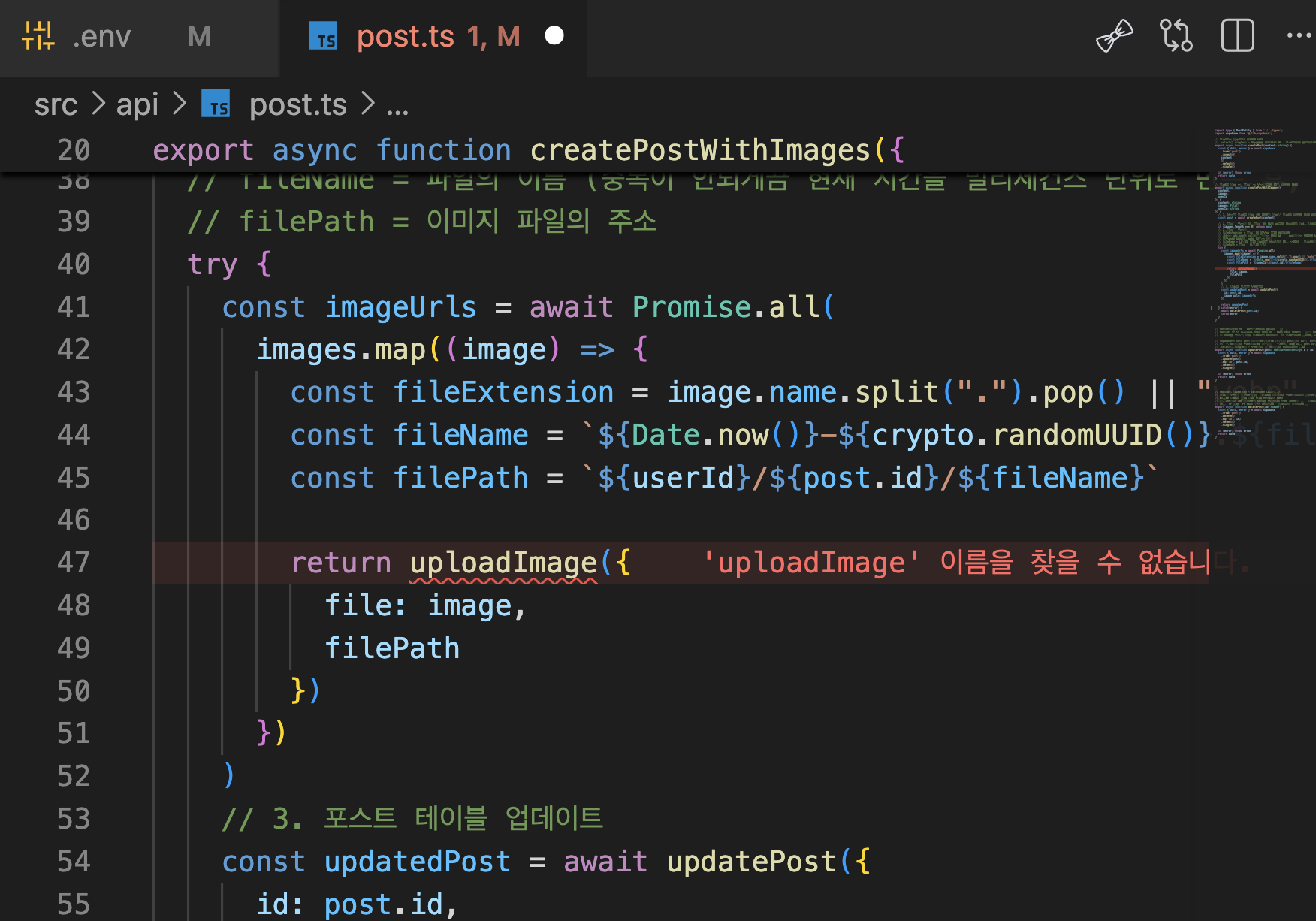
보내주신 코드 살펴보니 post.ts의 47번 라인에서 호출하는 uploadImage 함수의 import가 빠져있습니다. 이 함수만 제대로 import 하시면 정상적으로 포스트가 생성됩니다.
0
안녕하세요 rkdla666님 이정환입니다.
음...! 글쎄요 보내주신 코드 만으로는 정확한 원인 파악이 어렵습니다 ... ㅠㅠ .env.local 파일을 포함해 전체 프로젝트의 코드를 king199777@gmail.com 으로 보내주시면 직접 열어 살펴보겠습니다. 보내주시고 답글 남겨주세요
PS) .env.local의 파일을 포함해주셔야 합니다! 그래야 제가 직접 동작시켜볼 수 있습니다 😀 참고로 이 파일은 저 이외의 외부에는 절대 공개되어서는 안되니 공유에 주의하시기 바랍니다!!
수파베이스 데모 버전
0
39
1
modal-root질문드립니다.
0
63
2
모달 여러개 질문드립니다
0
53
2
tsconfig.app.json 파일 설정(경로 별칭 옵션) 관련 질문입니다.
0
72
2
onSettled 질문드립니다.
0
67
2
Zustand의 Store 타입은 어떤 기준으로 작성하는 건가요?
0
94
2
포스트 작성 중 이탈 방지 기능 (취소 버튼 클릭 시 오류)
0
102
2
강의자료는 어떻게 제작하시나요?
0
108
2
비밀번호 재설정 1회용 이메일 링크
0
115
1
강의 수강 후 포트폴리오 준비 방향에 대해 조언 부탁드립니다.
2
121
1
회원가입 구현 (구현 후 최종 화면 출력 X)
0
148
2
(6.11) 회원가입시 프로필 정보 자동 생성하기 Q. 호출 순서 문의
0
92
1
명시적 타입 선언(콜론 타입 선언)과 as 타입 단언 차이
0
97
2
useMutation 적용 후 새로운 글 등록시 content가 안보여요
0
122
3
6.8 zustand 세션 질문입니다.
0
170
2
next.js 강의에서도 리액트 라이브러리들을 다뤄주시나요?
0
147
2
shadcn에서 radix ui와 base ui 차이는 뭔가요?
1
830
2
updateTodo 함수 생성시 화살표 함수 사용 안하는 이유
0
139
2
4.11 바로 투두 삭제가 안됨 질문
0
157
3
매개변수 updatedTodo 관련 질문
0
127
3
인증 정보가 만료되었을 때 라우트 가드 처리가 궁금합니다!
0
142
2
supabase를 사용하지 않을 경우 세션 데이터의 변경을 감지하고 스토어에 보관하는 방법이 궁금합니다!
0
140
2
4.6 id를 string으로 변경시 오류
0
140
2
리액트 타입스크립트 관련 질문있습니다.
0
108
1