

bunx 로 프로젝트 생성 후 tailwind.config.ts 파일이 생성되지 않았습니다.
bunx 로 프로젝트 생성 후 tailwind.config.ts 파일이 생성되지 않았습니다.
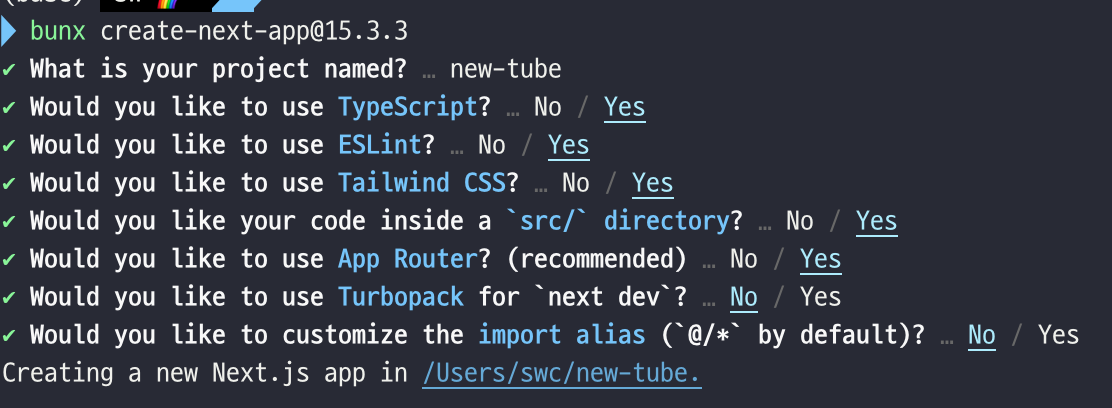
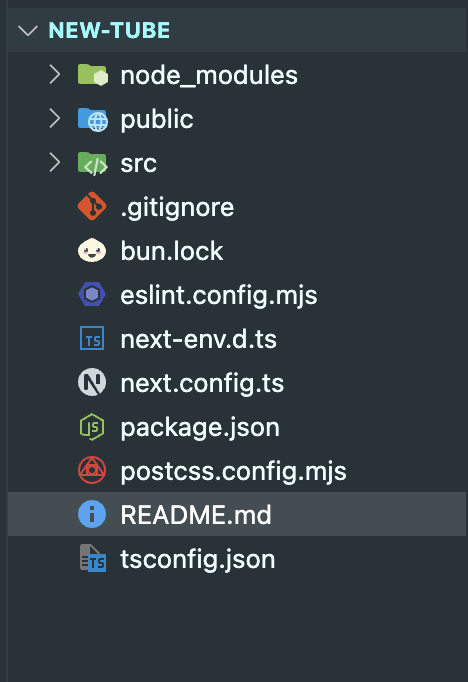
왜 생성되지 않았을까요..?
Answer 2
6
Hi there!
First of all, thank you so much for taking the course 🙏 I'm the instructor of the tutorial, and in it, I use create-next-app@15.1.6.
Because of that version, Tailwind CSS is initialized as v3, which automatically creates the tailwind.config.ts file. Starting with Tailwind v4, that file is no longer required for basic usage — so it's totally normal that you don’t see it when using a newer version like 15.3.3.
If you want to follow the tutorial as smoothly as possible, I recommend using the same version as me (15.1.6). That way, your setup will match mine exactly, and you’ll avoid unexpected differences.
That said, using the latest versions is totally fine too — just be aware it might lead to small differences like the missing config file. If you do go with the newer versions (Tailwind v4, etc.), make sure you're also using the latest version of shadcn/ui and other related packages to avoid compatibility issues.
Also, during the tutorial, I manually edit the tailwind.config.ts file. If you're using Tailwind v4 and don’t have that file, you can safely skip those edits — v4 handles a lot of those configurations automatically behind the scenes.
Thanks again for following the course! 🙇♂
Translation (I used ChatGPT):
안녕하세요!
먼저 제 강의를 수강해 주셔서 정말 감사합니다 🙏 저는 이 튜토리얼의 강사입니다.
강의에서는 create-next-app@15.1.6 버전을 사용하고 있으며, 이 버전에서는 Tailwind CSS가 v3으로 설치되어 tailwind.config.ts 파일이 자동으로 생성됩니다.
Tailwind v4부터는 기본적인 설정에 이 파일이 더 이상 필요하지 않기 때문에, 새 버전(예: 15.3.3)을 사용할 경우 해당 파일이 없는 것이 정상입니다.
튜토리얼을 최대한 원활하게 따라가고 싶으시다면 제가 사용하는 동일한 버전(15.1.6)을 사용하는 것을 추천드립니다. 그러면 강의와 동일한 환경이 구성되어 혼란이 적습니다.
물론, 최신 버전을 사용해도 괜찮습니다. 다만 tailwind.config.ts 파일이 없는 것처럼 약간의 차이로 인해 혼란이 생길 수 있습니다. 최신 Tailwind v4를 사용하신다면, shadcn/ui 및 다른 관련 패키지들도 최신 버전으로 함께 사용하시는 것을 권장드립니다. 그래야 호환성 문제가 줄어듭니다.
또한 강의 중간에 제가 tailwind.config.ts 파일을 수정하는 장면이 나올 텐데요, 만약 Tailwind v4를 사용 중이고 해당 파일이 없다면, 그 부분은 그냥 건너뛰셔도 됩니다. Tailwind v4는 이전에 수동으로 했던 설정들을 자동으로 처리해주기 때문입니다.
다시 한 번 강의를 들어주셔서 감사드리며 🙇♂
1
지금 기본세팅으로 깔리는 tailwindcss 버전이 4여서 그런 것 같아요
4부터는 tailwind.config.ts 없이도 css 설정이 바로 가능해서 해당 파일이 생성되지 않습니다!
하단 링크 확인해주세요~
tailwind.config.ts에서 설정하시는 css를 그냥 직접 넣으면 될 것 같아요!
https://velog.io/@oneook/tailwindcss-4.0-%EB%AC%B4%EC%97%87%EC%9D%B4-%EB%8B%AC%EB%9D%BC%EC%A1%8C%EB%82%98%EC%9A%94
저도 강사님 답변을 기다려보겠습니다 ㅠㅠ
claude api 크레딧
0
8
0
기존 미국주식 자동매매 프로그램과 같은 AWS 서버에서 돌리려고 할때
1
12
1
터미널에서 커서 AI 직접 실행
0
13
2
해결했습니다
0
17
1
이런 경우는 어떤 조치를 취해야할까요?
0
18
2
hooks 설정이 안되요
0
33
2
영상 최신으로 엡데이트 요청
0
59
2
소스 코드가 회사 보안 프로그램에 막혀서 안 보여요.
0
49
2
claude code 상태표시줄 궁금합니다!
0
44
2
수파베이스 데모 버전
0
36
1
10월 15일 삭제예정 강의 문의
0
37
1
설치의 필요성
0
68
2
modal-root질문드립니다.
0
58
2
drizzle-zod로 변환한 videoUpdateSchema를 z.infer로 추론하면 타입에러가 나타납니다.
0
197
1
폴더구조
0
133
1
[ Server ] Error: Cannot read properties of undefined (reading 'useSuspenseQuery')
0
122
1
ngrok 실행 안됨
0
414
1
dirzzle-kit push error
0
158
2
Link component의 legacyBehavior 속성이 deprecated
0
110
1
AI음성 전반적으로 수정이 필요한거같습니다.
0
126
0
AI 음성 에러 수정 요청
1
132
1
ErrorBoundary component 를 server component 에서 사용하는것
1
240
2
웹훅 동기화 에러
1
270
1
이 강의를 수강하려면 React와 javascript만 알고있으면 되나요?
1
317
1