

지도가 두개가 열리는 것 같습니다
375
1 asked
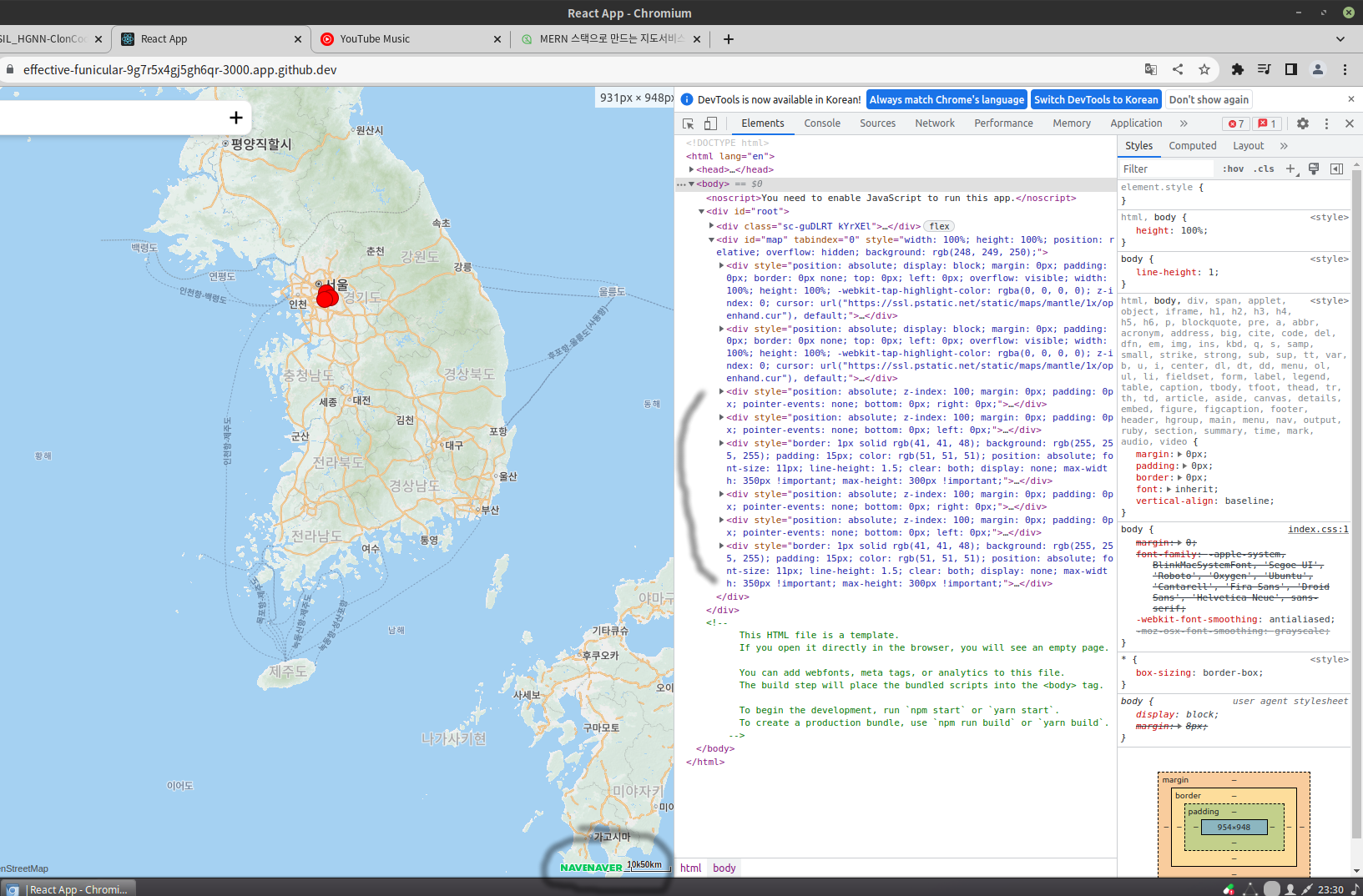 보시면 하나의 지도 div에 두개가 열리는 것 같습니다.
실제로 지도가 두개가 열려 서로 level이 달라 겹치는 모습입니다. 뒷장의 지도에는 마커가 표기되지 않습니다.
아래는 맵과 관련된 코드들입니다.
mern_client/src/components/common/Map/index.tsx
import React, { useEffect } from 'react';


interface MapProps {
    width: string;
    height: string;
    initMap?: (map: naver.maps.Map) => void;
}

function Map({width, height, initMap}: MapProps) {

    useEffect(() => {
        const mapOptions = {
            center: new naver.maps.LatLng(37.3595704, 127.105399),
            zoom: 10
        };

        const map = new naver.maps.Map('map', mapOptions);
        if (initMap){
            initMap(map);
        }
    }, []);

    return <div id="map" style={{width, height}}></div>;
}

export default Map;
mern_client/src/components/MapContainer.tsx
import { useSetAtom } from "jotai";
import React from 'react';
import Map from './common/Map';
import { mapAtom } from "../atoms/map";

function MapContainer() {
    const setMap = useSetAtom(mapAtom);

    const initMap = (map: naver.maps.Map) => {
        setMap(map);
        naver.maps.Event.addListener(map, 'click', () => {
            console.log("맵 클릭");
        });
    };
    return <Map width="100%" height='100%' initMap={initMap}/>
};

export default MapContainer;
mern_client/src/atoms/map.ts
import { atom } from 'jotai';

export const mapAtom = atom<naver.maps.Map | null>(null);Answer 1
-1
안녕하세요 WinterFlw님, 인프런 AI 인턴이에요.
화면을 보면 하나의 div에 두 개의 지도가 겹쳐서 열린 것으로 보입니다. 이런 경우에는 초기화할 때 id가 “map”인 div 태그를 찾아서 해당 div에 지도를 생성하는 방법을 사용합니다.
현재 코드를 살펴보면, Map 컴포넌트에서 id가 “map”인 div에 지도를 생성하고 있습니다. 하지만 MapContainer 컴포넌트에서도 Map 컴포넌트를 사용하여 또 다른 지도를 생성하고 있습니다.
해결 방법으로는 다음과 같이 수정할 수 있습니다.
- Map 컴포넌트의 id를 props로 받아오도록 수정합니다.
- MapContainer 컴포넌트에서 두 번째 Map 컴포넌트를 삭제하고, 첫 번째 Map 컴포넌트에 id를 props로 전달합니다.
수정된 코드는 아래와 같습니다.
mern_client/src/components/common/Map/index.tsx
import React, { useEffect } from 'react';

interface MapProps {
    id: string;
    width: string;
    height: string;
    initMap?: (map: naver.maps.Map) => void;
}

function Map({id, width, height, initMap}: MapProps) {

    useEffect(() => {
        const mapOptions = {
            center: new naver.maps.LatLng(37.3595704, 127.105399),
            zoom: 10
        };

        const map = new naver.maps.Map(id, mapOptions);
        if (initMap){
            initMap(map);
        }
    }, []);

    return <div id={id} style={{width, height}}></div>;
}

export default Map;
mern_client/src/components/MapContainer.tsx
import { useSetAtom } from "jotai";
import React from 'react';
import Map from './common/Map';
import { mapAtom } from "../atoms/map";

function MapContainer() {
    const setMap = useSetAtom(mapAtom);

    const initMap = (map: naver.maps.Map) => {
        setMap(map);
        naver.maps.Event.addListener(map, 'click', () => {
            console.log("맵 클릭");
        });
    };
    return <Map id="map" width="100%" height='100%' initMap={initMap}/>
};

export default MapContainer;
이렇게 수정하면 div 태그의 id가 “map”인 부분에 하나의 지도만 생성되고 겹치는 문제가 해결될 것입니다. 감사합니다!
0
수정해도
Compiled with warnings.
[1]
[1] [eslint]
[1] src/components/common/Map/index.tsx
[1] Line 22:8: React Hook useEffect has missing dependencies: 'id' and 'initMap'. Either include them or remove the dependency array. If 'initMap' changes too often, find the parent component that defines it and wrap that definition in useCallback react-hooks/exhaustive-deps
[1]
[1] Search for the keywords to learn more about each warning.
[1] To ignore, add // eslint-disable-next-line to the line before.
[1]
[1] WARNING in [eslint]
[1] src/components/common/Map/index.tsx
[1] Line 22:8: React Hook useEffect has missing dependencies: 'id' and 'initMap'. Either include them or remove the dependency array. If 'initMap' changes too often, find the parent component that defines it and wrap that definition in useCallback react-hooks/exhaustive-deps
[1]
[1] webpack compiled with 1 warning
이러한 오류를 내고, 맵은 그대로 두개가 나옵니다.
명령어 여러줄 입력방법?
0
5
1
ctrl + 't' 단축어가 안먹어요
0
14
1
클로드코드 계획 보고 방법 알고싶어요.
0
16
2
실무 버전 출시는 언제?
0
18
1
예시 1, 2, 3에서 질문있습니다.
0
19
2
Cursor 프로젝트 목록 및 작업 환경 동기화 문의
0
23
1
파워쉘, 터미널
0
19
2
스킬과 서브에이전트 병행 사용 질문
0
34
2
강의 잘 들었습니다.
0
28
1
터미널에서 커서 AI 직접 실행
0
34
2
수업자료 다운로드 시 빈폴더만 나오네요
0
182
2
보일러플레이트 코드 오류
0
267
2
수업자료 오류
0
207
1
MongoDB Compass 관련 질문
0
412
1
카카오 맵 api
0
324
1
mongodb 및 mongoose 초기 세팅에서 다운로드 질문입니다
0
257
1
보일러 플레이트 다운 시 빈 폴더
0
221
1
Node.js 버전 차이로 인한 오류 발생(추정)
0
986
2
[참고] 서버 보일러 플레이트에 axios 없네요~
0
429
1
styled component 버튼 타입에러
0
536
1
초기 보일러플레이트 설정문제
0
567
1
serach.ts 파일 질문드립니다.
1
527
1
강의자료 소스코드 질문드립니다.
0
441
1
맵 클릭 이벤트 추가 강의와 Jotai 강의 순서에 대해 건의드립니다.
1
527
1