From Issue to Merge with AI — 4-Week AI Native Development Challenge
This is a 4-week AI Native Challenge designed to establish context, permissions, automation, and verification loops in real-world projects, creating a recurring development loop from issues to verified merges.
🚀 Former Toss, POSTECH graduate | Current Backend Developer (+9 years) 🎥 YouTuber with 20,000 subscribers | Development content creator 📚 Inflearn Instructor | Over 18,000+ cumulative students 👥 Managing a developer career community (8,000+ members) 🧩 Contributor to multiple open-source projects (Gradle, Spring AI, etc.) 📝 Passed 38 resume screenings & experienced in 100+ Kmong resume reviews (5.0 rating)
I deliver vivid, real-world industry insights in a way that is easy to understand and logically deductive. Truyền tải những thông tin thực tế sống động từ ngành công nghiệp một cách dễ hiểu và có tính diễn dịch.
AI Native 4-Week Challenge · Free · First 100 people
DINGCO CHALLENGE · 4 WEEKS
Change development from just asking AI into a loop of merging together within 4 weeks.
Project rules, tool permissions, and acceptance tests are documented as code, repeating the process from issues to verified PRs. After four weeks, an operational manual will remain for the team to reuse as is.
Free · First 100 people (First-come, first-served)
Created by Dingcodingco, who has 18,000+ cumulative students on Inflearn, an average satisfaction rating of 4.9, and experience helping students get hired at 38 companies.
This challenge does not provide lectures or textbooks. It is an execution track where you prove what you already know or have learned on your own through practical problems and GitHub PRs. Preparation and submission before starting are conducted in a personal private repository created by Dinko. It contains a Next.js, TypeScript, and Tailwind blog project similar to the one in the lecture, with the mission answers left blank.
This is a 4-week execution track where you prove concepts you've already learned through code, experimentation, and explanation.
WHAT YOU SHIP
What you will achieve upon completion
claude.md constitution, repetitive task skills, and PreToolUse/PostToolUse Hooks
MCP connections and the gh CLI collaboration loop from issues to PRs
AI code review workflow, containerization and observability, and capstone operation manual
BEFORE
Every time, long prompts are rewritten, and a human checks the results from scratch.
AFTER
claude.md, Hooks, MCP, and gh CLI, along with the review workflow, remain in the repository and are repeated from issues to validated PRs.
ACTUAL WORKFLOW
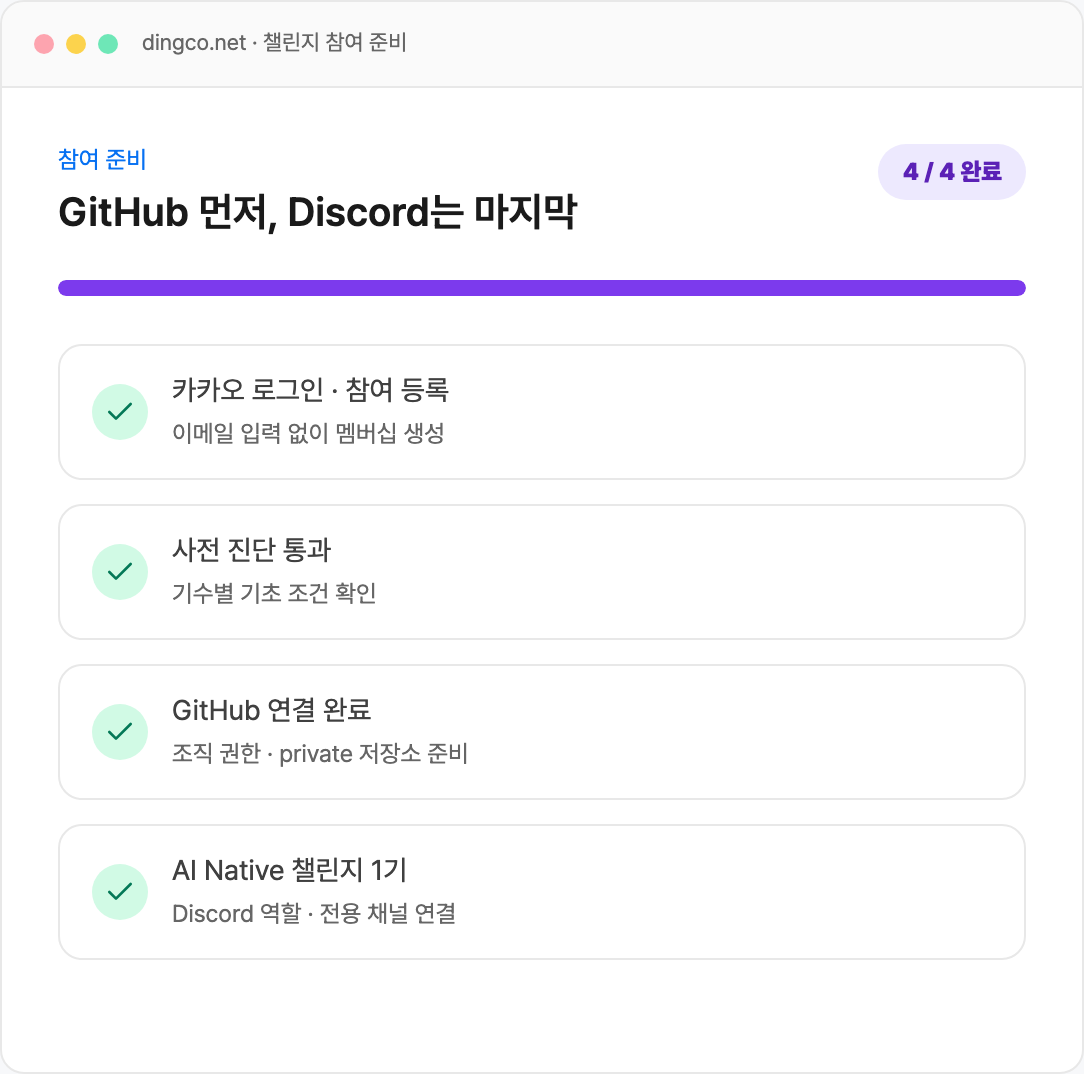
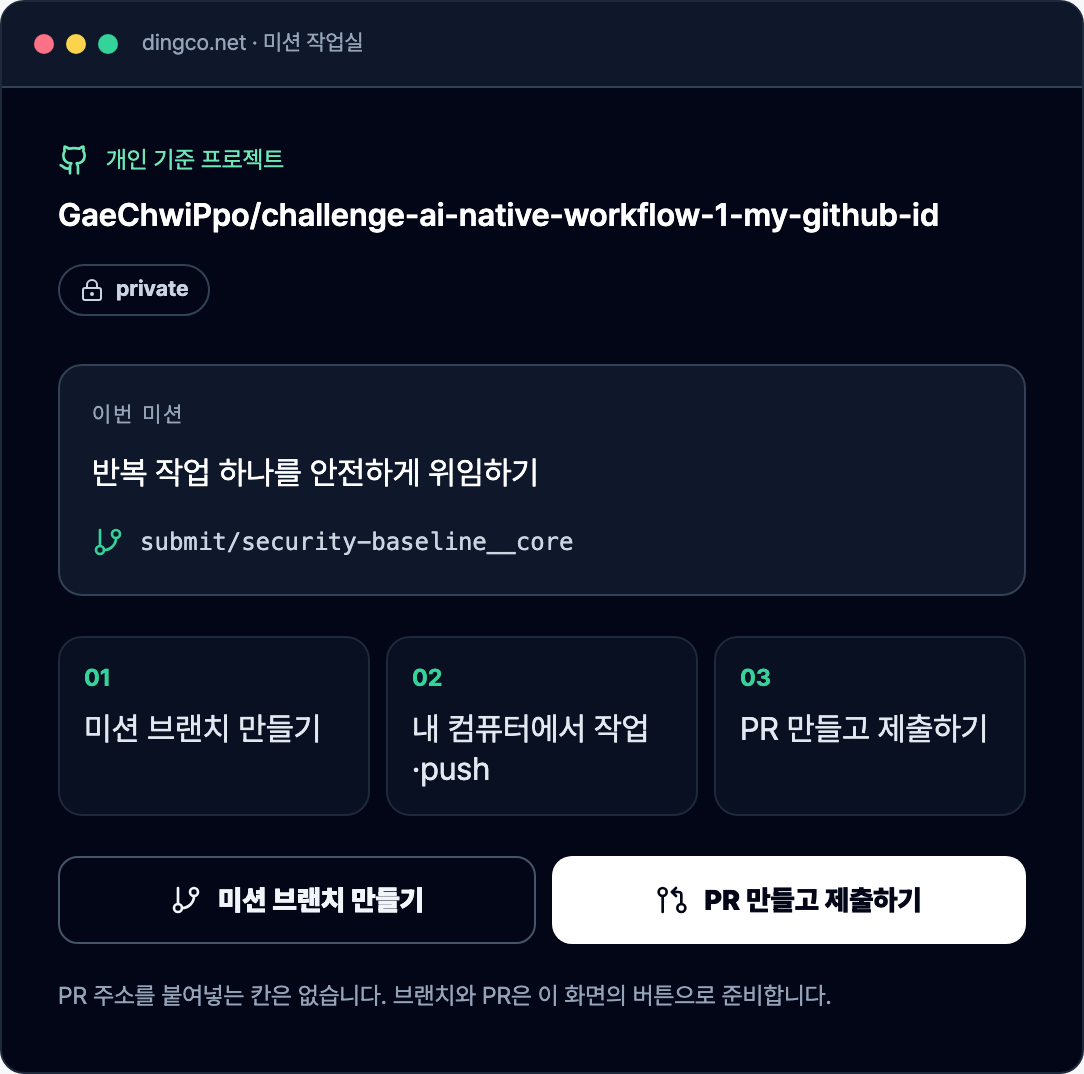
From application to review, in the order of the actual screens
Do not copy and submit the GitHub address. The Dingco website handles everything from preparing your private repository and creating mission branches and PRs to checking detailed reviews.
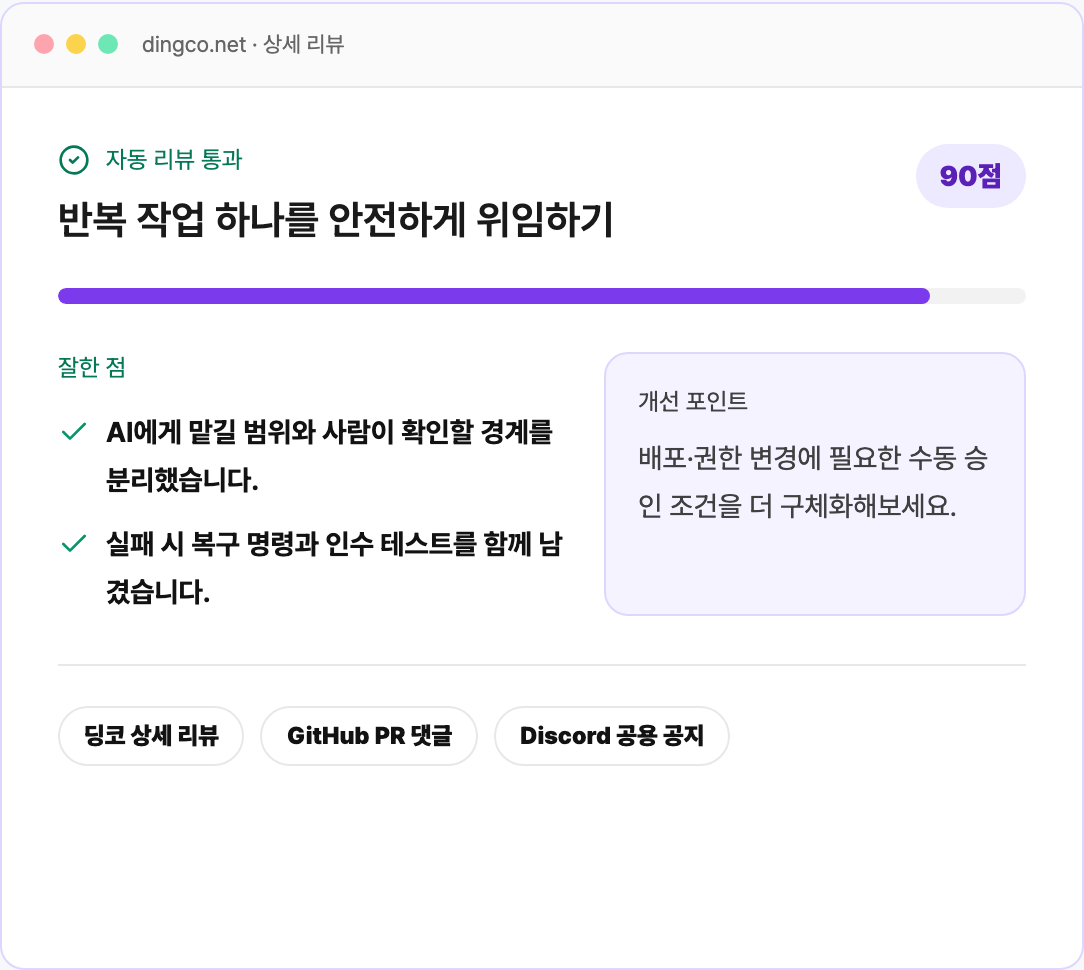
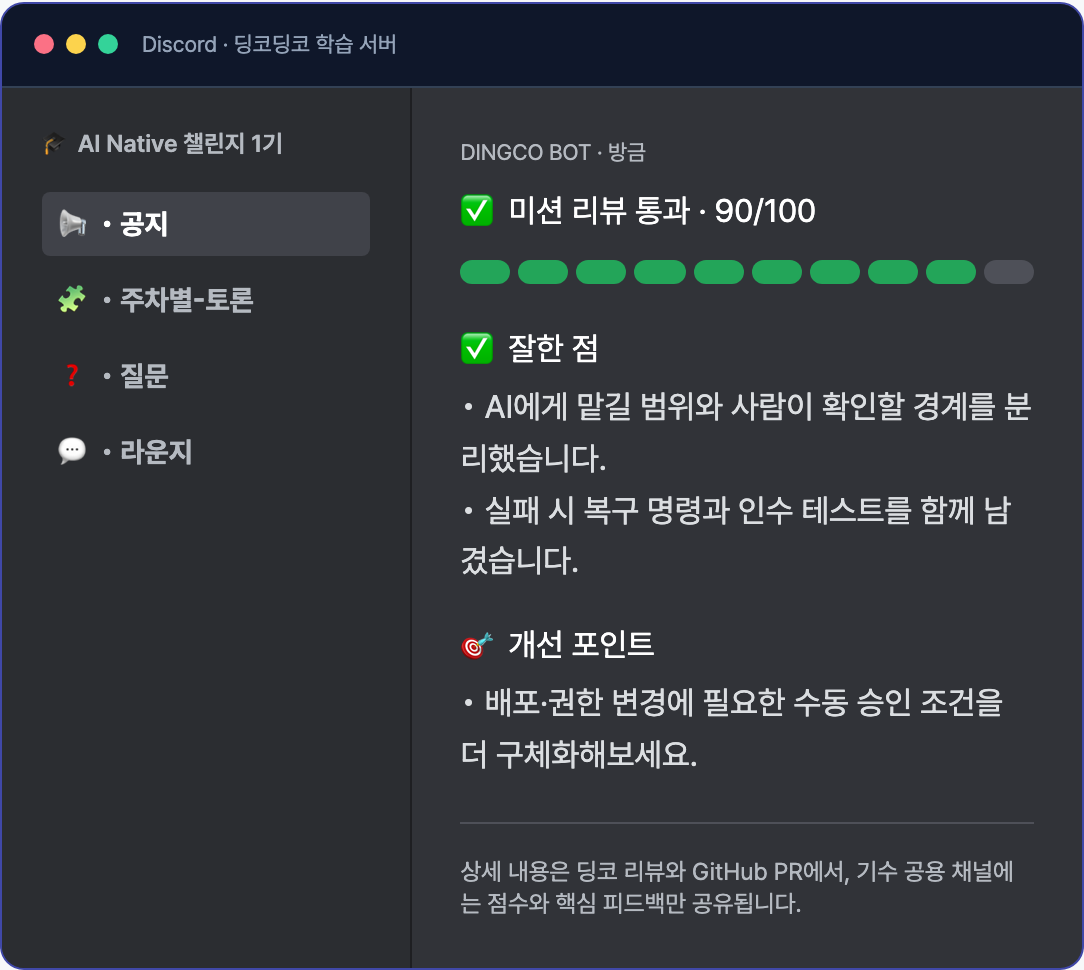
1GitHub first, Discord lastAfter completing Kakao login and the pre-diagnosis, prepare your personal private repository; Discord roles and cohort channels will be connected at the very end.2Perform the mission in your private repositoryThe homepage will guide you through creating the 'claude.md Constitution and Hook Safety Net Construction' branch and PR. Do not copy and paste the PR address.3Check the 90-point score and specific rationaleReview the strengths and improvement points from the automatic inspection and AI review in the Dingco detailed review and GitHub PR comments, then modify the same PR.4AI Native Challenge 1st Cohort Operation ChannelIndividual detailed reviews are not posted on Discord; only weekly summaries and operational announcements are shared.
The screen above is an example created based on the actual operational UI and repository/channel rules. The repository name, cohort number, and review scores will vary depending on the participant and cohort.
4-WEEK ROUTE
Weekly missions to transform what you already know into actual results
Every week, you will submit your implementation/experiments, tests/logs, decision rationales, and Q&A in a single PR. Questions are not homework assignments where you provide memorized answers; instead, you answer using the code and evidence you have just created.
W1
Context and Project Constitution
Fix the AI's work quality to the repository using claude.md, skills, and PreToolUse/PostToolUse hooks.
Weekly Integration PREstablishing the claude.md Constitution and Hook Safety Nets
[Required] Fill out the claude.md file in the repository root with the project structure, execution commands, coding rules, prohibited changes, and completion conditions using paths and commands that actually work in this repository. Utilize the constitution writing prompt from Lecture 6, but manually verify that the generated sentences match the actual file structure.
[Required] Create one skill to replace repetitive tasks at .claude/skills/<name>/SKILL.md. Fill in the name and description in the frontmatter, and verify that the skill generates an actual output (e.g., a new post under app/blog/posts/).
[Required] Register a PreToolUse Hook in .claude/settings.json to block prohibited changes, and submit a request that intentionally violates the rules to record the blocked output. Follow the exit code convention from Lecture 7.
[Required] Connect the PostToolUse Hook so that formatting or inspection is automatically executed immediately after file modification, and record the execution logs.
[Optional Extension] Extend to intelligent access control by creating branches for each path and extension using the dispatcher pattern from Lecture 8.
Submission Evidence · Five items: structure of claude.md, execution commands, coding rules, prohibited changes, and completion conditions · One .claude/skills/<name>/SKILL.md and the artifacts created by that skill · Output showing the PreToolUse Hook actually blocking a violation request · PostToolUse Hook automatic execution logs · Answers to questions 1-3
함께 답할 근거형 질문 3개
What information must be included in claude.md but can be omitted from a general README?
How did you distinguish between changes that must be blocked using PreToolUse and changes that can be handled as cleanup using PostToolUse?
What mistakes were you unable to prevent even after attaching the hooks, and how do you plan to prevent them next time?
W2
MCP and Git Collaboration Automation
Expand the AI's senses with MCP, and close the gh CLI collaboration loop from issues to PRs with E2E testing.
Weekly Integrated PRRunning a full cycle from issue to verified PR with gh CLI
[Required] Connect one of the mandatory MCPs from Lecture 2, Part 1 to .claude/settings.json and record the actual output responded by that MCP. Also, describe the read/write scope of the connected tool and specify the points where human approval is required.
[Required] Create one feature issue in this repository, add branch, commit, and PR rules to claude.md, then implement the feature on a feature/<issue-number>-<slug> branch and submit a PR. Fill out the .github/PULL_REQUEST_TEMPLATE.md format.
[Required] Fix the behavior of that feature with one Playwright scenario under tests/, and include both the failing output before implementation and the passing output after implementation.
[Optional Extension] Define sub-agents in .claude/agents/ or use git worktree to proceed with a second task in parallel and record conflict prevention boundaries.
Submission Evidence · Connected MCP settings and actual response output, read/write scope and approval points · Issue number, feature branch name, PR link with completed PR template · One Playwright scenario under tests/ and output of failure before implementation/pass after implementation · Answers to questions 1–3
함께 답할 근거형 질문 3개
How did you distinguish between points where read-only access is sufficient and points where write access is required in the connected MCP?
How did the AI's output change before and after adding the branch, commit, and PR rules to claude.md?
What does the Playwright scenario guarantee for this feature, and what does it still fail to guarantee?
W3
AI Code Review and Observation
Create a trust boundary before merging by integrating GitHub Actions review workflows, containerization, and error observability.
Weekly Integration PRPracticing Containerization, Observability, and Review Automation
[Required] Containerize this app using a Dockerfile, and provide the output showing the app actually responding within the container.
[Required] Connect Sentry to the app/ code to intentionally trigger an error, verify that the error is captured in Sentry, and then specify which metrics you would prioritize during operation along with numerical criteria.
[Required] Practice the AI code review from Part 3, Lecture 1 of the course in your personal repository and provide the execution link where the review comments are posted as evidence. Since .github/workflows/ in the submission repository is a protected path and cannot be modified, please organize and submit the workflow file content in the docs/ directory.
[Optional Extension] Configure AWS infrastructure with Terraform or deploy to ECS. This is not mandatory as it incurs actual costs; if you proceed, please leave a record showing that you have completed the resource cleanup.
[Optional Extension] Integrate Langfuse to track LLM calls.
Submission Evidence · Dockerfile and output of the app responding from the container · Record of intentional errors captured in Sentry, priority observation metrics, and alert criteria · Link to the execution where the AI review was posted in the private repository and the workflow details organized in docs/ · Answers to questions 1-3
함께 답할 근거형 질문 3개
Among the points caught by the AI review, which ones were likely to have been missed by a human?
Can this review setting filter out changes that pass the tests but should not be merged?
What are the metrics and alert criteria that will be the first to reveal problems during operation?
W4
Capstone Operational Loop
Complete a full operational loop from planning—including PRDs and tickets—to implementation, merging, observation, and retrospection.
Weekly Integrated PRCompleting one full capstone cycle from PRD to merge
[Required] Decide on one feature to add to this blog and fill out the problem definition, success criteria, user stories, functional/non-functional requirements, and out-of-scope sections in docs/prd.md, following the PRD format from Lecture 4, Part 2.
[Required] Break down the PRD into executable unit issues and write acceptance criteria for each issue. Link the issue numbers and acceptance criteria so they can be tracked in the PR body.
[Required] Select one of those features and implement it through to merging by following the claude.md, Hook, and review workflows created in weeks 1–3. Fix the acceptance criteria using scenarios under tests/.
[Required] In docs/retrospective.md, record the bottlenecks that automation actually reduced over the 4 weeks, the new bottlenecks created, and the personal dependencies that must be removed for team members to reuse it.
[Optional Extension] Spin up the entire local stack with docker-compose or automate deployment through CI/CD.
Submission Evidence · Problem definition, success criteria, user stories, requirements, and out-of-scope items in docs/prd.md · Issues containing acceptance criteria and the PR body referencing them · tests/ scenarios of implemented features with pass outputs and merged commits · Reduced bottlenecks, new bottlenecks, and personal dependencies in docs/retrospective.md · Answers to questions 1-3
함께 답할 근거형 질문 3개
Among the success criteria in the PRD, which ones were actually verified through this implementation, and which ones have not yet been verified?
Among the rules, hooks, and review workflows created in weeks 1–3, which ones were actually helpful this time, and which ones were a hindrance?
What else needs to be documented or removed for a team member to take over this repository as is?
WEEKLY LOOP
Complete one week's practical exercise within a single PR.
Check weekly practical problems
Perform the mission on your personal branch
Submit code, tests, and descriptions via PR
Check automatic inspections and AI reviews
Modify the same PR and merge automatically
Check passed PRs and official explanations
Reflecting cumulative peer reviews and crew learning records
Submissions are made only via GitHub PR. Changes created by AI must pass accurate commits, tests, and reviews just like regular code. It automatically verifies whether the necessary evidence is included within the PR.
CREW ENGAGEMENT
Spend only 20 minutes talking about the mission comments.
Starting from week 2, leave a short comment on the PR, and crew members will share only their roadblocks and different approaches.
Mission comment starting from Week 2 Leave a comment of 10–300 characters about any difficulties encountered when submitting a PR.
20 minutes at a time set by the team Starting at 21:15 on Tuesdays by default, share only the points where you got stuck and alternative approaches.
Leader wraps up in 1–30 characters Starting from Week 2, +5 for completed crews, separate from individual completion.
Team Bonus Activity Participants do not write separate posts other than the mission comment. The Crew +5 points are separate from individual completion.
LIVE SESSION
Once live, we align on the process together
A live session will be held once during the challenge period. We will align on the completion criteria together and check on the spot how the submission process flows on the screen.
KICKOFF LIVE8/31(Mon) 20:00
60 min · Online
AI Native Challenge Kickoff Live
Guide to the 4-week process and completion criteria
Preparation of the first mission branch at the Monday kickoff and a demonstration of GitHub PR submission after the Wednesday start
Real-time Q&A
The participation link will be posted in the Discord announcement before the start. Even if you cannot participate in the live session, you can still check the completion criteria and submission methods on the Dingco website and Discord announcements.
CHALLENGE CONTRACT
Learn concepts individually, practice and feedback together
This challenge does not provide lectures, textbooks, Notion pages, or bonus materials. You apply what you already know or have learned on your own to actual problems and prove it through GitHub PRs.
The challenge provides
Weekly practical problems · Private practice repository · Clear passing criteria · Automated checks and AI reviews · Peer comparisons and completion records
Participants prepare
Basic concepts in the relevant field · Experience with Git and GitHub PRs · Time to commit every week · An attitude of self-supplementing missing concepts
Optional Pre-learning · Separate Purchase · 16 hours 38 minutes
The 10x AI-Native Developer
This lecture and textbook are not included in the challenge, and enrollment is not mandatory. Please choose them only if you identify weak areas through the pre-diagnostic test or need to supplement your conceptual understanding.
Regardless of whether you have applied on Inflearn, check the recruitment status of the current cohort via the ‘Check Recruitment/Participation’ button above. Once you log in with Kakao on Dingco, your spot will be secured, and after completing all connections, you will be ready to participate.
Select the current cohort on the Dinko recruitment/participation confirmation page and log in with Kakao to immediately create your challenge membership and secure your spot.
Once you pass the pre-diagnosis for each cohort, the GitHub connection step will open.
If you connect GitHub first, the organization permission check and the preparation of a private repository for AI operation experiments will be automatically scheduled.
Connecting Discord will grant you access to the AI Native Challenge Season 1 category and permissions for the announcement, reading material, Q&A, and free talk channels.
Create a submit/<mission> branch on the homepage, push the rules, automation, and execution evidence, and then submit the PR with a single click.
The latest commits that pass automated checks and AI reviews are automatically merged by Dingco and celebrated together in the free channel. Security-sensitive or low-confidence results are processed after human review. In the crew Discord, questions and progress are shared, and official reviews prioritize PRs passed by the same crew; if none are available, they proceed to PRs from other crews in the same cohort. The scoreboard is provisionally updated during the week and finalized after the final cumulative review deadline.
Read access for the same cohort Personal repositories are kept private, and participants in the same cohort can access them as read-only after the weekly results are released. Write access is granted only to your own repository. Crews are typically operated with 5–6 members, and the roster remains hidden until revealed. Detailed scorecards are not disclosed; only the winning crews who have consented will be introduced in the Hall of Fame with GitHub badges and public names after the final scores are confirmed. Registration closes at 19:00 on the Wednesday of the starting week. For tracks with a preliminary diagnostic, it must be passed by the same time, and the crew list along with the dedicated Discord channel will be revealed at 20:00. The official start and the release of the Week 1 mission are at 21:00 on the same day. Thereafter, new missions open every Wednesday at 21:00, and submissions close the following Tuesday at 21:00. Official reviews do not need to be completed immediately each week, but the required number of reviews based on different weekly criteria must be met by 21:00 on the Sunday following the final week. Week 1 problems, personal repositories, and mission branches can be prepared in advance, and the PR submission button will be automatically activated once your crew channel setup is complete. Participants who have not finished linking GitHub and Discord will remain in their assigned crews.
FIT CHECK
This is suitable for these types of people, and not suitable for these types of people.
Recommended for
Developers who use Claude Code or coding agents but experience high variance in results
Those who want to turn AI automation into rules and repository structures for their teams to reuse
Those who want to manage not only speed but also testing, permissions, and recovery strategies.
Not recommended
Those who do not have experience with Git, testing, and basic project execution
Those looking for a way to merge generated code as-is without verification
COMPLETION
The completion criteria will be disclosed before the start.
Submit all 4 weekly integrated mission PRs over the course of 4 weeks.
Submit official reviews for passing PRs from three different weeks.
Preparation before starting
Submissions will be made through a personal private repository created by Dingco. It contains the same Next.js·TypeScript·Tailwind blog project as the lecture, with the answers for the missions left blank.
The language and framework are fixed based on the lecture. Submissions using other stacks are not allowed.
Every week, you must follow along with the corresponding part of the lecture for about 4 to 6 hours and provide evidence of execution.
FAQ
Most frequently asked questions before participating
Is this the same course as the existing 10-week bootcamp?
No. This challenge is a separate track where you complete one subject over the course of 4 weeks. It only leads to the 10-week bootcamp if you require a longer project and job-focused curriculum.
Are lectures or textbooks provided as well?
No. The challenge provides weekly problems, a private practice repository, submission criteria, and a review loop. The connected lectures are optional pre-learning materials available for separate purchase and are not mandatory to take.
Is it also possible to submit on the website or paste a link?
Submission results are only accepted via GitHub PR. However, preparing repositories, branches, and PRs, as well as checking reviews, can be easily accessed through buttons on the Dingco website.
What is shared on Discord?
Detailed individual reviews are not posted on Discord; only weekly summaries and operational announcements are shared. The AI Native Challenge 1st cohort public channel is a space for reading materials, questions, free conversation, and operational guidance.
CREATOR NOTE
Claude Skills, why should you use them?
You can first check in the video which criteria should be used to execute and verify this problem.