


빌드 에러
1740
작성자 없음
Failed to construct transformer:  Error: error:0308010C:digital envelope routines::unsupported
    at new Hash (node:internal/crypto/hash:71:19)
    at Object.createHash (node:crypto:133:10)
    at stableHash (C:\Users\user\Food-Delivery-App\front\node_modules\metro-cache\src\stableHash.js:19:8)
    at Object.getCacheKey (C:\Users\user\Food-Delivery-App\front\node_modules\metro-transform-worker\src\index.js:593:7)
    at getTransformCacheKey (C:\Users\user\Food-Delivery-App\front\node_modules\metro\src\DeltaBundler\getTransformCacheKey.js:24:19)
    at new Transformer (C:\Users\user\Food-Delivery-App\front\node_modules\metro\src\DeltaBundler\Transformer.js:48:9)
    at C:\Users\user\Food-Delivery-App\front\node_modules\metro\src\Bundler.js:22:29
    at runNextTicks (node:internal/process/task_queues:60:5)
    at process.processTimers (node:internal/timers:504:9) {
  opensslErrorStack: [ 'error:03000086:digital envelope routines::initialization error' ],
  library: 'digital envelope routines',
  reason: 'unsupported',
  code: 'ERR_OSSL_EVP_UNSUPPORTED'
}
파일을 옮기다가 에러가 났는데 몇 시간째 해결 못해서 결국 여기서 여쭤봅니다ㅠㅠ
npm run android 실행 결과 이 에러가 발생했습니다.
서칭 결과, 이 에러가 node 버전 문제라고 해서 다운그레이딩 시켜서 해봤으나 해결되지 않았어요
이 전에 다른 에러로 찾고 있다가 npm install -g npm@latest 로 했더니 해결 됐었거든요 그래서 npm이랑 node 버전을 다 다운그레이딩 했는데 안됐습니다
혹시 다른 방법이 있을까요???
답변 1
0
노드 16버전에서는 발생하지 않는 문제입니다. 노드17버전에서부터 발생합니다.
https://www.google.com/url?sa=t&source=web&rct=j&url=https://stackoverflow.com/questions/69394632/webpack-build-failing-with-err-ossl-evp-unsupported&ved=2ahUKEwjPnMzA85P9AhWNDd4KHfbCCrcQFnoECAoQAQ&usg=AOvVaw0wC224ZGAACOLLl1cayRWx
0
C:\Users\user\Food-Delivery-App\front>npm run android

> fooddeliveryapp@1.0.1 android
C:\Users\user\Food-Delivery-App\front>npm run android

> fooddeliveryapp@1.0.1 android
> react-native run-android

info Starting JS server...
info Installing the app...

> Configure project :app
Reading env from: .env

Deprecated Gradle features were used in this build, making it incompatible with Gradle 8.0.

You can use '--warning-mode all' to show the individual deprecation warnings and determine if they come from your own scripts or plugins.

See https://docs.gradle.org/7.5.1/userguide/command_line_interface.html#sec:command_line_warnings
5 actionable tasks: 5 up-to-date

FAILURE: Build failed with an exception.

* What went wrong:
Could not determine the dependencies of task ':app:compileDebugJavaWithJavac'.
> Could not resolve all task dependencies for configuration ':app:debugCompileClasspath'.
   > Could not resolve project :react-native-code-push.
     Required by:
         project :app
      > No matching configuration of project :react-native-code-push was found. The consumer was configured to find an API of a component, preferably optimized for Android, as well as attribute 'com.android.build.api.attributes.BuildTypeAttr' with value 'debug', attribute 'com.android.build.api.attributes.AgpVersionAttr' with value '7.3.1' but:
          - None of the consumable configurations have attributes.

* Try:
> Run with --stacktrace option to get the stack trace.
> Run with --info or --debug option to get more log output.
> Run with --scan to get full insights.

* Get more help at https://help.gradle.org

BUILD FAILED in 1m 13s

error Failed to install the app. Make sure you have the Android development environment set up: https://reactnative.dev/docs/environment-setup.
Error: Command failed: gradlew.bat app:installDebug -PreactNativeDevServerPort=8081

FAILURE: Build failed with an exception.

* What went wrong:
Could not determine the dependencies of task ':app:compileDebugJavaWithJavac'.
> Could not resolve all task dependencies for configuration ':app:debugCompileClasspath'.
   > Could not resolve project :react-native-code-push.
     Required by:
         project :app
      > No matching configuration of project :react-native-code-push was found. The consumer was configured to find an API of a component, preferably optimized for Android, as well as attribute 'com.android.build.api.attributes.BuildTypeAttr' with value 'debug', attribute 'com.android.build.api.attributes.AgpVersionAttr' with value '7.3.1' but:
          - None of the consumable configurations have attributes.

* Try:
> Run with --stacktrace option to get the stack trace.
> Run with --info or --debug option to get more log output.
> Run with --scan to get full insights.

* Get more help at https://help.gradle.org

BUILD FAILED in 1m 13s

    at makeError (C:\Users\user\Food-Delivery-App\front\node_modules\@react-native-community\cli-platform-android\node_modules\execa\index.js:174:9)
    at C:\Users\user\Food-Delivery-App\front\node_modules\@react-native-community\cli-platform-android\node_modules\execa\index.js:278:16
    at processTicksAndRejections (node:internal/process/task_queues:96:5)
    at async runOnAllDevices (C:\Users\user\Food-Delivery-App\front\node_modules\@react-native-community\cli-platform-android\build\commands\runAndroid\runOnAllDevices.js:82:7)
    at async Command.handleAction (C:\Users\user\Food-Delivery-App\front\node_modules\@react-native-community\cli\build\index.js:108:9)
info Run CLI with --verbose flag for more details.
이 후 이것도 해보고 저것도 해보고 돌고 돌다보니 다시 이 에러가 생겼습니다.
앞의 수업을 바탕으로 노드 16.13.1 버전으로 다운그레이드해서 빌드를 진행했으나, 상황은 같습니다..
https://code-hoon.tistory.com/238
https://velog.io/@seora/RN-%EC%97%90%EB%9F%AC-run-android-build-error
위 블로그 에러와 같은 상황인데, sdk 환경변수 문제라고 하는데 제가 보기엔 문제가 없어보여서 어디가 문제인지 모르겠어요
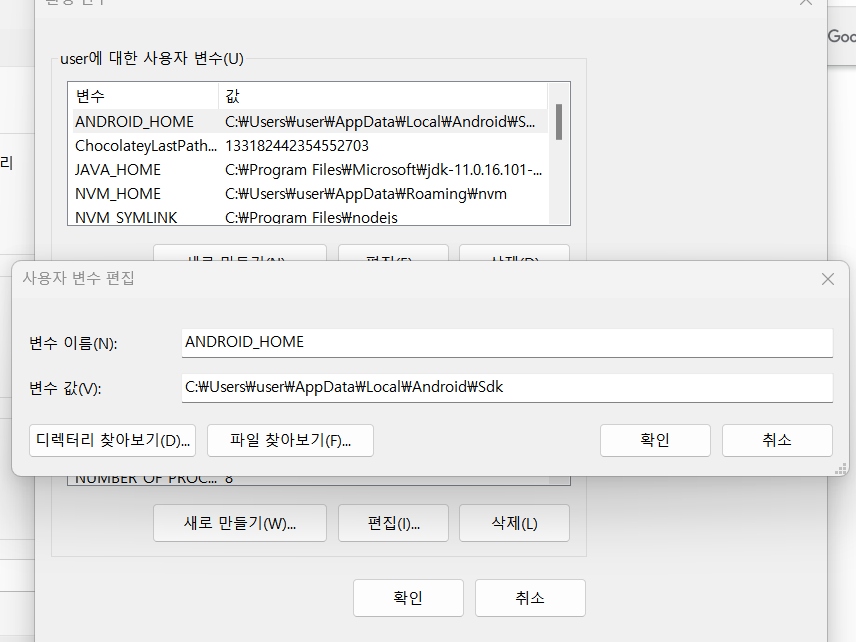
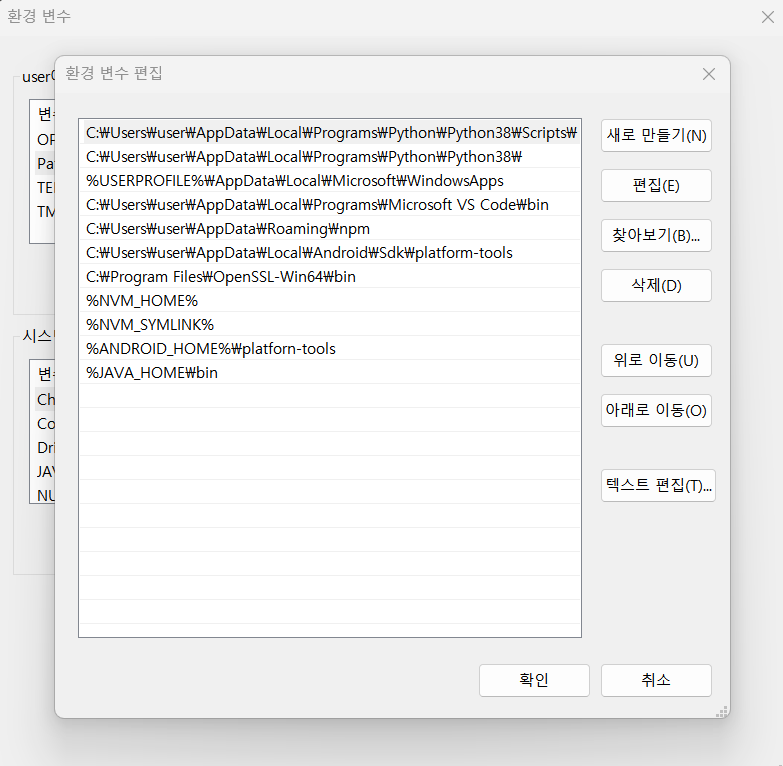
0
C:\Users\user\Food-Delivery-App\front>npm run android

> fooddeliveryapp@1.0.1 android
> react-native run-android

info Starting JS server...
info Installing the app...

> Configure project :app
Reading env from: .env
WARNING:The specified Android SDK Build Tools version (28.0.3) is ignored, as it is below the minimum supported version (30.0.3) for Android Gradle Plugin 7.3.1.
Android SDK Build Tools 30.0.3 will be used.
To suppress this warning, remove "buildToolsVersion '28.0.3'" from your build.gradle file, as each version of the Android Gradle Plugin now has a default version of the build tools.

> Task :app:checkDebugDuplicateClasses FAILED

Deprecated Gradle features were used in this build, making it incompatible with Gradle 8.0.

You can use '--warning-mode all' to show the individual deprecation warnings and determine if they come from your own scripts or plugins.

See https://docs.gradle.org/7.5.1/userguide/command_line_interface.html#sec:command_line_warnings
277 actionable tasks: 8 executed, 269 up-to-date

FAILURE: Build completed with 2 failures.

1: Task failed with an exception.
-----------
* What went wrong:
Execution failed for task ':app:checkDebugDuplicateClasses'.
> Could not resolve all files for configuration ':app:debugRuntimeClasspath'.
   > Failed to transform com.skt.Tmap_1.75.jar to match attributes {artifactType=enumerated-runtime-classes, org.gradle.libraryelements=jar, org.gradle.usage=java-runtime}.
      > Execution failed for JetifyTransform: C:\Users\user\Food-Delivery-App\front\android\app\libs\com.skt.Tmap_1.75.jar.
         > Transform's input file does not exist: C:\Users\user\Food-Delivery-App\front\android\app\libs\com.skt.Tmap_1.75.jar. (See https://issuetracker.google.com/issues/158753935)

* Try:
> Run with --stacktrace option to get the stack trace.
> Run with --info or --debug option to get more log output.
> Run with --scan to get full insights.
==============================================================================

2: Task failed with an exception.
-----------
* What went wrong:
java.lang.StackOverflowError (no error message)

* Try:
> Run with --stacktrace option to get the stack trace.
> Run with --info or --debug option to get more log output.
> Run with --scan to get full insights.
==============================================================================

* Get more help at https://help.gradle.org

BUILD FAILED in 1m 11s

error Failed to install the app. Make sure you have the Android development environment set up: https://reactnative.dev/docs/environment-setup.
Error: Command failed: gradlew.bat app:installDebug -PreactNativeDevServerPort=8081

FAILURE: Build completed with 2 failures.

1: Task failed with an exception.
-----------
* What went wrong:
Execution failed for task ':app:checkDebugDuplicateClasses'.
> Could not resolve all files for configuration ':app:debugRuntimeClasspath'.
   > Failed to transform com.skt.Tmap_1.75.jar to match attributes {artifactType=enumerated-runtime-classes, org.gradle.libraryelements=jar, org.gradle.usage=java-runtime}.
      > Execution failed for JetifyTransform: C:\Users\user\Food-Delivery-App\front\android\app\libs\com.skt.Tmap_1.75.jar.
         > Transform's input file does not exist: C:\Users\user\Food-Delivery-App\front\android\app\libs\com.skt.Tmap_1.75.jar. (See https://issuetracker.google.com/issues/158753935)

* Try:
> Run with --stacktrace option to get the stack trace.
> Run with --info or --debug option to get more log output.
> Run with --scan to get full insights.
==============================================================================

2: Task failed with an exception.
-----------
* What went wrong:
java.lang.StackOverflowError (no error message)

* Try:
> Run with --stacktrace option to get the stack trace.
> Run with --info or --debug option to get more log output.
> Run with --scan to get full insights.
==============================================================================

* Get more help at https://help.gradle.org

BUILD FAILED in 1m 11s

    at makeError (C:\Users\user\Food-Delivery-App\front\node_modules\@react-native-community\cli-platform-android\node_modules\execa\index.js:174:9)
    at C:\Users\user\Food-Delivery-App\front\node_modules\@react-native-community\cli-platform-android\node_modules\execa\index.js:278:16
    at processTicksAndRejections (node:internal/process/task_queues:96:5)
    at async runOnAllDevices (C:\Users\user\Food-Delivery-App\front\node_modules\@react-native-community\cli-platform-android\build\commands\runAndroid\runOnAllDevices.js:82:7)
    at async Command.handleAction (C:\Users\user\Food-Delivery-App\front\node_modules\@react-native-community\cli\build\index.js:108:9)
info Run CLI with --verbose flag for more details.
rn71 레포 참고해서 수정하였습니다.
이번엔 또 다른 에러가 발생했네요...ㅠㅠ
build.gradle, patches 파일 추가해주었고, AndroidManifest.xml true로 다 변경해주었습니다. 이후 npm i 했구요
0
C:\Users\user\Food-Delivery-App\front\android\app\libs\com.skt.Tmap_1.75.jar.
이 파일이 없나요?? Add as library도 하셨나요?
0
음... 진도를 어디까지 나가신건가요? 처음에 code-push 에러는 수업 완전 마지막 부분입니다. tmap 부분은 중간 정도이고요. 너무 후반부 소스 코드를 쓰신 게 아닌가 싶습니다.
앱실행시 네이버맵 [401] 에러
0
1182
2
스타일링 라이브러리
0
194
2
expo, cli 선택 중에 고민이 있습니다.
0
212
2
JDK 버전이 달라도 괜찮나요?
0
282
2
dimenstion usewindowdeminstion
0
164
3
[맥 전용]환경 설정하기 1편 & [맥 전용]환경 설정하기 2편의 영상이 안나옵니다.
0
238
1
jdk11 버전과 gradle 버전의 호환성 관련 질문드립니다.
0
441
2
강의 외 질문입니다!
0
187
2
react native랑 맞는 ui 라이브러리 어떤게 좋을까요?
0
1676
2
react native와 spring boot 연결
0
393
1
java가 아닌 .kt에서 code push 에러가 발생합니다.
0
253
2
flipper 239 에러가 발생합니다.
0
202
2
package.json에 /lib/panino.js 문제입니다.
0
519
2
window - mac 협업 과정 질문합니다
0
248
1
ios 빌드 중 RCTBridgeDelegate.h import 오류
0
318
2
ios 앱 빌드 중 hermesEnabled 관련 오류발생
0
280
2
Socket 연결시 질문 드립니다.!
0
186
2
wifi 환경에서 axios 통신이 로컬서버에서 안됩니다.
0
470
2
iOS render error 질문드립니다.
0
459
2
iOS 가상머신 오류
0
198
2
npc react init 명령어 실행시 발생되는 오류
0
240
1
nom start 시 오류
0
145
1
NextJS 기반으로 만들어서 웹뷰 React Native로 배포 가능한가요?
0
1066
2
안드로이드 rn75 버전에 맞게 설정 중에 android13 다운로드에 대해서 막혔습니다!
0
214
2