


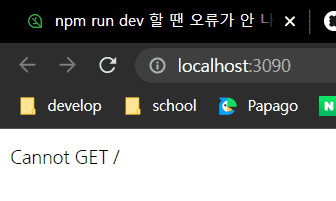
npm run dev 할 땐 오류가 안 나는데 웹에 들어가보면 Error가 떠요 ㅠㅠㅠ
1437
작성한 질문수 2
Failed to load resource: the server responded with a status of 404 (Not Found)
-> 이런 오류가 뜨고 경로도 바꿔봤는데 안 되네요...
webpack.config.ts
import path from 'path';
import ReactRefreshWebpackPlugin from '@pmmmwh/react-refresh-webpack-plugin';
import webpack from 'webpack';
import ForkTsCheckerWebpackPlugin from 'fork-ts-checker-webpack-plugin';
// import { BundleAnalyzerPlugin } from 'webpack-bundle-analyzer';

const isDevelopment = process.env.NODE_ENV !== 'production';
const __dirname = path.resolve();

const config: webpack.Configuration = {
  name: 'slack-clone',
  mode: isDevelopment ? 'development' : 'production',
  devtool: !isDevelopment ? 'hidden-source-map' : 'eval',
  resolve: {
    extensions: ['.js', '.jsx', '.ts', '.tsx', '.json'],
    alias: {
      '@hooks': path.resolve(__dirname, 'hooks'),
      '@components': path.resolve(__dirname, 'components'),
      '@layouts': path.resolve(__dirname, 'layouts'),
      '@pages': path.resolve(__dirname, 'pages'),
      '@utils': path.resolve(__dirname, 'utils'),
      '@typings': path.resolve(__dirname, 'typings'),
    },
  },
  entry: {
    app: './client', // app2, app3 ... 만들 수 있음
  },
  module: {
    rules: [
      {
        test: /\.tsx?$/,
        loader: 'babel-loader',
        options: {
          presets: [
            [
              '@babel/preset-env',
              {
                targets: { browsers: ['last 2 chrome versions'] },
                debug: isDevelopment,
              },
            ],
            '@babel/preset-react',
            '@babel/preset-typescript',
          ],
          env: {
            development: {
              plugins: [['@emotion', { sourceMap: true }], require.resolve('react-refresh/babel')],
            },
            production: {
              plugins: ['@emotion'],
            },
          },
        },
        exclude: path.join(__dirname, 'node_modules'),
      },
      {
        test: /\.css?$/,
        use: ['style-loader', 'css-loader'],
      },
    ],
  },
  plugins: [
    new ForkTsCheckerWebpackPlugin({
      async: false,
      // eslint: {
      //   files: "./src/**/*",
      // },
    }),
    new webpack.EnvironmentPlugin({ NODE_ENV: isDevelopment ? 'development' : 'production' }),
  ],
  output: {
    path: path.join(__dirname, 'dist'),
    filename: '[name].js', // name : client

    // publicPath: '/dist/',
  },
  devServer: {
    historyApiFallback: true, // react router
    port: 3090,

    // publicPath: '/dist/',
    // proxy: {
    //   '/api/': {
    //     target: 'http://localhost:3095',
    //     changeOrigin: true,
    //   },
    // },
  },
};

if (isDevelopment && config.plugins) { // 개발환경일 때 쓸 플러그인
  config.plugins.push(new webpack.HotModuleReplacementPlugin());
  config.plugins.push(new ReactRefreshWebpackPlugin());
  // config.plugins.push(new BundleAnalyzerPlugin({ analyzerMode: 'server', openAnalyzer: true }));
}
if (!isDevelopment && config.plugins) { // 개발환경이 아닐 때 쓸 플러그인
  // config.plugins.push(new webpack.LoaderOptionsPlugin({ minimize: true }));
  // config.plugins.push(new BundleAnalyzerPlugin({ analyzerMode: 'static' }));
}

export default config;
package.json
{
  "name": "alecture",
  "version": "1.0.0",
  "description": "",
  "main": "index.js",
  "scripts": {
    "dev": "cross-env TS_NODE_PROJECT=\"tsconfig-for-webpack-config.json\" NODE_ENV=production webpack serve --env development",
    "build": "cross-env TS_NODE_PROJECT=\"tsconfig-for-webpack-config.json\" NODE_ENV=production webpack",
    "test": "echo \"Error: no test specified\" && exit 1"
  },
  "author": "",
  "license": "ISC",
  "dependencies": {
    "@emotion/babel-plugin": "^11.7.2",
    "@types/react": "^17.0.41",
    "@types/react-dom": "^17.0.14",
    "cross-env": "^7.0.3",
    "react": "^17.0.2",
    "react-dom": "^17.0.2",
    "typescript": "^4.6.2"
  },
  "devDependencies": {
    "@babel/core": "^7.17.8",
    "@babel/preset-env": "^7.16.11",
    "@babel/preset-react": "^7.16.7",
    "@babel/preset-typescript": "^7.16.7",
    "@pmmmwh/react-refresh-webpack-plugin": "^0.5.4",
    "@types/node": "^17.0.21",
    "@types/webpack": "^5.28.0",
    "@types/webpack-dev-server": "^4.7.2",
    "babel-loader": "^8.2.3",
    "css-loader": "^6.7.1",
    "eslint": "^8.11.0",
    "eslint-config-prettier": "^8.5.0",
    "eslint-plugin-prettier": "^4.0.0",
    "fork-ts-checker-webpack-plugin": "^7.2.1",
    "prettier": "^2.6.0",
    "react-refresh": "^0.11.0",
    "style-loader": "^3.3.1",
    "ts-node": "^10.7.0",
    "webpack": "^5.70.0",
    "webpack-cli": "^4.9.2",
    "webpack-dev-server": "^4.7.4"
  }
}
<html>
  <head profile="http://www.w3.org/2005/10/profile">
    <meta charset="UTF-8">
    <meta name="viewport"
          content="width=device-width, user-scalable=no, initial-scale=1.0, maximum-scale=1.0, minimum-scale=1.0">
    <meta http-equiv="X-UA-Compatible" content="ie=edge">
    <title>슬리액</title>
    <link rel="icon" type="image/png" href="http://example.com/myicon.png">
    <style>
        html, body {
            margin: 0;
            padding: 0;
            overflow: initial !important;
        }
        body {
            font-size: 15px;
            line-height: 1.46668;
            font-weight: 400;
            font-variant-ligatures: common-ligatures;
            -moz-osx-font-smoothing: grayscale;
            -webkit-font-smoothing: antialiased;
        }
        * {
            box-sizing: border-box;
        }
    </style>
    <link rel="stylesheet" href="https://a.slack-edge.com/bv1-9/client-boot-styles.dc0a11f.css?cacheKey=gantry-1613184053" crossorigin="anonymous" />
    <link rel="shortcut icon" href="https://a.slack-edge.com/cebaa/img/ico/favicon.ico" />
    <link href="https://a.slack-edge.com/bv1-9/slack-icons-v2-16ca3a7.woff2" rel="preload" as="font" crossorigin="anonymous" />
  </head>
  <body>
    <div id="app">

    </div>
    <script src="./dist/app.js"></script>
    <!-- index.html로 실행할 때는 ./ 쓰고 webpack-dev-server로 실행할 때는 ./ 없이 쓴다. -->
  </body>
</html>답변 1
0
에러메시지 보시면 어떤 파일이 404인지도 뜰텐데요?
<script src="./dist/app.js"></script>
    <!-- index.html로 실행할 때는 ./ 쓰고 webpack-dev-server로 실행할 때는 ./ 없이 쓴다. -->
0
Failed to load resource: the server responded with a status of 404 (Not Found)
localhost/:1 -> 이렇게만 뜨고 어떤 파일인지는 안 뜨네요...
타입 점검하기 swr관련 질문 있습니다.
0
74
2
기본 셋팅과 관련하여
0
140
1
초기 셋팅 back과 front만 남겨두고 다 지운 후 진행 방법
0
144
2
focus 시에만 화면 업데이트 되는 이유 + 해결방법
0
219
2
useEffect 개수 관리
0
161
2
라이브러리 서치 방법
0
154
2
함수 정의 패턴
0
111
1
npm run dev 에러
0
196
3
npx webpack 후 에러
0
220
2
'void' 형식 식의 truthiness를 테스트할 수 없습니다.ts(1345)
0
186
2
사용자 가입시 에러발생 (TypeError: Cannot read properties of null (reading 'addMembers')
1
238
2
초기세팅중 packge.json 에러떠요
0
199
2
CORS - Access-Control-Allow-Origin 누락 문제
0
495
3
로그인 페이지 무한 새로고침 현상
0
661
2
Module not found: Error: Can't resolve './App' 에러
0
997
1
배포 방법
0
338
2
npm run dev 시 빌드가 매우 느려졌습니다
0
1084
2
alias 경로 설정 오류
0
503
2
fetcher 함수의 data 값이 두번 찍히는 이유
0
318
1
제네릭 질문
0
260
2
ts-node 대신 tsx 사용여부
0
408
1
배포 관련 질문
0
261
1
[nginx + https] 서비스를 실행하면 niginx가 아닌 서비스 화면을 보여주게 하고 싶습니다.
0
422
2
[배포하기] webpack에 aws 퍼블릭 IPv4 주소 와 포트 주소를 작성하고 나서 빌드후 실행하면 오류가 발생합니다.
0
367
1