인프런 워밍업 클럽 4기 DevOps 미션 4.
2025.06.13
실습
자료실의 파일 생성 api 2개 > 각각의 폴더에 파일만들어짐 > 3군데 위치에서 파일 생성된걸 확인 > Pod 삭제 > 저 위치에서 다시 파일 확인
hostPath 써서 똑같이 실행
로컬 동작 확인
[root@k8s-master ~]# kubectl get pods -n anotherclass-123
NAME                               READY   STATUS    RESTARTS   AGE
api-tester-1231-6fd678cd55-gbjtx   1/1     Running   0          11m
api-tester-1231-6fd678cd55-hprxx   1/1     Running   0          110s

// 1번 API - 파일 생성
curl http://192.168.56.30:31231/create-file-pod
curl http://192.168.56.30:31231/create-file-pv
[root@k8s-master ~]# curl http://192.168.56.30:31231/create-file-pod
abmfbdhohw.txt
[root@k8s-master ~]# curl http://192.168.56.30:31231/create-file-pv
tjvoyjqsql.txt jawhiikqtb.txt helfolpopo.txt
에러때문에 3번 진행했다가 3개 생성... 아니 그냥 이거를 했을 때에 무조건 replicas 를 1로 바꾸나..?
[root@k8s-master ~]# kubectl get pods -n anotherclass-123
NAME                               READY   STATUS    RESTARTS   AGE
api-tester-1231-6fd678cd55-gbjtx   1/1     Running   0          16m
api-tester-1231-6fd678cd55-gbjtx < 사용 파드명
// 2번 - Container 임시 폴더 확인
kubectl exec -n anotherclass-123 -it api-tester-1231-6fd678cd55-gbjtx -- ls /usr/src/myapp/tmp
// 2번 - Container 영구저장 폴더 확인
kubectl exec -n anotherclass-123 -it api-tester-1231-6fd678cd55-gbjtx -- ls /usr/src/myapp/files/dev
// 2번 - master node 폴더 확인
ls /root/k8s-local-volume/1231
[root@k8s-master ~]# kubectl exec -n anotherclass-123 -it api-tester-1231-6fd678cd55-gbjtx -- ls /usr/src/myapp/tmp
abmfbdhohw.txt
[root@k8s-master ~]# kubectl exec -n anotherclass-123 -it api-tester-1231-6fd678cd55-gbjtx -- ls /usr/src/myapp/files/dev
helfolpopo.txt  jawhiikqtb.txt  tjvoyjqsql.txt
[root@k8s-master ~]# ls /root/k8s-local-volume/1231
helfolpopo.txt  jawhiikqtb.txt  tjvoyjqsql.txt
[root@k8s-master ~]# kubectl delete -n anotherclass-123 pod api-tester-1231-6fd678cd55-gbjtx
pod "api-tester-1231-6fd678cd55-gbjtx" deleted
[root@k8s-master ~]# curl http://192.168.56.30:31231/list-file-pod
[root@k8s-master ~]# curl http://192.168.56.30:31231/list-file-pv
tjvoyjqsql.txt jawhiikqtb.txt helfolpopo.txt
POD에 생성한 파일은 날아가고, PV 받아 생성한 파일은 남아있음 ( 오류 2번 있었어서, 파일 총 3개인 모습 )
2. hostPath 동작 확인
    spec:
      volumes:
        - name: files
          hostPath:
            path: /root/k8s-local-volume/1231
deployment 수정
[root@k8s-master ~]# kubectl get pods -n anotherclass-123
NAME                               READY   STATUS    RESTARTS   AGE
api-tester-1231-7998bc7d89-7pqlr   1/1     Running   0          84s
완료. 위와 동일한 동작!
[root@k8s-master ~]# curl http://192.168.56.30:31231/create-file-pod
yhwyoujvgo.txt
[root@k8s-master ~]# curl http://192.168.56.30:31231/create-file-pv
ygvvkrwlzq.txt tjvoyjqsql.txt jawhiikqtb.txt helfolpopo.txt


[root@k8s-master ~]# kubectl exec -n anotherclass-123 -it api-tester-1231-7998bc7d89-7pqlr -- ls /usr/src/myapp/tmp
yhwyoujvgo.txt
[root@k8s-master ~]# kubectl exec -n anotherclass-123 -it api-tester-1231-7998bc7d89-7pqlr -- ls /usr/src/myapp/files/dev
helfolpopo.txt  jawhiikqtb.txt  tjvoyjqsql.txt  ygvvkrwlzq.txt
[root@k8s-master ~]# ls /root/k8s-local-volume/1231
helfolpopo.txt  jawhiikqtb.txt  tjvoyjqsql.txt  ygvvkrwlzq.txt

[root@k8s-master ~]# curl http://192.168.56.30:31231/list-file-pod
[root@k8s-master ~]# curl http://192.168.56.30:31231/list-file-pv
ygvvkrwlzq.txt tjvoyjqsql.txt jawhiikqtb.txt helfolpopo.txt
실습 :
Rollingupdate
# 1) HPA minReplica 2로 바꾸기 (이전 강의에서 minReplicas를 1로 바꿔놨었음)
[root@k8s-master ~]# kubectl patch -n anotherclass-123 hpa api-tester-1231-default -p '{"spec":{"minReplicas":2}}'
horizontalpodautoscaler.autoscaling/api-tester-1231-default patched


# 1) 그외 Deployment scale 명령
[root@k8s-master ~]# kubectl scale -n anotherclass-123 deployment api-tester-1231 --replicas=2
deployment.apps/api-tester-1231 scaled

# 1) edit 모드로 직접 수정
kubectl edit -n anotherclass-123 deployment api-tester-1231

# 2) 지속적으로 Version 호출하기 (RollingUpdate 중 리턴값 관찰)
while true; do curl http://192.168.56.30:31231/version; sleep 2; echo ''; done;

# 3) 별도의 원격 콘솔창에서 업데이트 실행
[root@k8s-master ~]# kubectl set image -n anotherclass-123 deployment/api-tester-1231 api-tester-1231=1pro/api-tester:v2.0.0
deployment.apps/api-tester-1231 image updated
[App Version] : Api Tester v1.0.0
[App Version] : Api Tester v1.0.0
[App Version] : Api Tester v1.0.0
[App Version] : Api Tester v2.0.0
[App Version] : Api Tester v1.0.0
[App Version] : Api Tester v2.0.0
[App Version] : Api Tester v1.0.0
[App Version] : Api Tester v1.0.0
[App Version] : Api Tester v2.0.0
[App Version] : Api Tester v1.0.0
[App Version] : Api Tester v2.0.0
[App Version] : Api Tester v1.0.0
[App Version] : Api Tester v2.0.0
[App Version] : Api Tester v2.0.0
[App Version] : Api Tester v2.0.0
[App Version] : Api Tester v2.0.0


# (현재 이미지 상태 확인)
kubectl set image -n anotherclass-123 deployment/api-tester-1231

# [참고] 업데이트 실행 명령 포맷:
# kubectl set image -n <namespace> deployment/<deployment-name> <container-name>=<image-name>:<tag>
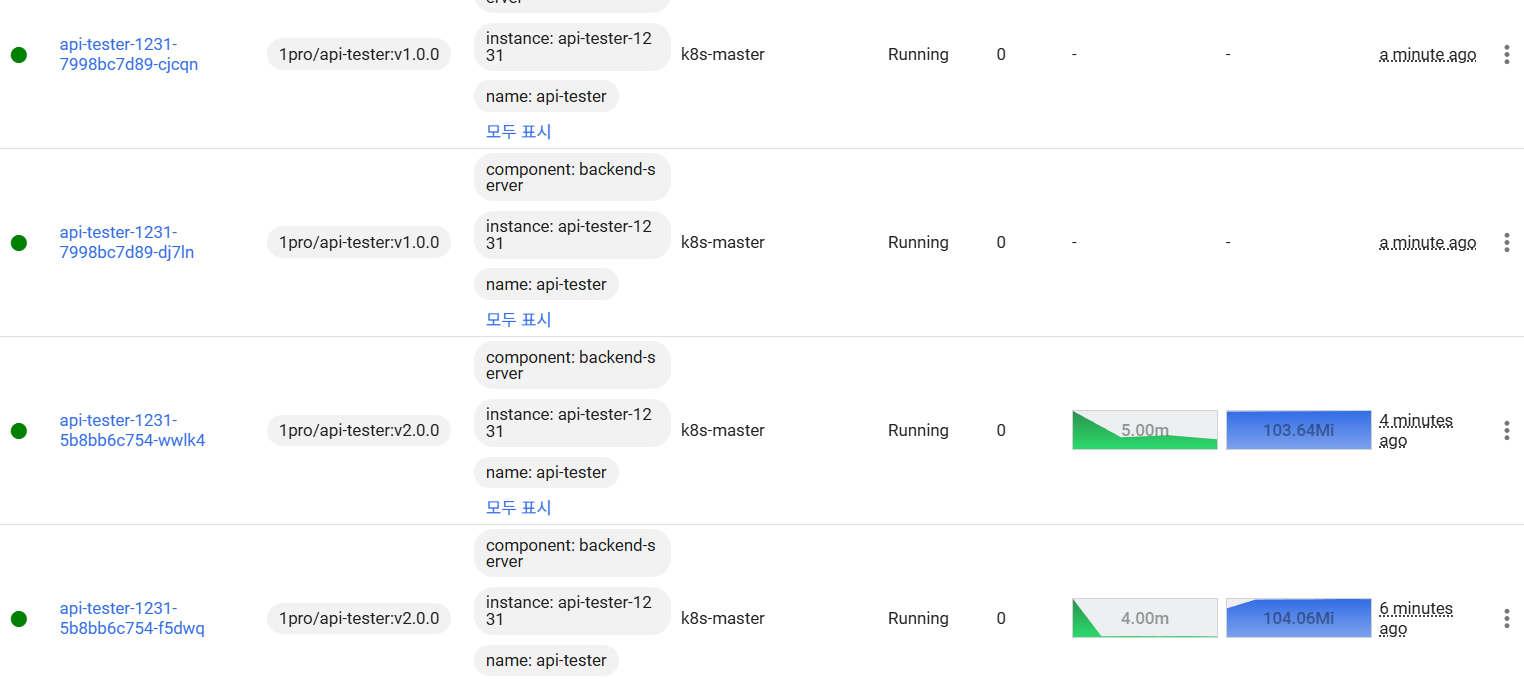
0% / 100% :
deployment 수정 & 확인
    rollingUpdate:
      maxUnavailable: 25% -> 0%  # 수정
      maxSurge: 25% -> 100%      # 수정

[root@k8s-master ~]# kubectl set image -n anotherclass-123 deployment/api-tester-1231 api-tester-1231=1pro/api-tester:v1.0.0
deployment.apps/api-tester-1231 image updated

# 블루그린 느낌 내게. 부하 2배 걸리지만 무중단
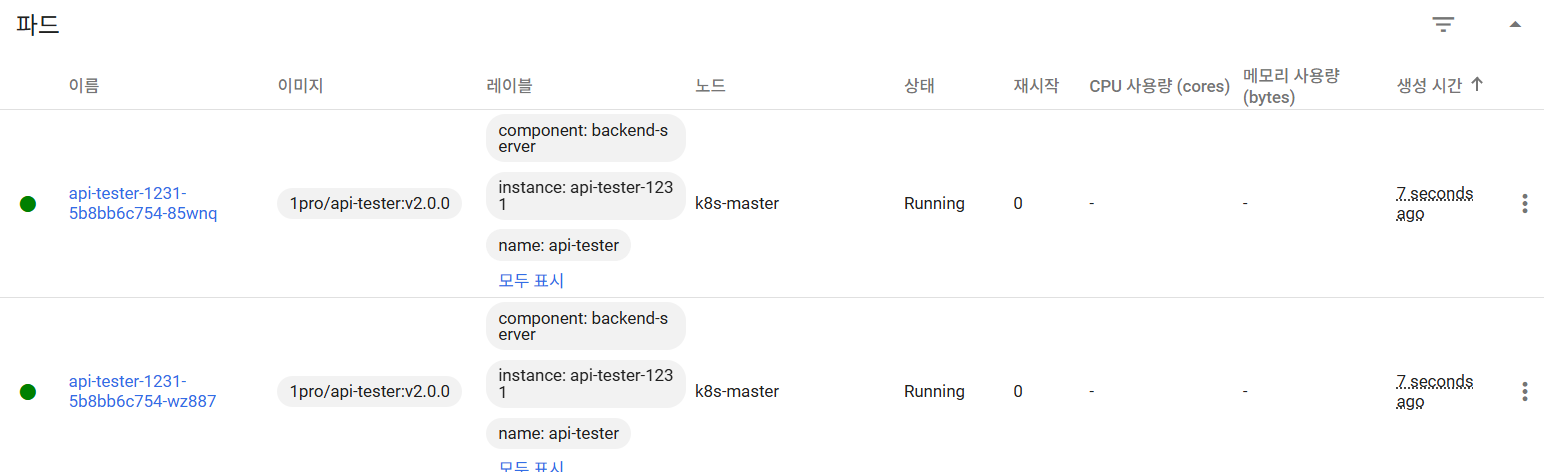
Recreate : deployment 수정 & 확인
spec:
  replicas: 2
  strategy:
    type: RollingUpdate -> Recreate   # 수정
    rollingUpdate:        # 삭제
      maxUnavailable: 0%  # 삭제
      maxSurge: 100%      # 삭제

[root@k8s-master ~]# kubectl set image -n anotherclass-123 deployment/api-tester-1231 api-tester-1231=1pro/api-tester:v2.0.0
deployment.apps/api-tester-1231 image updated

# 0~2개로 유지 > 다운타임 생김
Rollback
[root@k8s-master ~]# kubectl rollout undo -n anotherclass-123 deployment/api-tester-1231
deployment.apps/api-tester-1231 rolled back


[root@k8s-master ~]# kubectl get deployment api-tester-1231 -n anotherclass-123 -o yaml | grep -A5 strategy
  strategy:
    type: Recreate
  template:
    metadata:
      creationTimestamp: null
      labels:

# 아예 rolling update로 돌아가는건 아니구만... 정확히는 잘 모르겠다
실습
서비스 디스커버리 ( 별도 Pod 생성 X, 파드 내부에서 API 날려보기 )
// Version API 호출
curl http://api-tester-1231:80/version
APP 내부의 ports 삭제 > service 도 http 대신 8080 변경하고 API 날리기 > 성공하는지 (*containerPort는 정보성 역할이라 되어야 함 *)
# Deployment에서 Pod의 ports 전체 삭제
      containers:
        - name: api-tester-1231
          ports:                // 삭제
          - name: http          // 삭제
            containerPort: 8080 // 삭제
---
# Service targetPort를 http -> 8080으로 수정
spec:
  ports:
    - port: 80
      targetPort: http -> 8080 // 변경
      nodePort: 31231
  type: NodePort
# 그리고 다시 Pod 내부에서 Service 명으로 API 호출
bash-4.4# curl http://api-tester-1231:80/version
[App Version] : Api Tester v1.0.0
실습
behavior 기능 적용되어있는 상태 > 2분 이상 부하 발생해야 scale out
# 3분동안 부하 발생 ( * Pod에 부하가 심할 경우 livenessProbe에 의해 파드가 restart 가능 )
curl http://192.168.56.30:31231/cpu-load?min=3

# 개인 PC 사양(core 수)에 따라 부하가 너무 오르거나/오르지 않을 경우 queryparam으로 수치 조정
curl http://192.168.56.30:31231/cpu-load?min=3&thread=5
# 3분 동안 5개의 쓰레드로 80% 부하 발생 ( default : min=2, thread=10 )
# 부하 확인 - 실시간 업데이트는 명령어로 확인하는 게 빨라요
# HPA 상태 확인
kubectl get hpa -n anotherclass-123
# 리소스 모니터링
kubectl top -n anotherclass-123 pods


###
[root@k8s-master ~]# kubectl get hpa -n anotherclass-123
NAME                      REFERENCE                    TARGETS   MINPODS   MAXPODS   REPLICAS   AGE
api-tester-1231-default   Deployment/api-tester-1231   5%/60%    2         4         2          5d22h
[root@k8s-master ~]# kubectl get hpa -n anotherclass-123
NAME                      REFERENCE                    TARGETS   MINPODS   MAXPODS   REPLICAS   AGE
api-tester-1231-default   Deployment/api-tester-1231   29%/60%   2         4         2          5d22h
[root@k8s-master ~]# kubectl get hpa -n anotherclass-123
NAME                      REFERENCE                    TARGETS   MINPODS   MAXPODS   REPLICAS   AGE
api-tester-1231-default   Deployment/api-tester-1231   61%/60%   2         4         2          5d22h

###


# Grafana는 Prometheus를 거쳐 오기 때문에 좀 늦습니다
Grafana > Home > Dashboards > [Default] Kubernetes / Compute Resources / Pod
확인이 쉽지 않다... 3분 계속 기다렸는데 2분동안 계속 60%보다 높아서 그런듯? 밑에거 시도해보기
scale up 설정 지우고 부하 > 기다리지 않고 스케일 아웃
# [behavior] 미사용으로 적용

# 그냥 nano 설치하고 그걸로 수정했음.
kubectl edit -n anotherclass-123 hpa api-tester-1231-default
---
apiVersion: autoscaling/v2
kind: HorizontalPodAutoscaler
metadata:
  namespace: anotherclass-123
  name: api-tester-1231-default
spec:
  behavior:  # 삭제
    scaleUp:   # 삭제
      stabilizationWindowSeconds: 120   # 삭제
# 부하 발생 API
curl http://192.168.56.30:31231/cpu-load
// 2분 동안 10개의 쓰레드로 80% 부하 발생
// default : min=2, thread=10
# 부하 확인 (kubectl)

# HPA 상태 확인
kubectl get hpa -n anotherclass-123
# 리소스 모니터링
kubectl top -n anotherclass-123 pods
[root@k8s-master ~]# # HPA 상태 확인
[root@k8s-master ~]# kubectl get hpa -n anotherclass-123
NAME                      REFERENCE                    TARGETS    MINPODS   MAXPODS   REPLICAS   AGE
api-tester-1231-default   Deployment/api-tester-1231   182%/60%   2         4         3          5d22h


# 부하 확인 (grafana) -
# 성능 (Prometheus를 거쳐 오기 때문에 좀 표시가 늦습니다)
Grafana > Home > Dashboards > [Default] Kubernetes / Compute Resources / Pod

# Replica 보기 (Grafana Dashbaord에서 [Kubernetes / Horizontal Pod Autoscaler] 다운로드
Grafana > Home > Dashboards > New > Import 클릭
- Import via grafana.com 항목에 17125 입력 후 [Load] 클릭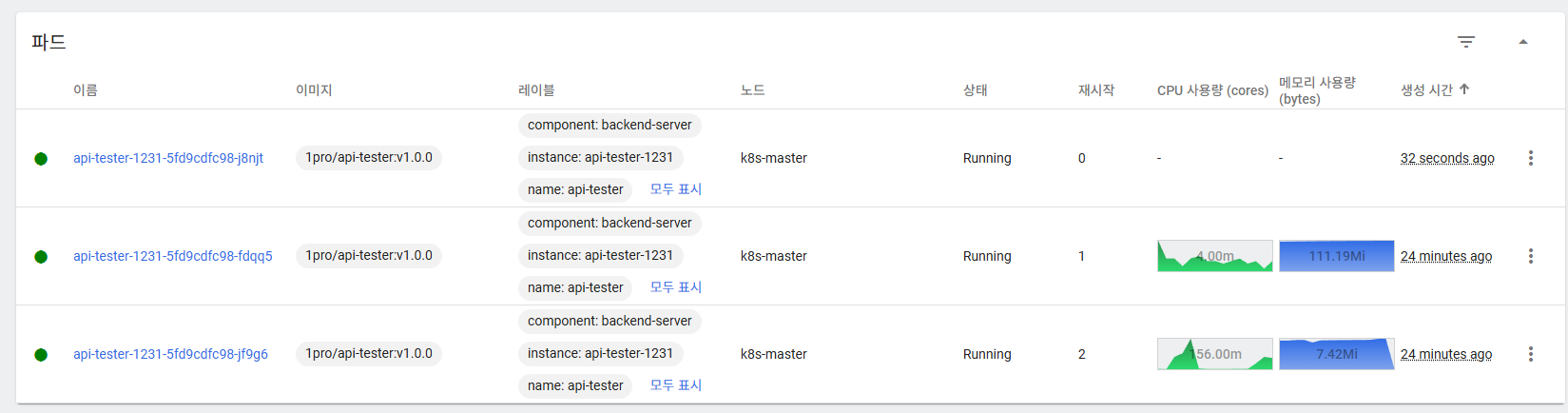
# 부하 확인 (grafana)

// 성능 (Prometheus를 거쳐 오기 때문에 좀 표시가 늦습니다)
Grafana > Home > Dashboards > [Default] Kubernetes / Compute Resources / Pod

// Replica 보기 (Grafana Dashbaord에서 [Kubernetes / Horizontal Pod Autoscaler] 다운로드
Grafana > Home > Dashboards > New > Import 클릭
- Import via grafana.com 항목에 17125 입력 후 [Load] 클릭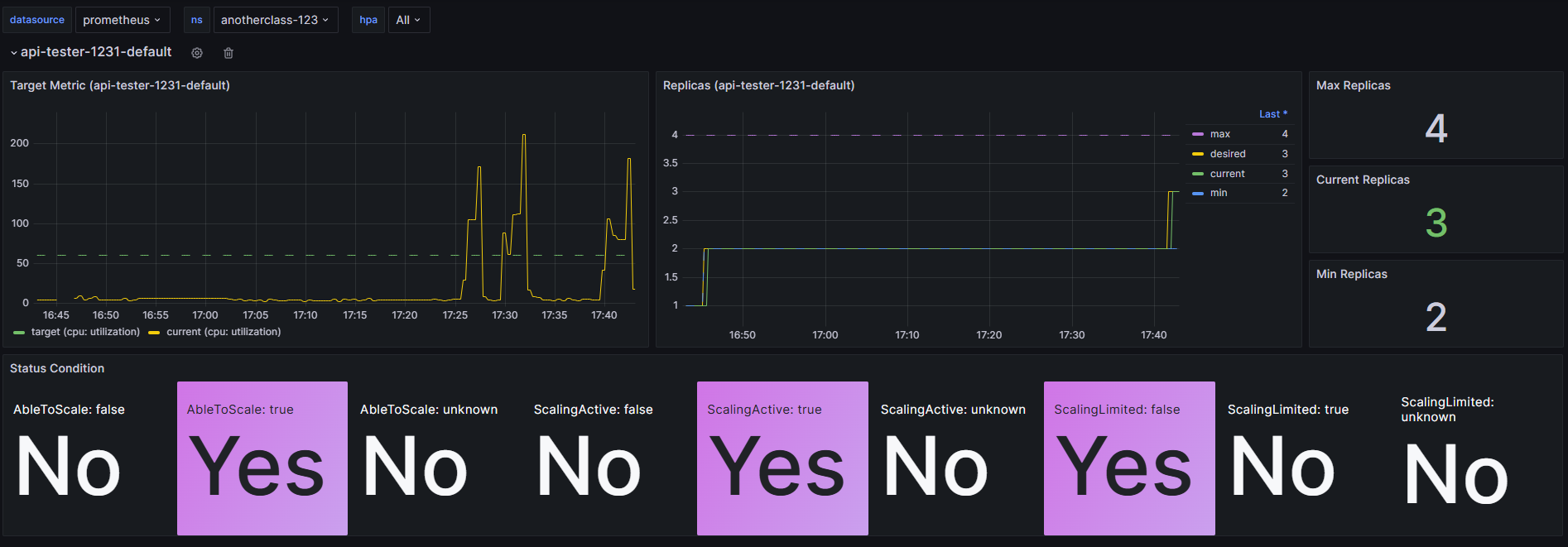
댓글을 작성해보세요.
